MAME4droid Current (0.289)
Updated
Current Version
1.41.2
Offered By

With your passion for MAME4droid Current (0.289), you shouldn’t have to limit yourself to the small screen of a phone. Play like a pro and take full control of the game using a keyboard and mouse. MEmu gives you everything you’re looking for. Download and play MAME4droid Current (0.289) on PC. Play as long as you want — no more worries about battery life, mobile data, or unexpected calls. The all-new MEmu 9 is the best way to play MAME4droid Current (0.289) on PC. With our expertly designed keymapping system, MAME4droid Current (0.289) feels just like a real PC game. The MEmu multi-instance manager lets you run two or more accounts on the same device at the same time. Most importantly, our exclusive emulation engine unlocks your PC’s full potential, delivering smooth and seamless performance.
Show more
Download MAME4droid Current (0.289) on PC with MEmu Android Emulator. Enjoy playing on big screen. MAME4droid (Current) is a powerful Android port of the latest MAME emulator (by MAMEDev and contributors), developed by David Valdeita (Seleuco).
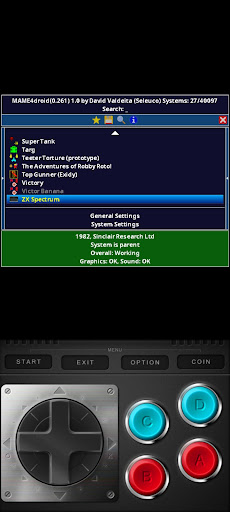
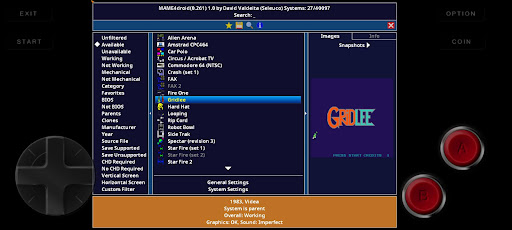
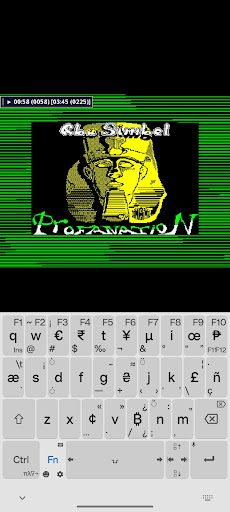
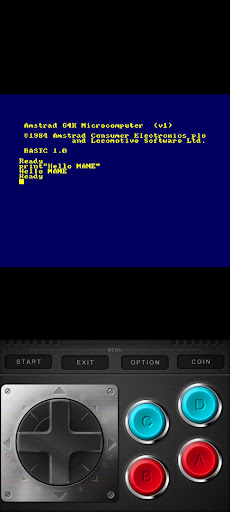
MAME4droid (Current) is a powerful Android port of the latest MAME emulator (by MAMEDev and contributors), developed by David Valdeita (Seleuco). It supports over 40,000 different ROMs and emulates classic arcade systems along with home computers like ZX Spectrum, Amstrad CPC, and MSX.
IMPORTANT DISCLAIMERS
NO ROMS INCLUDED: MAME4droid is strictly an EMULATOR and DOES NOT INCLUDE ROMS or copyrighted material.
Not Affiliated with MAMEDev: This project is independent of the official MAME team.
Support: Due to the massive library of titles, support for specific individual games cannot be provided.
NEW & NOTABLE FEATURES
Native NetPlay (Rollback & Lockstep): Play together over Wi-Fi or mobile data. Built-in Rollback sync provides near-zero input lag for fast action games, while Lockstep covers everything else.
Direct IPv6 Connections: Bypass CGNAT on mobile networks (4G/5G) for seamless peer-to-peer multiplayer without complex router configuration. Just tap 'Share' to send a connection invite via any messenger app.
ADPF & Frame Pacing: Integrates the Android Dynamic Performance Framework to manage device thermals dynamically, paired with accurate frame pacing for a smooth experience.
SAF Persistent Cache: A new concurrent cache drastically improves boot times when reading large ROM sets via Android's Scoped Storage.
PERFORMANCE & HARDWARE
While MAME is known for being demanding, this version includes modern optimizations:
arm64 DRC (Dynamic Recompiler): Features a dedicated 64-bit ARMv8 recompiler, providing a massive performance boost for complex 90s systems (like CPS-3).
Requirements: A high-end Android device is still recommended for the most demanding 3D arcade games to achieve full speed.
VISUALS & GRAPHICS
GLES 3.2 Overhaul & Vector Simulation: Complete rewrite of the vector engine leveraging modern GLES 3.2 paths. It physically simulates electron beams, optical bloom, and phosphor persistence for an incredibly authentic arcade neon glow.
True HDR Display Support: Unlocks peak panel brightness on compatible devices. Includes a dedicated FP16 HDR rendering path for vectors and SDR-to-HDR highlight expansion for classic raster games.
Shaders & Filters: Advanced shader support (enable via Options > Settings > Shaders) and overlay filters like scanlines and CRT effects.
INPUT & CONTROLS
Completely rebuilt input system for ultra-low latency and higher reliability.
Plug-and-play support for Bluetooth/USB gamepads (with true right analog joystick support and UI mapping), touch lightgun, and mouse.
Customizable on-screen button layouts (1-6 buttons), autorotation, and tilt sensor support.
RECOMMENDED SETUP (EXTERNAL STORAGE)
For the best experience, store your ROMs on external storage using Android's Scoped Storage.
First-Time Installation Guide:
Prepare storage: Create a folder named MAME4droid on your SD card or internal memory.
Launch: Open the app for the first time.
Path Selection: When asked "Where do you have stored or want to store your roms files?", select EXTERNAL STORAGE.
Grant Permission: The Android file picker will open. Navigate to your folder, tap "Use this folder", and tap Allow.
Romset: Ensure you are using the 0.288 romset for compatibility.
(Note: Change the path later in Options > Settings > General > Change ROMs path)
MAME LICENSE
Copyright (C) 1997-2026 MAMEDev and contributors.
This program is free software; you can redistribute it and/or modify it under the terms of the GNU General Public License as published by the Free Software Foundation. Distributed WITHOUT ANY WARRANTY.
Show more

1. Download MEmu installer and finish the setup

2. Start MEmu then open Google Play on the desktop

3. Search MAME4droid Current (0.289) in Google Play
Install
4. Download and Install MAME4droid Current (0.289)
5. On install completion click the icon to start

6. Enjoy playing MAME4droid Current (0.289) on PC with MEmu
MEmu Play is the best Android emulator and 100 million people already enjoy its superb Android gaming experience. The MEmu virtualization technology empowers you to play thousands of Android games smoothly on your PC, even the most graphic-intensive ones.
Bigger screen with better graphics; Long duration, without limitation of battery or mobile data.
Full Keymapping support for precise control of keyboard and mouse or gamepad.
Multiple game accounts or tasks on single PC at one time with Multi-Instance manager.
Play MAME4droid Current (0.289) on PC by following steps: