MONOPOLY: Bingo!
Updated
Current Version
1.10.0
Offered By

With your passion for MONOPOLY: Bingo!, you shouldn’t have to limit yourself to the small screen of a phone. Play like a pro and take full control of the game using a keyboard and mouse. MEmu gives you everything you’re looking for. Download and play MONOPOLY: Bingo! on PC. Play as long as you want — no more worries about battery life, mobile data, or unexpected calls. The all-new MEmu 9 is the best way to play MONOPOLY: Bingo! on PC. With our expertly designed keymapping system, MONOPOLY: Bingo! feels just like a real PC game. The MEmu multi-instance manager lets you run two or more accounts on the same device at the same time. Most importantly, our exclusive emulation engine unlocks your PC’s full potential, delivering smooth and seamless performance.
Show more
Download MONOPOLY: Bingo! on PC with MEmu Android Emulator. Enjoy playing on big screen. MONOPOLY: Bingo!
MONOPOLY: Bingo!
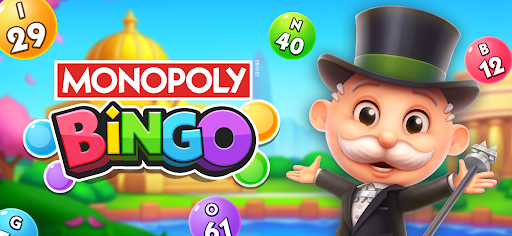
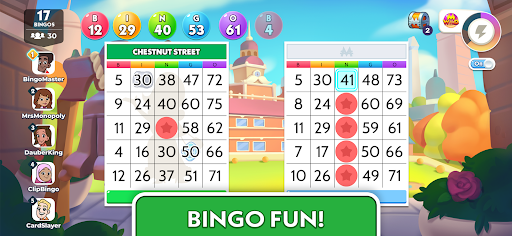
Roll the dice, daub your cards, and step into the world of MONOPOLY: Bingo! It’s not just bingo—it’s the iconic MONOPOLY game brought to life with a fun bingo twist. Join Mr. MONOPOLY on an exciting journey to collect properties, travel the world, and compete with players in a race to build your empire!
NOT JUST BINGO – IT’S MONOPOLY!
Play bingo like never before with a MONOPOLY twist! Roll the dice, acquire properties, build houses and hotels, and collect rent. Close deeds and create your ultimate MONOPOLY empire—all while enjoying thrilling bingo gameplay.
ICONIC MONOPOLY BOARDS WITH ROTATING FUN THEMES
Immerse yourself in the classic MONOPOLY experience with boards inspired by the original game and enhanced with festive rotating themes! Daub and win to collect dice, then roll them to move around the MONOPOLY board. Explore properties, earn rewards, and enjoy the thrill of classic MONOPOLY gameplay with every roll!
UNLOCK EXCITING BONUS WHEEL
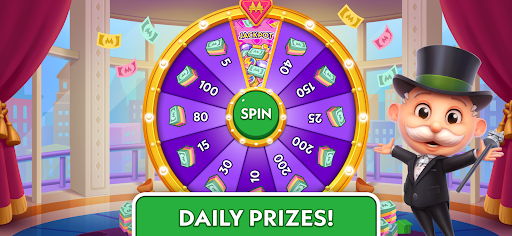
Daub special bonus cards and unlock the Bonus Wheel for huge payouts! Spin the wheel to land on property spaces, jackpots, or special tiles like railroads and utilities. You can unlock fun minigames for even more rewards! The higher your boost level, the bigger the payouts—get ready to win big!
MR. MONOPOLY’S CARD COLLECTION
Dive into the excitement of building your very own Mr. MONOPOLY card collection! Open card packs filled with surprises, uncover rare and unique cards and work to complete entire sets. Trade with friends to find those hard-to-get cards and build the ultimate collection. Each set captures the charm and personality of Mr. MONOPOLY in fun and creative ways.
COMPETE IN TOURNAMENTS WITH OTHER PLAYERS
Join the competition and climb the ranks in thrilling! Show off your skills as you daub, roll, and strategize your way to the top. Can you become the ultimate MONOPOLY: Bingo! champion?
TRAVEL THE WORLD AND UNLOCK NEW LOCATIONS
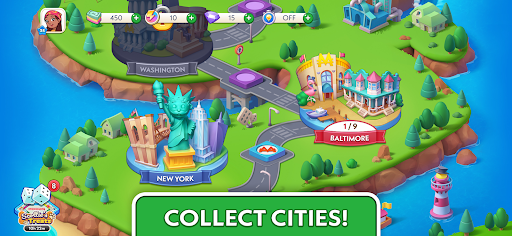
Pack your bags and explore the globe! Travel to stunning cities as you unlock new locations on the MONOPOLY map. Each city comes with its own unique challenges and rewards!
BUILD AND EXPAND YOUR MONOPOLY EMPIRE
Unlock properties, earn rewards, and daub your way to completing your MONOPOLY map. With each new achievement, you’ll grow closer to owning it all!
___________________________________________________________________________
If you love MONOPOLY, bingo, or strategic games, MONOPOLY: Bingo! has it all! Join Mr. MONOPOLY and start your journey to become a real estate tycoon while enjoying the classic thrill of bingo.
Show more

1. Download MEmu installer and finish the setup

2. Start MEmu then open Google Play on the desktop

3. Search MONOPOLY: Bingo! in Google Play
Install
4. Download and Install MONOPOLY: Bingo!
5. On install completion click the icon to start

6. Enjoy playing MONOPOLY: Bingo! on PC with MEmu
MEmu Play is the best Android emulator and 100 million people already enjoy its superb Android gaming experience. The MEmu virtualization technology empowers you to play thousands of Android games smoothly on your PC, even the most graphic-intensive ones.
Bigger screen with better graphics; Long duration, without limitation of battery or mobile data.
Full Keymapping support for precise control of keyboard and mouse or gamepad.
Multiple game accounts or tasks on single PC at one time with Multi-Instance manager.
Play MONOPOLY: Bingo! on PC by following steps: