Mythic GME 2e
Updated
Current Version
1.6.3
Offered By

With your passion for Mythic GME 2e, you shouldn’t have to limit yourself to the small screen of a phone. Play like a pro and take full control of the game using a keyboard and mouse. MEmu gives you everything you’re looking for. Download and play Mythic GME 2e on PC. Play as long as you want — no more worries about battery life, mobile data, or unexpected calls. The all-new MEmu 9 is the best way to play Mythic GME 2e on PC. With our expertly designed keymapping system, Mythic GME 2e feels just like a real PC game. The MEmu multi-instance manager lets you run two or more accounts on the same device at the same time. Most importantly, our exclusive emulation engine unlocks your PC’s full potential, delivering smooth and seamless performance.
Show more
Download Mythic GME 2e on PC with MEmu Android Emulator. Enjoy playing on big screen. Transform your roleplaying experience with the official Mythic Game Master Emulator 2nd Edition companion app.
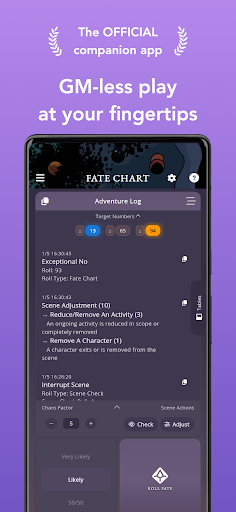
Transform your roleplaying experience with the official Mythic Game Master Emulator 2nd Edition companion app. Designed for solo players, GM-less groups, and Game Masters alike, Mythic GME 2e brings the power of the Mythic system to your fingertips.
Now supports foldable phones for an even better experience!
Core Systems
• Fate Chart and streamlined Fate Check to guide any TTRPG.
• Ask Your Fate Question: Write the question first, then roll for deeper Yes/No/Exceptional context.
• Scene checks with Chaos Factor, including doubles-triggered drama and Prepared Adventure mode.
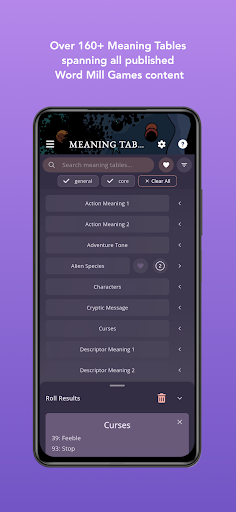
• 50 core tables from Mythic GME 2e (48 meaning + 2 event focus). Expand to 160+ tables from Variations, Magazines, and more with the Expanded Features add-on.
• Favorite, tag, search, and filter meaning tables for quick access during play.
• Custom Tables: Create, import, link, and export your own oracles in CSV/JSON/PSV—your tables, your language, your world.
Journals and Game Logs
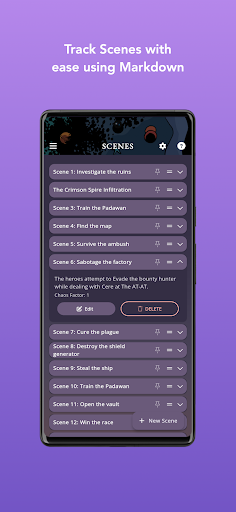
• Keep multiple journals with markdown-ready scene notes and native spell check.
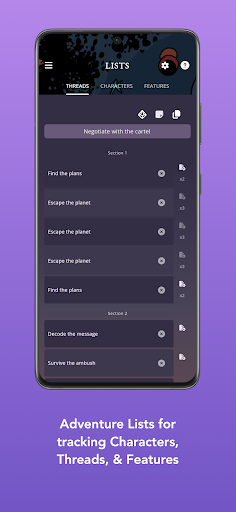
• Track Characters, Threads, and Features with quick notes and optional random "Choose" rolls.
• Export journals to JSON or Markdown for backup, sharing, or device changes; import with a tap.
• Dealer's Choice settings: Turn off "Choose", roll once on tables, fine-tune oracle behavior.
Tools and Utilities
• Versatile dice roller supporting standard, advanced, and custom formulas (keep/highest, drop/lowest, and more).
• Quick access to favorite tables, tags, and recent activity to minimize context switching.
• Shake to undo scenes and log entries—recover from accidental deletions instantly.
• In-app Help Center with searchable guides for every feature.
Accessibility First
• Full screen-reader support with labeled controls and dynamic hints.
• Adjustable text sizes, high-contrast and color-blind friendly palette.
• Left-hand operation option on mobile devices.
Play Your Way
• Offline-first design with secure local storage—perfect for trains, planes, and remote retreats.
• Export/import for backups and restores across devices.
• Optimized layouts for phones, tablets, and Wear OS watches with portrait and landscape support.
• Customizable panel layout on tablet and desktop—drag, resize, and arrange your perfect GM screen.
Data and Purchases
• Expanded Features is a one-time purchase restored on any device using the same Google account.
• Features you unlock are permanently available, and new pro features added within 12 months are also yours to keep.
• After one year, new pro features require an upgrade. The app continues to receive improvements and bug fixes.
• No subscriptions.
Languages
• Full support: English and Brazilian Portuguese (official localization).
• Unofficial UI translations: Spanish, French, Italian, and German (UI only—no translated tables yet).
• Official publisher translations in progress; Custom Tables lets you add your own table translations now.
Important Note
The Mythic Game Master Emulator 2nd Edition rulebook is required to fully understand the Mythic system. While the app includes helpful quick-start guides, the rulebook contains essential information for optimal use.
Community & Feedback
• Feature requests welcome at https://feedback.jasonholtdigital.com/board
• Also available via in-app Support tab and Discord
• Over 50% of app improvements come from community suggestions
Join countless storytellers who have discovered the freedom of solo and GM-less roleplaying with this powerful companion app. Whether you are crafting personal adventures, running collaborative sessions, or seeking inspiration for your campaigns, Mythic GME 2e provides the tools you need to bring your stories to life.
Begin your journey into limitless storytelling possibilities!
Show more

1. Download MEmu installer and finish the setup

2. Start MEmu then open Google Play on the desktop

3. Search Mythic GME 2e in Google Play
Install
4. Download and Install Mythic GME 2e
5. On install completion click the icon to start

6. Enjoy playing Mythic GME 2e on PC with MEmu
MEmu Play is the best Android emulator and 100 million people already enjoy its superb Android gaming experience. The MEmu virtualization technology empowers you to play thousands of Android games smoothly on your PC, even the most graphic-intensive ones.
Bigger screen with better graphics; Long duration, without limitation of battery or mobile data.
Full Keymapping support for precise control of keyboard and mouse or gamepad.
Multiple game accounts or tasks on single PC at one time with Multi-Instance manager.
Play Mythic GME 2e on PC by following steps: