NN555Rule
Updated
Current Version
1.1.4
Offered By

With your passion for NN555Rule, you shouldn’t have to limit yourself to the small screen of a phone. Play like a pro and take full control of the game using a keyboard and mouse. MEmu gives you everything you’re looking for. Download and play NN555Rule on PC. Play as long as you want — no more worries about battery life, mobile data, or unexpected calls. The all-new MEmu 9 is the best way to play NN555Rule on PC. With our expertly designed keymapping system, NN555Rule feels just like a real PC game. The MEmu multi-instance manager lets you run two or more accounts on the same device at the same time. Most importantly, our exclusive emulation engine unlocks your PC’s full potential, delivering smooth and seamless performance.
Show more
Download NN555Rule on PC with MEmu Android Emulator. Enjoy playing on big screen. NN555Rule is a focused logic game about observing relationships between geometric symbol cards.
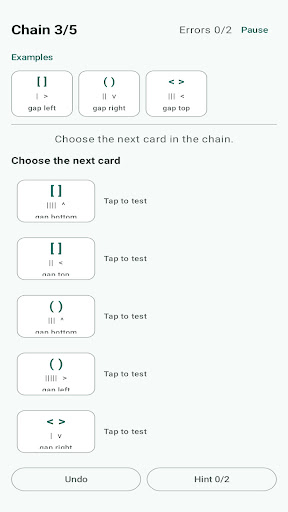


NN555Rule is a focused logic game about observing relationships between geometric symbol cards.
Each challenge begins with a short chain of example cards. Study their outlines, mark counts, directions, and gap positions, then select the next card that keeps the relationship intact. The goal is not to match a picture. It is to explain how the visible attributes change from one card to the next.
Choose from three challenge levels:
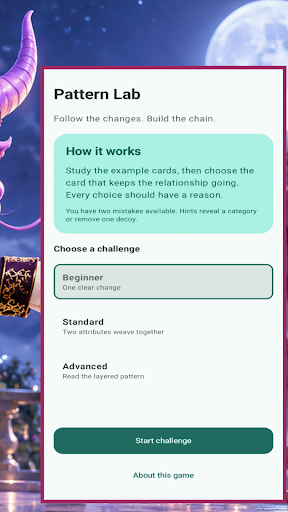
Beginner introduces one clear change with a short chain. Standard weaves two visible attributes together and adds more decoys. Advanced asks you to follow a layered relationship through a longer chain.
Two mistakes are available in every challenge. If a choice breaks the pattern, the game identifies the kind of relationship that failed without giving away the answer. Use up to two optional hints: the first points your attention to a changing category, and the second removes one decoy. Undo a choice when you want to re-read the latest step.
Complete a chain to earn a result based on your mistakes, and keep your best result on the device. Challenges work offline, require no account, and store progress locally.
Show more

1. Download MEmu installer and finish the setup

2. Start MEmu then open Google Play on the desktop

3. Search NN555Rule in Google Play
Install
4. Download and Install NN555Rule
5. On install completion click the icon to start

6. Enjoy playing NN555Rule on PC with MEmu
MEmu Play is the best Android emulator and 100 million people already enjoy its superb Android gaming experience. The MEmu virtualization technology empowers you to play thousands of Android games smoothly on your PC, even the most graphic-intensive ones.
Bigger screen with better graphics; Long duration, without limitation of battery or mobile data.
Full Keymapping support for precise control of keyboard and mouse or gamepad.
Multiple game accounts or tasks on single PC at one time with Multi-Instance manager.
Play NN555Rule on PC by following steps: