
over the hill
Updated
Current Version
Offered By

With your passion for over the hill, you shouldn’t have to limit yourself to the small screen of a phone. Play like a pro and take full control of the game using a keyboard and mouse. MEmu gives you everything you’re looking for. Download and play over the hill on PC. Play as long as you want — no more worries about battery life, mobile data, or unexpected calls. The all-new MEmu 9 is the best way to play over the hill on PC. With our expertly designed keymapping system, over the hill feels just like a real PC game. The MEmu multi-instance manager lets you run two or more accounts on the same device at the same time. Most importantly, our exclusive emulation engine unlocks your PC’s full potential, delivering smooth and seamless performance.
Show more
Download over the hill on PC with MEmu Android Emulator. Enjoy playing on big screen. Over the Hill is an immersive offroading simulation game that transports players back to the golden era of offroading, spanning the 1960s through the 1980s.

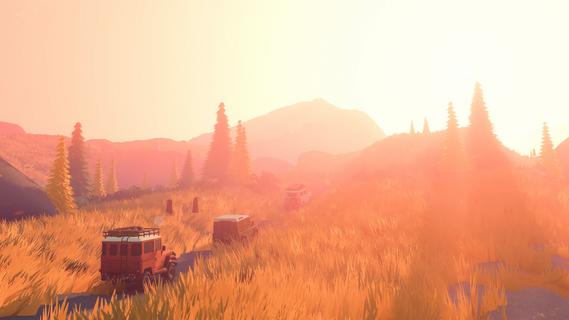

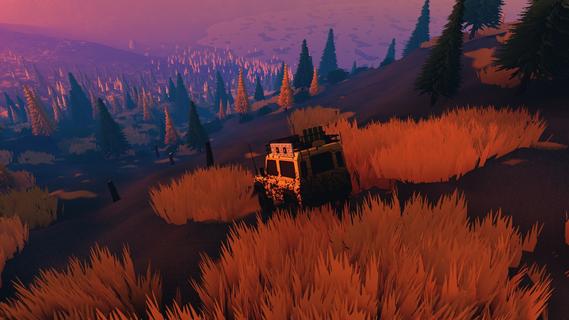
Over the Hill is an immersive offroading simulation game that transports players back to the golden era of offroading, spanning the 1960s through the 1980s. This game celebrates the spirit of adventure and exploration that defined those decades, offering a unique blend of nostalgia, challenging terrain, and stunning natural landscapes. Whether you’re a solo explorer or looking to share the thrill with friends, Over the Hill provides an engaging experience that captures the essence of classic offroad driving. Set against a backdrop of diverse and beautifully rendered environments, Over the Hill invites players to traverse a variety of challenging trails that test both driving skills and vehicle durability. From dense forests and rocky mountain paths to muddy river crossings and sprawling deserts, each location is meticulously crafted to offer a realistic and immersive offroading experience. The dynamic weather system and day-night cycle add further depth, influencing driving conditions and visibility, making every journey unique. One of the standout features of Over the Hill is its collection of iconic vehicles from the 60s, 70s, and 80s. Players can get behind the wheel of classic offroaders that defined the era, each with its own distinct handling characteristics and mechanical quirks. From rugged 4x4 trucks to vintage SUVs, the game offers a range of vehicles that enthusiasts will appreciate. The attention to detail extends to vehicle customization and maintenance, allowing players to upgrade parts, tweak performance, and repair damage sustained on the trails. The gameplay balances realism with accessibility. While the physics engine simulates authentic offroad driving challenges-such as traction loss, suspension dynamics, and engine strain-the controls are designed to be intuitive, welcoming both hardcore sim fans and casual players. Navigating steep inclines, deep mud, and narrow paths requires careful throttle control, strategic gear shifting, and sometimes a bit of patience, rewarding players who master the nuances of offroad driving. Over the Hill also shines in its multiplayer mode, where up to four players can team up to explore the wilderness together. Cooperative gameplay encourages teamwork as players help each other overcome obstacles, tow stuck vehicles, or simply enjoy the scenic routes side by side. The social aspect adds a layer of fun and camaraderie, making it an ideal game for friends who share a passion for offroading and outdoor adventure. Beyond the core driving experience, the game includes exploration elements that encourage players to discover hidden spots, scenic viewpoints, and secret trails. Collectibles and challenges scattered throughout the map incentivize thorough exploration and provide additional goals beyond simply reaching the destination. This open-world approach invites players to set their own pace and create memorable journeys through the untamed wilderness. Visually, Over the Hill impresses with its vibrant and detailed environments. The art style captures the rugged beauty of natural landscapes, with realistic textures, lighting effects, and atmospheric sounds that immerse players in the experience. The sound design complements the visuals perfectly, featuring authentic engine noises, environmental sounds like rustling leaves and flowing water, and a soundtrack that evokes the adventurous spirit of the era. In summary, Over the Hill offers a compelling offroading simulation that combines the charm of classic vehicles with the thrill of exploring challenging terrain. Its blend of realistic physics, cooperative multiplayer, and richly detailed environments makes it a standout title for fans of driving games and outdoor adventure alike. Whether you’re navigating a muddy trail alone or cruising with friends through breathtaking scenery, Over the Hill delivers an unforgettable journey into the heart of offroad exploration.
Show more

1. Download MEmu installer and finish the setup

2. Start MEmu then open Google Play on the desktop

3. Search over the hill in Google Play
Install
4. Download and Install over the hill
5. On install completion click the icon to start

6. Enjoy playing over the hill on PC with MEmu
MEmu Play is the best Android emulator and 100 million people already enjoy its superb Android gaming experience. The MEmu virtualization technology empowers you to play thousands of Android games smoothly on your PC, even the most graphic-intensive ones.
Bigger screen with better graphics; Long duration, without limitation of battery or mobile data.
Full Keymapping support for precise control of keyboard and mouse or gamepad.
Multiple game accounts or tasks on single PC at one time with Multi-Instance manager.
Play over the hill on PC by following steps:

















































