Pop Piano: Music Games
Updated
Current Version
0.3.7
Offered By

With your passion for Pop Piano: Music Games, you shouldn’t have to limit yourself to the small screen of a phone. Play like a pro and take full control of the game using a keyboard and mouse. MEmu gives you everything you’re looking for. Download and play Pop Piano: Music Games on PC. Play as long as you want — no more worries about battery life, mobile data, or unexpected calls. The all-new MEmu 9 is the best way to play Pop Piano: Music Games on PC. With our expertly designed keymapping system, Pop Piano: Music Games feels just like a real PC game. The MEmu multi-instance manager lets you run two or more accounts on the same device at the same time. Most importantly, our exclusive emulation engine unlocks your PC’s full potential, delivering smooth and seamless performance.
Show more
Download Pop Piano: Music Games on PC with MEmu Android Emulator. Enjoy playing on big screen. Are you ready to become a piano master?


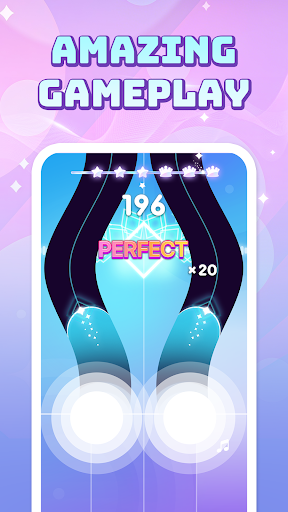
Are you ready to become a piano master? Get ready for Pop Piano, the most exciting and addictive pop music games ever! If you love piano games, music games, and rhythm games, then you've found your new obsession. This isn't just another piano game; it's a vibrant, fun, and challenging journey through the world of pop music.
Pop Piano brings you the best of pop music games with an incredible selection of hot songs! Tap along to your favorite singing songs and discover new hits. Our constantly updated library means you'll always have fresh music games to play. Whether you're into the latest chart-toppers, classic pop anthems, or even some kpop and edm beats, Pop Piano has the songs you love.
Experience the Magic of Music Games!
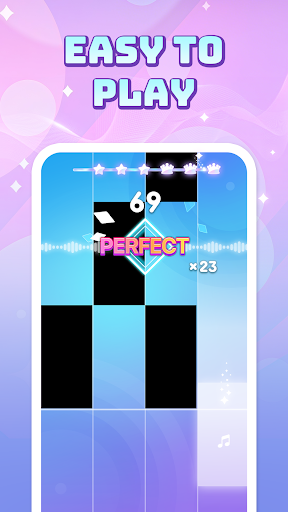
The core of Pop Piano is simple yet captivating: tap the tiles as they fall down the screen. Hit the pop tiles in time with the rhythm to play the melody. It’s a classic rhythm game mechanic, but perfected for maximum fun. Each tap feels like you're truly playing the piano, transforming you into a virtual piano master. The vibrant visual effects and smooth gameplay make every session of this music game a joy.
Magic Games Design & Intuitive Gameplay!
Beyond the thrilling rhythm game action, Pop Piano boasts a charming and cute games aesthetic. The colorful graphics and user-friendly interface make it appealing to players of all ages. The mechanics are easy to grasp for beginners, but mastering the more complex songs will challenge even seasoned rhythm game pros. It's a truly fun game for everyone! The falling tiles are visually appealing, and the entire experience is designed to be delightful.
Become a Piano Master – Challenge Yourself!
Think you have what it takes to be a piano master? Pop Piano offers various difficulty levels for each song. Start with easier tracks to get the hang of the tile tapping, then push your limits with faster, more intricate melodies. Compete with friends and players worldwide on the leaderboards to prove who's the ultimate piano master of pop music games! Improve your rhythm, speed, and accuracy with every music game you play. This is more than just a piano game; it's a journey to becoming a true rhythm game legend.
⭐Key Features⭐
- Pop Music Games Extravaganza: A vast library of hot songs from all your favorite pop music artists.
- Piano Games Perfection: Classic piano game mechanics with a modern twist.
- Magic Music & Rhythm Games: Experience the thrill of tapping to the beat and creating beautiful music.
- Singing Songs & Pop Tiles: Play along to popular singing songs by hitting the falling pop tiles.
- No Wifi Games & Offline Games: Enjoy uninterrupted gameplay anytime, anywhere – absolutely free games!
- Free Games for Everyone: Download and play without any cost. It's truly a free game for endless fun.
- Fun Games for All Ages: Easy to learn, challenging to master, and always enjoyable.
- Magic Games Aesthetics: Visually appealing design with vibrant colors and charming animations.
- Tile Tapping Action: Engaging tile and tiles gameplay that tests your reflexes and rhythm.
- Piano Master Challenge: Climb the leaderboards and prove your skills as a true piano master.
- Diverse Music Selection: Includes edm, kpop, and a wide range of pop music genres.
- Regular Updates: New songs and features added frequently to keep the music games fresh.
- High-Quality Audio: Crystal clear sound for an immersive music game experience.
Join the millions of players already enjoying Pop Piano! Download now and start your journey to become a piano master in the world of hot songs and magic music. This is the ultimate rhythm game for fans of pop music games and piano games. Get ready to tap, play, and dominate the tiles!
Show more

1. Download MEmu installer and finish the setup

2. Start MEmu then open Google Play on the desktop

3. Search Pop Piano: Music Games in Google Play
Install
4. Download and Install Pop Piano: Music Games
5. On install completion click the icon to start

6. Enjoy playing Pop Piano: Music Games on PC with MEmu
MEmu Play is the best Android emulator and 100 million people already enjoy its superb Android gaming experience. The MEmu virtualization technology empowers you to play thousands of Android games smoothly on your PC, even the most graphic-intensive ones.
Bigger screen with better graphics; Long duration, without limitation of battery or mobile data.
Full Keymapping support for precise control of keyboard and mouse or gamepad.
Multiple game accounts or tasks on single PC at one time with Multi-Instance manager.
Play Pop Piano: Music Games on PC by following steps: