Project Bengal
Updated
Current Version
0.2.3
Offered By

With your passion for Project Bengal, you shouldn’t have to limit yourself to the small screen of a phone. Play like a pro and take full control of the game using a keyboard and mouse. MEmu gives you everything you’re looking for. Download and play Project Bengal on PC. Play as long as you want — no more worries about battery life, mobile data, or unexpected calls. The all-new MEmu 9 is the best way to play Project Bengal on PC. With our expertly designed keymapping system, Project Bengal feels just like a real PC game. The MEmu multi-instance manager lets you run two or more accounts on the same device at the same time. Most importantly, our exclusive emulation engine unlocks your PC’s full potential, delivering smooth and seamless performance.
Show more
Download Project Bengal on PC with MEmu Android Emulator. Enjoy playing on big screen. Welcome to Project Bengal, the most immersive open-world action game of 2024!

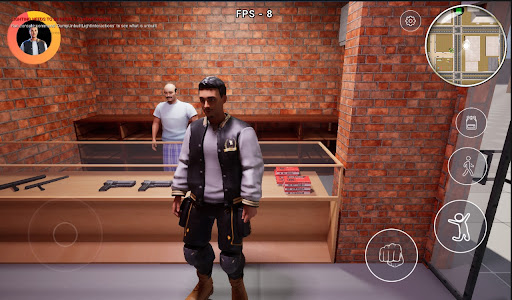
Welcome to Project Bengal, the most immersive open-world action game of 2024! Step into the shoes of our fearless protagonist and explore a vast, dynamic world filled with thrilling adventures and challenging tasks.In Bengal, you are the hero of your own story. Navigate through bustling cities, dense forests, and ancient ruins as you take on a variety of missions that test your skills and wit. From rescuing villagers to uncovering hidden treasures, every task brings you closer to unraveling the mysteries of Bengal.
Key Features:
Expansive Open World: Explore a beautifully crafted world inspired by the rich culture and landscapes of Bangladesh.
Diverse Missions: Engage in a wide range of tasks, from combat and stealth missions to puzzle-solving and exploration.
Dynamic Gameplay: Experience a living world with day-night cycles, weather changes, and interactive environments.
Customization: Upgrade your character with unique abilities, weapons, and gear to suit your playstyle.
Stunning Graphics: Enjoy high-quality visuals that bring the world of Bengal to life.
Engaging Storyline: Follow a captivating narrative filled with twists, turns, and unforgettable characters.
Why You’ll Love Bengal:
Immersive Experience: Lose yourself in a world that feels alive and full of possibilities.
Challenging Tasks: Test your skills with a variety of missions that keep you on your toes.
Cultural Richness: Discover elements of Bangladeshi culture woven into the game’s story and environment.
Community: Join a growing community of players and share your adventures.
Download Project Bengal Now and Start Your Adventure!
Show more

1. Download MEmu installer and finish the setup

2. Start MEmu then open Google Play on the desktop

3. Search Project Bengal in Google Play
Install
4. Download and Install Project Bengal
5. On install completion click the icon to start

6. Enjoy playing Project Bengal on PC with MEmu
MEmu Play is the best Android emulator and 100 million people already enjoy its superb Android gaming experience. The MEmu virtualization technology empowers you to play thousands of Android games smoothly on your PC, even the most graphic-intensive ones.
Bigger screen with better graphics; Long duration, without limitation of battery or mobile data.
Full Keymapping support for precise control of keyboard and mouse or gamepad.
Multiple game accounts or tasks on single PC at one time with Multi-Instance manager.
Play Project Bengal on PC by following steps: