ScarFall 2.0 : Battle Royale
Updated
Current Version
1.3.4
Offered By

With your passion for ScarFall 2.0 : Battle Royale, you shouldn’t have to limit yourself to the small screen of a phone. Play like a pro and take full control of the game using a keyboard and mouse. MEmu gives you everything you’re looking for. Download and play ScarFall 2.0 : Battle Royale on PC. Play as long as you want — no more worries about battery life, mobile data, or unexpected calls. The all-new MEmu 9 is the best way to play ScarFall 2.0 : Battle Royale on PC. With our expertly designed keymapping system, ScarFall 2.0 : Battle Royale feels just like a real PC game. The MEmu multi-instance manager lets you run two or more accounts on the same device at the same time. Most importantly, our exclusive emulation engine unlocks your PC’s full potential, delivering smooth and seamless performance.
Show more
Download ScarFall 2.0 : Battle Royale on PC with MEmu Android Emulator. Enjoy playing on big screen. Welcome to the next level of Indian gaming.
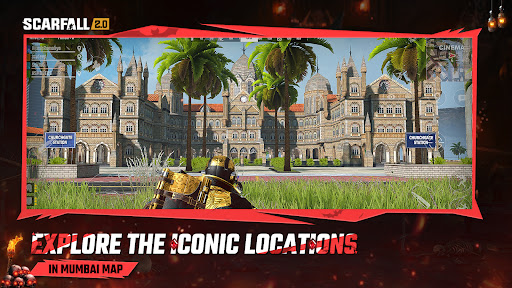
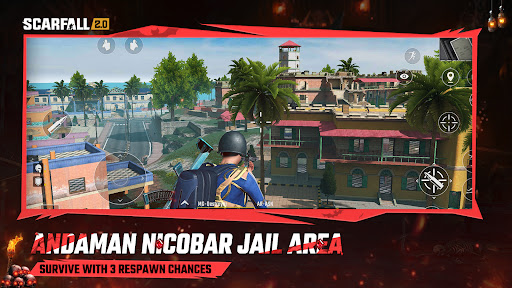
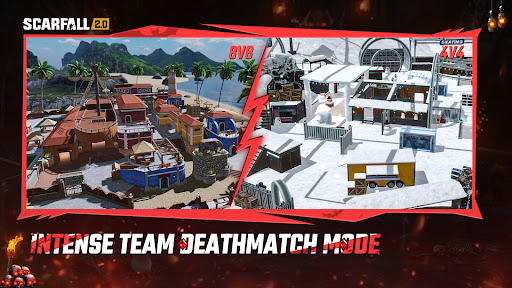
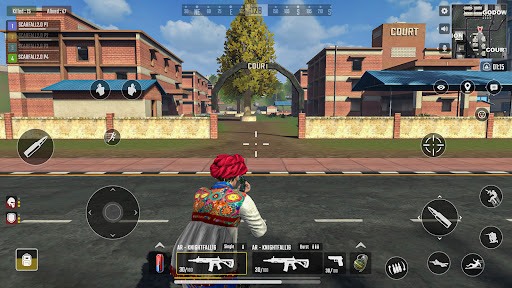
Welcome to the next level of Indian gaming. ScarFall 2.0 is a feature-rich Made in India battle royale crafted for fans of real-time combat, squad-based strategy, and fast-paced shooting games. Combining the depth of an online action game with the thrill of a multiplayer survival game, it offers a unique mix of high-stakes PvP encounters set in iconic Indian locations.
Season 03: ScarPass – Kaal Reborn Enter the underworld and awaken your dark legacy. Season 03 brings a hell-themed ScarPass packed with infernal outfits, blazing weapon skins, and exclusive rewards inspired by fire, shadows, and rebellion. Rise through the chaos, dominate the battlegrounds, and prove you are the true Kaal of the arena.
Game Modes for Every Action Lover:
Classic Battle Royale (Andaman Map): 40-player lobbies with 3 respawn chances. A dynamic mode for reviving, regrouping, and winning as a team in this squad survival game.
Hardcore Survival (Mumbai Map): A tough 100-player match with no respawns. Navigate high-rise zones, close alleys, and travel using moving local trains in the ultimate mobile strike experience.
Team Deathmatch (TDM): Choose between quick 4v4 skirmishes in Snow Park or large-scale 8v8 action in Goa. Perfect for those who love fast-paced gun games and team fights.
Explore Iconic Indian Battlegrounds:
Mumbai: Urban warfare across stations, rooftops, and local trains.
Andaman: Island-style open terrain ideal for wide-spread sniper 3D shootouts.
Goa: A scenic town converted into an 8v8 multiplayer warzone.
Snow Park: A close-range frozen arena designed for intense FPS action.
From tropical beaches to icy parks and crowded train platforms — ScarFall 2.0 brings diverse Indian battlegrounds to life.
Core Features of the Experience:
Online Multiplayer: Play in real-time with players across India in a smooth multiplayer shooting game.
Live Voice Chat: Talk and strategize with your squad in the lobby and during matches.
Custom Loadouts: Choose your favorite assault rifles and snipers to build the perfect kit.
Indian Vehicles: Drive the Chakdo, Rickshaw, Jeep, Bike, and Helicopter.
Repositioning Tactics: Use the Mumbai local trains to rotate across the map strategically.
Ranked Matches: Compete in leagues and climb the global leaderboards.
Optimized for All Devices: ScarFall 2.0 is a low MB game highly optimized to deliver smooth performance and high-quality visuals on everything from entry-level phones to high-end smartphones. Enjoy responsive controls and stable frame rates without compromise.
Join the "Made in India" Revolution: If you’re looking for a true Indian game that combines shooting, survival, and real multiplayer action—ScarFall 2.0 delivers. Whether you prefer TDM battles, large-scale squad encounters, or exploring Indian environments with friends, this adventure game gives you the freedom to play your way.
Enter the battlegrounds. Choose your loadout. Lead your squad. Experience the most authentic Indian shooting game today.
Follow us :
Website : https://scarfall.in
YouTube : https://www.youtube.com/@ScarFall2.0
Instagram : https://www.instagram.com/scarfall_2.0/
Show more

1. Download MEmu installer and finish the setup

2. Start MEmu then open Google Play on the desktop

3. Search ScarFall 2.0 : Battle Royale in Google Play
Install
4. Download and Install ScarFall 2.0 : Battle Royale
5. On install completion click the icon to start

6. Enjoy playing ScarFall 2.0 : Battle Royale on PC with MEmu
MEmu Play is the best Android emulator and 100 million people already enjoy its superb Android gaming experience. The MEmu virtualization technology empowers you to play thousands of Android games smoothly on your PC, even the most graphic-intensive ones.
Bigger screen with better graphics; Long duration, without limitation of battery or mobile data.
Full Keymapping support for precise control of keyboard and mouse or gamepad.
Multiple game accounts or tasks on single PC at one time with Multi-Instance manager.
Play ScarFall 2.0 : Battle Royale on PC by following steps:












































