Sea of Stars
Updated
Current Version
3.0.60158
Offered By

With your passion for Sea of Stars, you shouldn’t have to limit yourself to the small screen of a phone. Play like a pro and take full control of the game using a keyboard and mouse. MEmu gives you everything you’re looking for. Download and play Sea of Stars on PC. Play as long as you want — no more worries about battery life, mobile data, or unexpected calls. The all-new MEmu 9 is the best way to play Sea of Stars on PC. With our expertly designed keymapping system, Sea of Stars feels just like a real PC game. The MEmu multi-instance manager lets you run two or more accounts on the same device at the same time. Most importantly, our exclusive emulation engine unlocks your PC’s full potential, delivering smooth and seamless performance.
Show more
Download Sea of Stars on PC with MEmu Android Emulator. Enjoy playing on big screen. Promising the Sabotage touch in every system, Sea of Stars aims to modernize the classic RPG formula in terms of turn-based combat, storytelling, exploration and interactions with the environment, while still offering a hearty slice of nostalgia and good old, simple fun.
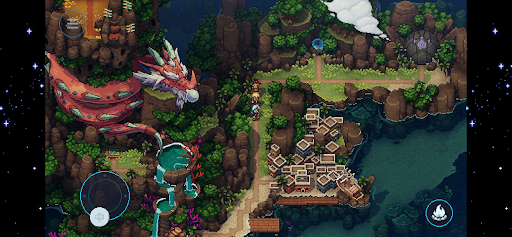
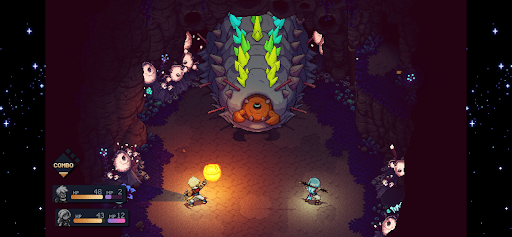
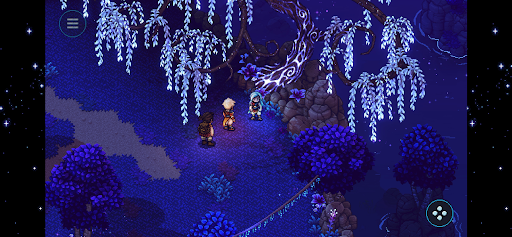
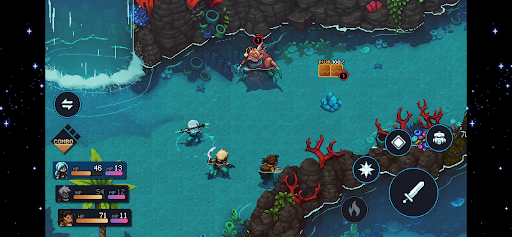
Promising the Sabotage touch in every system, Sea of Stars aims to modernize the classic RPG formula in terms of turn-based combat, storytelling, exploration and interactions with the environment, while still offering a hearty slice of nostalgia and good old, simple fun.
It tells the story of two Children of the Solstice who will combine the powers of the sun and moon to perform Eclipse Magic, the only force capable of fending off the monstrous creations of the evil alchemist known as The Fleshmancer.
Traverse seamlessly through the world with a navigation system that breaks free from the classic bound-to-the-grid tileset movement and fight enemies in an immersive take on the genre; no random encounters, no transitions to separate battlefields, and no grinding.
FEATURES
- Engaging turn-based combat: Along with timed hits, combat features combo attacks, boosting, and a strategic "locks" system, all in an immersive take on the genre; no random encounters, no transitions to separate battlefields, and no grinding.
- Full-on dynamic lighting: Our custom-made render pipeline allows the creation of a breathtaking world coming to life by pushing the limits of 2D pixel-art games.
- A story-rich adventure: Sometimes epic, sometimes silly, and other times emotional, Sea of Stars does its RPG duty of exploring classic themes of adventure and friendship, while also being chock-full of the unexpected twists and events you’d expect from a Sabotage production.
- A world you can touch: Sailing, cooking, fishing, stopping by a tavern to listen to a song or play the infamous tabletop game known as "Wheels"... every system has been designed to deliver an experience that pays respect to retro classics, while rethinking in some areas to offer a smooth and modernized experience.
CAREFULLY REDESIGNED FOR MOBILE
- Revamped interface – exclusive mobile UI with complete touch control
- Google Play Games achievements
- Cloud Save – Share your progress between Android devices
- Compatible with controllers
Show more

1. Download MEmu installer and finish the setup

2. Start MEmu then open Google Play on the desktop

3. Search Sea of Stars in Google Play
Install
4. Download and Install Sea of Stars
5. On install completion click the icon to start

6. Enjoy playing Sea of Stars on PC with MEmu
MEmu Play is the best Android emulator and 100 million people already enjoy its superb Android gaming experience. The MEmu virtualization technology empowers you to play thousands of Android games smoothly on your PC, even the most graphic-intensive ones.
Bigger screen with better graphics; Long duration, without limitation of battery or mobile data.
Full Keymapping support for precise control of keyboard and mouse or gamepad.
Multiple game accounts or tasks on single PC at one time with Multi-Instance manager.
Play Sea of Stars on PC by following steps: