Dungeon of the Endless: Apogee
Updated
Current Version
1.3.21
Offered By

With your passion for Dungeon of the Endless: Apogee, you shouldn’t have to limit yourself to the small screen of a phone. Play like a pro and take full control of the game using a keyboard and mouse. MEmu gives you everything you’re looking for. Download and play Dungeon of the Endless: Apogee on PC. Play as long as you want — no more worries about battery life, mobile data, or unexpected calls. The all-new MEmu 9 is the best way to play Dungeon of the Endless: Apogee on PC. With our expertly designed keymapping system, Dungeon of the Endless: Apogee feels just like a real PC game. The MEmu multi-instance manager lets you run two or more accounts on the same device at the same time. Most importantly, our exclusive emulation engine unlocks your PC’s full potential, delivering smooth and seamless performance.
Show more
Download Dungeon of the Endless: Apogee on PC with MEmu Android Emulator. Enjoy playing on big screen. Dungeon of the Endless: Apogee is a Rogue-Like Dungeon-Defense game in which you and your team of heroes must protect the generator of your crashed ship while exploring an ever-expanding dungeon, all while facing waves of monsters and special events as you try to find your way out.
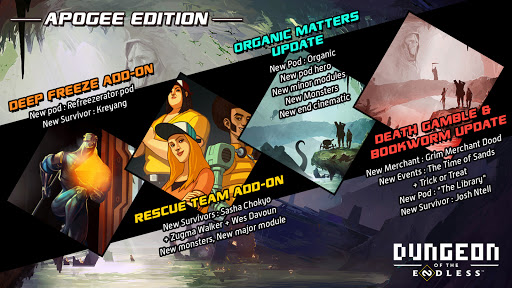
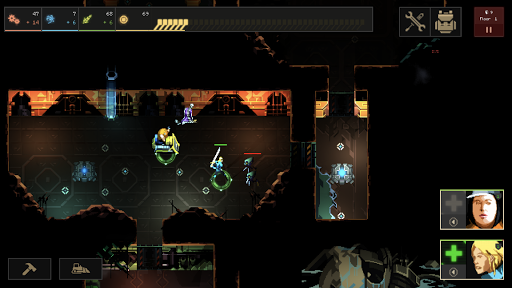
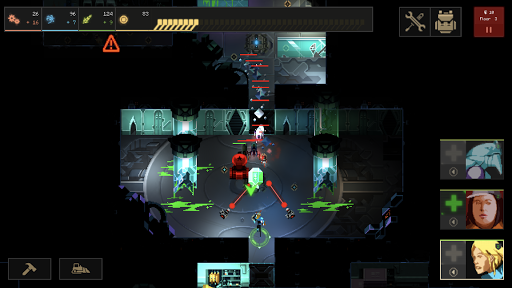
Dungeon of the Endless: Apogee is a Rogue-Like Dungeon-Defense game in which you and your team of heroes must protect the generator of your crashed ship while exploring an ever-expanding dungeon, all while facing waves of monsters and special events as you try to find your way out. The Apogee Edition of Dungeon Of The Endless includes the full game and five DLCs.
WHAT’S BEHIND THE DOOR?
A few hundred condemned criminals were being shipped to the Auriga system on board the prison hulk “Success”. While this was presented as a chance to earn back their place in society by working hard for the common good, they understood that in fact they would be slave labour, sent to colonize an unexplored planet. All they knew about Auriga Prime was what the probes told them: it had water, temperate zones, plant life, and plenty of metals in the crust.
In fact, the planet Auriga once hosted a major settlement of the galaxy-travelling ancestors known as the Endless. In addition, the planet was still orbited by a functioning (and well cloaked) defensive system, which sprang eagerly to life upon the arrival of the Success. Within a few minutes, the ship was nothing but a few large chunks of metal falling toward the planet.
Luckily, every set of holding cells also functioned as an escape pod, so the ship let itself disintegrate and the surviving prisoners fell bruised but (temporarily) alive and (momentarily) safe to the planet below. Safe, that is, until they realized that they had crashed through some sort of Endless facility, all the way down to a sub-basement so deep and ancient it might as well be called a dungeon…
Gather A Team
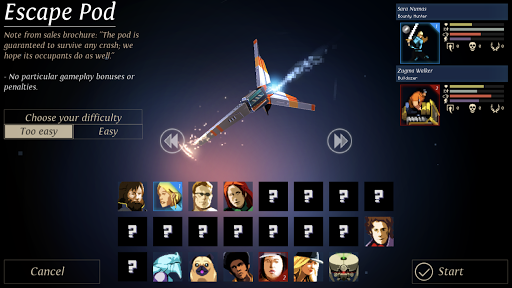
• Form a team of heroes, each with their own strengths (and psychoses)
• Equip them, deploy them, and earn powerful abilities
• Manage the balance between ex-prison inmates and guards
Build Your Defenses
• Use the Dust you gather to power the rooms
• Use scarce resources to help your team survive
• Build minor and major modules to hold off waves of monsters
• Decode Endless ruins to discover life-saving technologies
Open the Door
• Each door is a danger; prepare yourself and your team for anything
• Explore and discover an infinity of levels and layouts
• Carry your crystal through waves of monsters to the exit of each level
• Fight your way to the surface to discover the truth about Auriga
The Apogee Edition includes the following add-ons
• DEEP FREEZE: New ship, New game mode and New character
• DEATH GAMBLE: New merchant
• RESCUE TEAM: Three new characters, New monsters, New major module
• ORGANIC MATTERS: New ship, New game mode, New character, New minor modules, New monsters
• BOOKWORM: New ship, New character
Carefully Redesigned for Mobile
• Revamped interface
• Cloud Save
• Pay once to get the full Dungeon of the Endless game and 5 DLCs! No ads, no in-app purchases!
If you experience any issue with Dungeon of the Endless: Apogee, please contact our customer support at support@playdigious.mail.helpshift.com and give us as much as possible information on your problem.
Show more

1. Download MEmu installer and finish the setup

2. Start MEmu then open Google Play on the desktop

3. Search Dungeon of the Endless: Apogee in Google Play
Install
4. Download and Install Dungeon of the Endless: Apogee
5. On install completion click the icon to start

6. Enjoy playing Dungeon of the Endless: Apogee on PC with MEmu
MEmu Play is the best Android emulator and 100 million people already enjoy its superb Android gaming experience. The MEmu virtualization technology empowers you to play thousands of Android games smoothly on your PC, even the most graphic-intensive ones.
Bigger screen with better graphics; Long duration, without limitation of battery or mobile data.
Full Keymapping support for precise control of keyboard and mouse or gamepad.
Multiple game accounts or tasks on single PC at one time with Multi-Instance manager.
Play Dungeon of the Endless: Apogee on PC by following steps: