
AI Hug & Kiss Video Generator
Updated
Current Version
1.16.0
Offered By

Stop worrying about high battery drain when using AI Hug & Kiss Video Generator on your phone. Free yourself from the tiny screen and enjoy the app on a much larger display. From now on, get a full-screen experience of your app with the convenience of a keyboard and mouse. MEmu offers you all the surprising features you’d expect: quick installation and easy setup, intuitive controls, and no more worries about battery life, mobile data, or unexpected calls. The all-new MEmu 9 is the choice for using AI Hug & Kiss Video Generator on your computer. With the MEmu multi-instance manager, you can run two or more accounts at the same time. Most importantly, our exclusive emulation engine unlocks your PC’s full potential, delivering smooth and enjoyable performance.
Show more
Enjoy superb experience of using AI Hug & Kiss Video Generator on PC with MEMU App Player. It's a powerful free Android emulator which provides you with thousands of android apps for their desktop version. Enjoy connecting with friends and polishing your work with higher efficiency! Bring Your Imagination to Life with AI Hug & Kiss Video Generator!
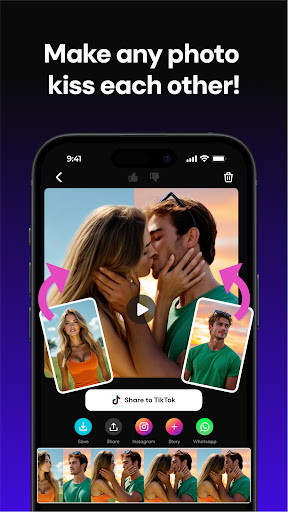
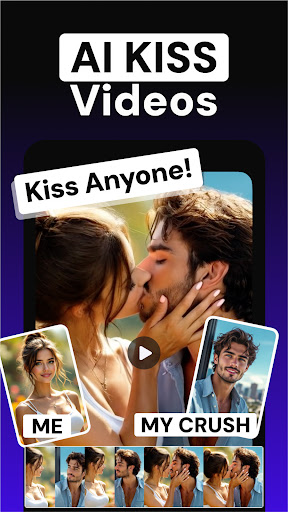
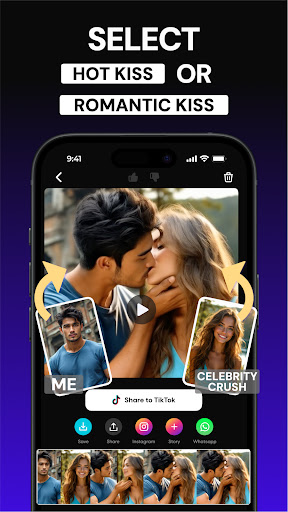
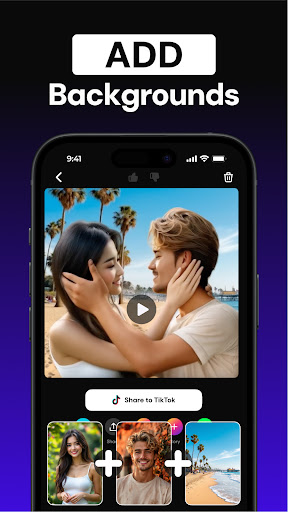
Bring Your Imagination to Life with AI Hug & Kiss Video Generator!
Whether you want to animate heartfelt moments like hugs and kisses, create dynamic walking scenes, explode into action sequences, or transform text into vivid videos, AI Hug & Kiss Video Generator makes it easy and fun. Dive into endless creative scenarios with our powerful AI at your fingertips and create anything that you dream. Turn your ordinary photos into AI Art and get ready to become viral!
Key Features:
• AI-Powered Video Generation: Create high-quality videos using advanced artificial intelligence technology.
• Text to Video: Simply input your ideas as text and watch AI Hug & Kiss Video Generator bring them to life as captivating animations.
• Diverse Animation Styles: Generate various animations, including hugging scenes, kissing moments, walking sequences, explosive effects, and more.
• Easy-to-Use Interface: User-friendly design suitable for both beginners and professionals.
• Fast Processing: Get your videos ready in minutes with our efficient rendering system.
• Share & Inspire: Easily share your creations on social media platforms and inspire others.
Why Choose AI Hug & Kiss Video Generator?
• Innovative Technology: Harness the power of AI to produce videos that stand out.
• Creative Freedom: Customize and tweak your videos to match your vision.
• Continuous Updates: Regular enhancements and new features based on user feedback.
Get Started Today!
Download AI Hug & Kiss Video Generator now and start creating videos that captivate and engage your audience. Unleash the power of AI and let your creativity soar!
Payment & Subscription Terms:
Subscribe to have unlimited access to premium features. You can choose between weekly or yearly subscription for unlimited access to all features. You may cancel your subscription at any time.
Have a feature in mind but you don’t see it in our app? We will be glad to hear from you!
Please do not hesitate to contact us at info@apptribe.co .
For more information, please review our Privacy Policy: https://sites.google.com/apptribe.co/ai-video-generator-privacy/ana-sayfa
Terms of Use: https://sites.google.com/view/ai-video-generator-tc/home?authuser=2
Experience the future of video creation with AI Hug & Kiss Video Generator!
Show more

1. Download MEmu installer and finish the setup

2. Start MEmu then open Google Play on the desktop

3. Search AI Hug & Kiss Video Generator in Google Play
Install
4. Download and Install AI Hug & Kiss Video Generator
5. On install completion click the icon to start

6. Enjoy using AI Hug & Kiss Video Generator on PC with MEmu
MEmu Play is the best Android emulator, and 100 million users already enjoy its superb Android app experience. Powered by advanced virtualization technology, it lets you enjoy thousands of Android apps smoothly on your PC—including the most graphics-intensive ones.
Bigger screen with better graphics; Long duration, without limitation of battery or mobile data.
Full Keymapping support for precise control of keyboard and mouse or gamepad.
Multiple game accounts or tasks on single PC at one time with Multi-Instance manager.
Use AI Hug & Kiss Video Generator on PC by following steps: