
MyHeritage - Family tree, DNA & ancestry search
Updated
Current Version
7.1.12
Offered By

Stop worrying about high battery drain when using MyHeritage - Family tree, DNA & ancestry search on your phone. Free yourself from the tiny screen and enjoy the app on a much larger display. From now on, get a full-screen experience of your app with the convenience of a keyboard and mouse. MEmu offers you all the surprising features you’d expect: quick installation and easy setup, intuitive controls, and no more worries about battery life, mobile data, or unexpected calls. The all-new MEmu 9 is the choice for using MyHeritage - Family tree, DNA & ancestry search on your computer. With the MEmu multi-instance manager, you can run two or more accounts at the same time. Most importantly, our exclusive emulation engine unlocks your PC’s full potential, delivering smooth and enjoyable performance.
Show more
Enjoy superb experience of using MyHeritage - Family tree, DNA & ancestry search on PC with MEMU App Player. It's a powerful free Android emulator which provides you with thousands of android apps for their desktop version. Enjoy connecting with friends and polishing your work with higher efficiency! Explore your roots, find new relatives, and make amazing discoveries with genealogical search tools and an intuitive family tree builder.

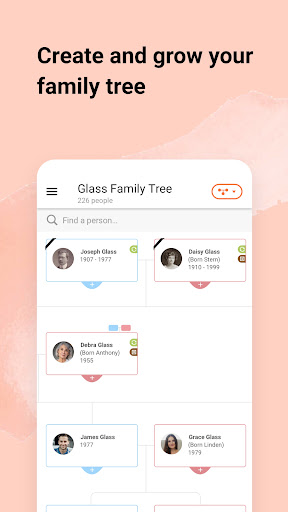
Explore your roots, find new relatives, and make amazing discoveries with genealogical search tools and an intuitive family tree builder. Join our global community of users to map your ancestors and family history effortlessly.
LiveMemory™
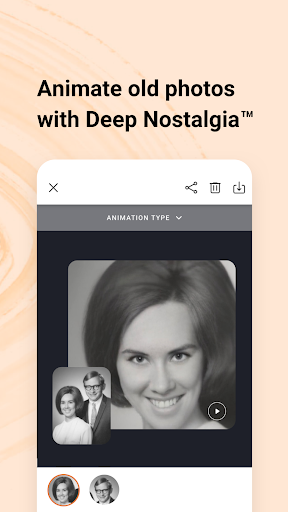
Make your memories come to life as AI-powered videos with LiveMemory™! Turn photos into video clips with AI-powered photo animation and relive your favorite moments. Animate entire family photos and see your memories reimagined in lifelike videos. Our AI video generator creates animated memories that bring photos to life. Share on social media and amaze your family and friends!
Build Your Family Tree
Start your family tree by entering a few names, and MyHeritage will do the rest. Our matching technologies for genealogical research will automatically find new information for you in our diverse collection of 81 million family trees built by users all over the world, and in our huge database of 21 billion historical records. Watch your family history come to life and make fascinating discoveries with this family tree maker app.
Make Instant Family History Discoveries
MyHeritage’s genealogical search features can easily match your family tree to other family trees and historical records to provide you with meaningful new insights about your ancestors. Enrich your family tree with MyHeritage’s powerful search and matching technologies:
Smart Matches™
A unique technology that automatically matches your family tree to other family trees, revealing new information about your family origins.
Record Matches: an innovative technology that finds new information about your ancestors in our global collection of historical records.
Instant Discoveries™: a useful feature that adds entire branches and photos to your family tree in one click.
Find Your Ancestors in Historical Records
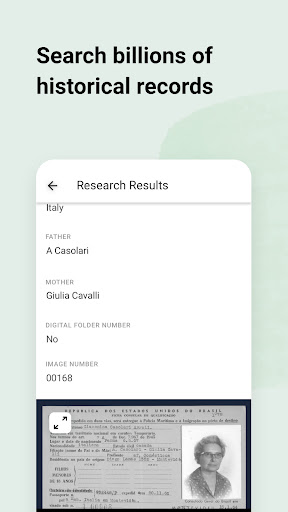
Explore your family history in MyHeritage’s vast database of 21 billion historical records from around the world. The historical record collections include vital records (birth, marriage, and death certificates) from 66 countries; census and immigration records; gravestone and burial records; and much more.
Deep Nostalgia™
Have you ever dreamed of bringing historical family photos to life? With MyHeritage’s Deep Nostalgia™ feature, your historical family photos will come to life and you’ll see your ancestors’ faces move! Deep Nostalgia™ uses AI technology to breathe new life into historical photos and recreate moments from your family history. Pull out those photo albums and discover your ancestry as you connect to cherished family memories and trace history across generations.
Enrich Your Family Tree with Photos
Capture and share your family memories, old and new. Scan your family photos directly from the app and use our AI-based photo tools to bring your family history to life. Repair scratched or damaged photos with Photo Repair, colorize your black and white photos, and bring blurry faces into focus with the MyHeritage Photo Enhancer. Record the stories behind your family photos with the Photo Storyteller™ and preserve them for generations to come.
AI Time Machine™
Create photo-realistic time-travel images and AI avatars using Artificial Intelligence (AI) technology.
MyHeritage DNA
Locked inside your DNA is your unique ethnic makeup. The test consists of a simple cheek swab and reveals your genetic heritage across 2,114 geographic regions — more than any other test. It also matches you to relatives you never knew existed in our DNA database of 5.2 million people. View your DNA results on the app; they’re private and secure, and will never be shared or sold.
Download MyHeritage today to uncover your roots with an all-in-one family tree app, photo animator, and ancestry search tool.
Show more

1. Download MEmu installer and finish the setup

2. Start MEmu then open Google Play on the desktop

3. Search MyHeritage - Family tree, DNA & ancestry search in Google Play
Install
4. Download and Install MyHeritage - Family tree, DNA & ancestry search
5. On install completion click the icon to start

6. Enjoy using MyHeritage - Family tree, DNA & ancestry search on PC with MEmu
MEmu Play is the best Android emulator, and 100 million users already enjoy its superb Android app experience. Powered by advanced virtualization technology, it lets you enjoy thousands of Android apps smoothly on your PC—including the most graphics-intensive ones.
Bigger screen with better graphics; Long duration, without limitation of battery or mobile data.
Full Keymapping support for precise control of keyboard and mouse or gamepad.
Multiple game accounts or tasks on single PC at one time with Multi-Instance manager.
Use MyHeritage - Family tree, DNA & ancestry search on PC by following steps: