Tarteel ترتيل - Memorize Quran
Updated
Current Version
5.53.1
Offered By

Stop worrying about high battery drain when using Tarteel ترتيل - Memorize Quran on your phone. Free yourself from the tiny screen and enjoy the app on a much larger display. From now on, get a full-screen experience of your app with the convenience of a keyboard and mouse. MEmu offers you all the surprising features you’d expect: quick installation and easy setup, intuitive controls, and no more worries about battery life, mobile data, or unexpected calls. The all-new MEmu 9 is the choice for using Tarteel ترتيل - Memorize Quran on your computer. With the MEmu multi-instance manager, you can run two or more accounts at the same time. Most importantly, our exclusive emulation engine unlocks your PC’s full potential, delivering smooth and enjoyable performance.
Show more
Enjoy superb experience of using Tarteel ترتيل - Memorize Quran on PC with MEMU App Player. It's a powerful free Android emulator which provides you with thousands of android apps for their desktop version. Enjoy connecting with friends and polishing your work with higher efficiency! No one to recite to?
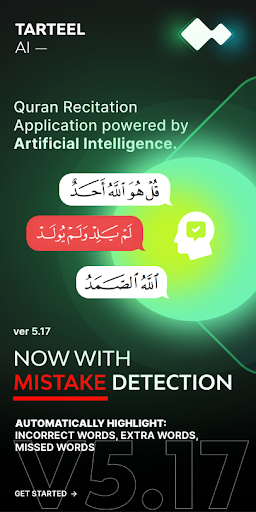
No one to recite to? No problem. Tarteel AI is here!
How many times have you wished you knew more surahs to use in salah? That you could get feedback on your recitation whenever you needed it? That you could memorize more, and worry less?
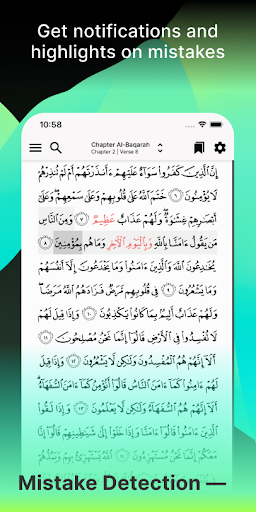
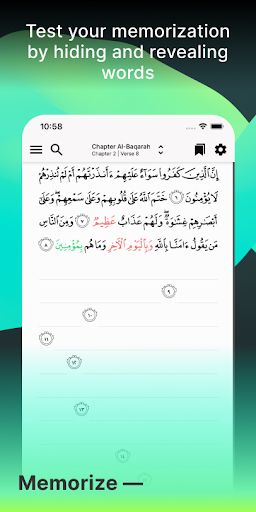
Hide. Tap. Recite. In three easy moves, you’re strengthening your memorization of the Quran with the world’s leading AI Quran memorization companion. Simply hide the verses, tap the mic and start reciting. The pages will fill with your recitation and if you make a mistake, Tarteel’s intuitive AI will be sure let you know INSTANTLY with its flagship feature, Memorization Mistake Detection. That’s live feedback on your recitation, any time, anywhere - even if you whisper!
Whether you’re memorizing for your next Hifz class or revising Juz Amma on your daily commute, Tarteel adapts to your recitation, tracks your progress and aligns with your goals. It’s your companion —helping you memorize better, build confidence, and create a Quran habit that lasts a lifetime. No matter where you are in your memorization, Tarteel is here for the journey.
Tarteel is free to use with no ads and prioritizes user privacy. The team operates within the framework of Ihsan, striving for excellence and using innovative tech to serve the Muslim Ummah.
**TARTEEL PREMIUM**
Supercharge your Quran memorization with a paid subscription to **Tarteel Premium**. Try it now for FREE, no credit card required. Features include:
- Memorization Mistake Detection
Start reciting and you’ll be notified whenever you miss a word, use the wrong word or say one word too many! Tarteel will highlight your mistakes and keep track so you can revise and review for next time. Currently, this feature does not include Tajweed or pronunciation correction, but we know there’s community demand and it’s on our roadmap for the future!
- Hidden Verses
Hide the verses and recite; Tarteel will highlight verses and follow along with your recitation so you can check your memorization as you go. You’re one step closer to perfecting that verse!
- Goals
Set custom Goals for what you want to memorize and revise. Choose your portion, deadline and the type of engagement you want; memorization, reading, revision or recitation!
- Historical Mistakes
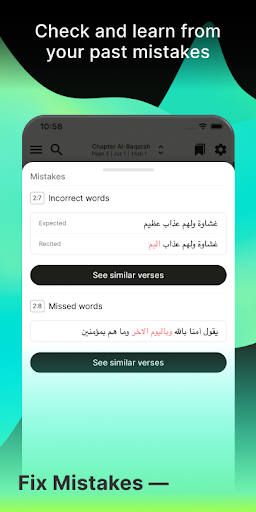
Progress is key! Tarteel keeps a record of all of your mistakes so you know exactly where your memorization is strong and what could use a little more work.
- Unlimited Listening and Audio
Solidify your memorization with listening and audio! Choose your favourite Qari, the portion and how many times you want to listen.
- Advanced Progress Tracking
Check if you’re reaching your goals with detailed analytics around your Quran engagement.
—
Join the 9M+ Muslims worldwide who are using Tarteel to support their memorization of the Quran!
Do you use Tarteel? Your feedback helps us improve the platform and add to our long-term roadmap. If you’ve benefited from Tarteel, please remember to leave us a review - we’d love to hear from you! Request new features here: [http://feedback.tarteel.ai]
—
NOTES:
Tarteel requires microphone access and a stable internet connection in order for its voice features to function properly. Please ensure you allow Tarteel to access these permissions on your device.
Privacy Policy: https://www.tarteel.ai/privacy/
Terms of Service: https://www.tarteel.ai/terms/
Show more

1. Download MEmu installer and finish the setup

2. Start MEmu then open Google Play on the desktop

3. Search Tarteel ترتيل - Memorize Quran in Google Play
Install
4. Download and Install Tarteel ترتيل - Memorize Quran
5. On install completion click the icon to start

6. Enjoy using Tarteel ترتيل - Memorize Quran on PC with MEmu
MEmu Play is the best Android emulator, and 100 million users already enjoy its superb Android app experience. Powered by advanced virtualization technology, it lets you enjoy thousands of Android apps smoothly on your PC—including the most graphics-intensive ones.
Bigger screen with better graphics; Long duration, without limitation of battery or mobile data.
Full Keymapping support for precise control of keyboard and mouse or gamepad.
Multiple game accounts or tasks on single PC at one time with Multi-Instance manager.
Use Tarteel ترتيل - Memorize Quran on PC by following steps: