Airlearn - Language Learning
Updated
Current Version
3.12.78
Offered By

Stop worrying about high battery drain when using Airlearn - Language Learning on your phone. Free yourself from the tiny screen and enjoy the app on a much larger display. From now on, get a full-screen experience of your app with the convenience of a keyboard and mouse. MEmu offers you all the surprising features you’d expect: quick installation and easy setup, intuitive controls, and no more worries about battery life, mobile data, or unexpected calls. The all-new MEmu 9 is the choice for using Airlearn - Language Learning on your computer. With the MEmu multi-instance manager, you can run two or more accounts at the same time. Most importantly, our exclusive emulation engine unlocks your PC’s full potential, delivering smooth and enjoyable performance.
Show more
Enjoy superb experience of using Airlearn - Language Learning on PC with MEMU App Player. It's a powerful free Android emulator which provides you with thousands of android apps for their desktop version. Enjoy connecting with friends and polishing your work with higher efficiency! Airlearn: Learn Spanish, German, French, Italian, Dutch, Portuguese, Japanese, Korean, Chinese, Hindi, English, Turkish, and Russian in one intuitive app.
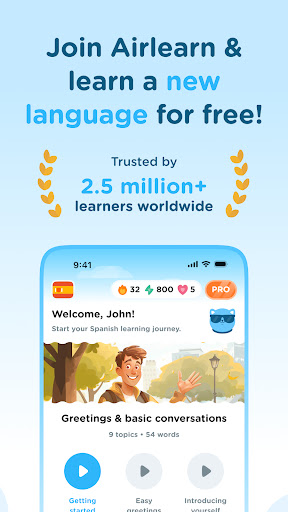
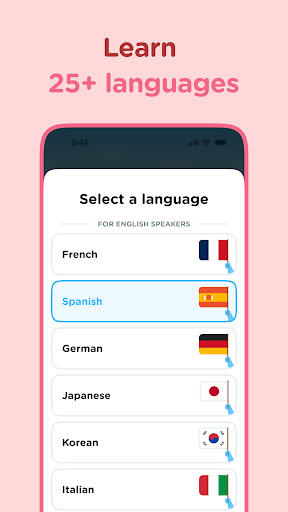
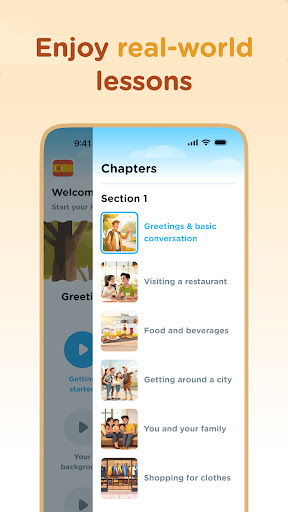

Airlearn: Learn Spanish, German, French, Italian, Dutch, Portuguese, Japanese, Korean, Chinese, Hindi, English, Turkish, and Russian in one intuitive app. Enjoy short lessons, cultural insights, and fun practice slides that make language learning stress-free and engaging.
OUR APPROACH
• Learn First, Practice Next: We teach key grammar, vocabulary, and cultural context before you dive into quizzes. Gain real understanding instead of guessing.
• Rich Cultural Insights: Explore history, customs, and local expressions. Language is more than words—Airlearn helps you appreciate its cultural essence.
• Clean & Minimalist: No overblown gamification or cluttered screens. Lessons stay focused, so you can learn at your own pace without distractions.
• Weekly Leagues & XP: Motivate yourself by competing with others studying the same language. Earn XP from each lesson and climb the leaderboard for extra fun.
WHY AIRLEARN
• Concise Lessons: Each module covers grammar rules, vocabulary, and examples in bite-sized slides.
• Practical Dialogues: From casual greetings to deeper conversations, practice relevant situations.
• Spaced Repetition: Lock new words into long-term memory with our smart revision approach.
• Track Progress: Daily goals, streaks, and achievements keep your momentum alive.
• Community Feel: Join like-minded learners, share study tips, and celebrate mutual achievements.
DIVE INTO 12 LANGUAGES
1. Spanish: Vibrant dialogues for travel, work, or fun.
2. German: Master precise grammar for Europe’s economic hub.
3. French: Absorb its romantic flair and cultural legacy.
4. Italian: Savor the melodic flow and culinary charm.
5. Dutch: Expand career options in a globalized world.
6. Portuguese: Explore Brazil’s rich diversity or Portugal’s historic roots.
7. Japanese: Conquer kanji, hiragana, and katakana with confidence.
8. Korean: Learn Hangeul, K-pop phrases, and daily expressions.
9. Chinese: Build listening and reading skills in one of the world’s most spoken tongues.
10. Hindi: Unlock India’s cultural treasure, cinema, and business potential.
11. English: Hone global communication for travel, work, or personal growth.
12. Russian: Tackle Cyrillic and immerse in a language of literary tradition.
HOW IT WORKS
1. Install Airlearn: Begin with the basics or jump into advanced modules anytime.
2. Learn: Study essential grammar and vocabulary in short, clear lessons.
3. Practice: Tackle engaging quizzes and drills to reinforce your knowledge.
4. Compete: Earn XP and measure your progress in our fun Weekly League.
5. Flourish: Speak, read, and write with newfound fluency and cultural understanding.
WHAT SETS US APART
• Genuine Learning: We prioritize understanding over memorization.
• All Levels Welcome: From novices to pros, our modules adapt to you.
• Regular Updates: New lessons and features keep it fresh.
• Lifestyle Friendly: Learn anytime—during breaks, commutes, or weekends.
GET STARTED FOR FREE
Airlearn transforms language study into an immersive experience. Whether you’re planning a trip, boosting your résumé, or simply curious about global cultures, we’ll guide you step by step. Enjoy short lessons that fit smoothly into your day, gather XP, and watch your language skills skyrocket.
Join thousands of motivated learners worldwide. Download Airlearn now for Spanish, German, French, Italian, Dutch, Portuguese, Japanese, Korean, Chinese, Hindi, English, or Russian. Experience the spark of real progress, gain cultural know-how, and feel the thrill of community-powered learning. Go beyond translations—master languages in a way that truly sticks. With Airlearn, you’ll open doors to new friendships, opportunities, and an expanded worldview. Welcome to your next adventure in language mastery!
Show more

1. Download MEmu installer and finish the setup

2. Start MEmu then open Google Play on the desktop

3. Search Airlearn - Language Learning in Google Play
Install
4. Download and Install Airlearn - Language Learning
5. On install completion click the icon to start

6. Enjoy using Airlearn - Language Learning on PC with MEmu
MEmu Play is the best Android emulator, and 100 million users already enjoy its superb Android app experience. Powered by advanced virtualization technology, it lets you enjoy thousands of Android apps smoothly on your PC—including the most graphics-intensive ones.
Bigger screen with better graphics; Long duration, without limitation of battery or mobile data.
Full Keymapping support for precise control of keyboard and mouse or gamepad.
Multiple game accounts or tasks on single PC at one time with Multi-Instance manager.
Use Airlearn - Language Learning on PC by following steps: