Al Quran (Tafsir & by Word)
Updated
Current Version
1.31.0
Offered By

Stop worrying about high battery drain when using Al Quran (Tafsir & by Word) on your phone. Free yourself from the tiny screen and enjoy the app on a much larger display. From now on, get a full-screen experience of your app with the convenience of a keyboard and mouse. MEmu offers you all the surprising features you’d expect: quick installation and easy setup, intuitive controls, and no more worries about battery life, mobile data, or unexpected calls. The all-new MEmu 9 is the choice for using Al Quran (Tafsir & by Word) on your computer. With the MEmu multi-instance manager, you can run two or more accounts at the same time. Most importantly, our exclusive emulation engine unlocks your PC’s full potential, delivering smooth and enjoyable performance.
Show more
Enjoy superb experience of using Al Quran (Tafsir & by Word) on PC with MEMU App Player. It's a powerful free Android emulator which provides you with thousands of android apps for their desktop version. Enjoy connecting with friends and polishing your work with higher efficiency! Are you looking for ways to deepen your connection with the Quran?
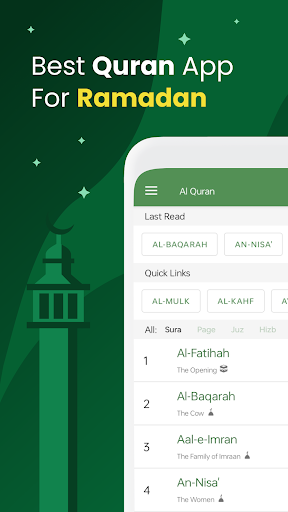
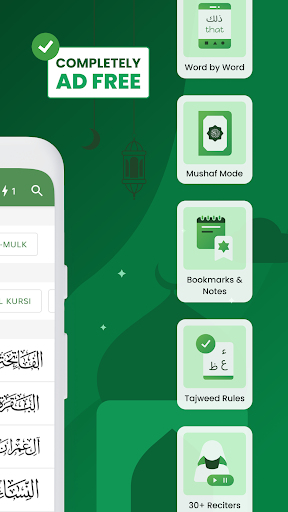
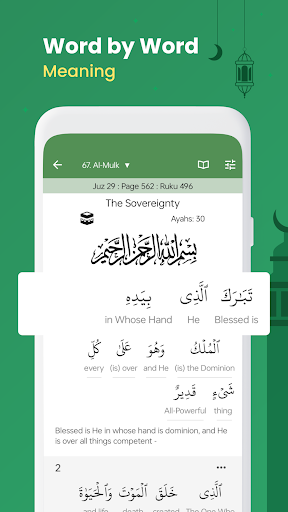
Are you looking for ways to deepen your connection with the Quran? Understand the Quran in your language with authentic explanations (Tafseer). Connect with every verse with recitations and word-by-word meaning.
Engage in deep study by searching, bookmarking verses and taking notes everywhere. Listen to the Quran on repeat while you're travelling, working or memorising the Quran.
You will improve your tajweed and recitation. You can even read the Quran in your familiar Mushaf pages, build a habit using reminders and track your progress!
Our goal is to build "A comprehensive and engaging Quran study tool helping Muslims connect with the Quran meaningfully."
Several Translations & Tafsirs
● 90+ Translations & Tafsirs of the Quran in 60+ languages: Bangla, Chinese, English, French, Hindi, German, Indonesian, Italian, Malay, Russian, Spanish, Urdu and many more!
● 8 Arabic Tafsirs (including Tafseer Ibn Kathir, Tafseer Tabari, etc.) along with Arabic E3rab, Word Meaning, Asabun Nuzool
Word by word Analysis & Translations
● Word by Word translations of the Quran in Bangla, English, German, Hindi, Indonesian, Ingush, Malay, Russian, Tamil, Turkish and Urdu
● Word by Word Root / Lemma Information, Grammar Details and Verb Forms to dive in more depth.
Mushaf mode
● Recite Quran in Mushaf mode to have the same experience when reciting from hard-copy Mushaf
● Several Mushafs are available, including Madani, Naskh Indopak, Qaloon, Shemerly and Warsh.
Library: Bookmarks & Notes
● Bookmark ayahs to your own Collections and keep track of the last read ayah using Pins
● Start reading from where you left off using automatic Last Reads
● Take Notes for each ayah in the Tafsir view
● Library Sync & Import / Export option to sync across multiple devices and even share with others!
Search & Topics
● Powerful Search with Highlights
● Explore by Topics and read all ayahs related to a topic together. E.g. Hajj, Salah, Zakah and many more.
Quran Audio
● Listen to several recitations by 30+ reciters (downloadable for offline use)
● Reciter Options: Sheikh Mishary Al Afasy, Sheikh Husary (Muallim), Shaykh Ayman Suwaid, Sheikh Abdur Rahman As-Sudais and many others
● Robust Audio System with repeat, group playback of verses function to aid in Quran Memorization / Hifz
● Reciters tagged based on recitation types: Murattal, Mujawwad, WBW, Translation
● English Quran Audio Translation and Arabic Audio Commentary
● Word by Word Audio Playback
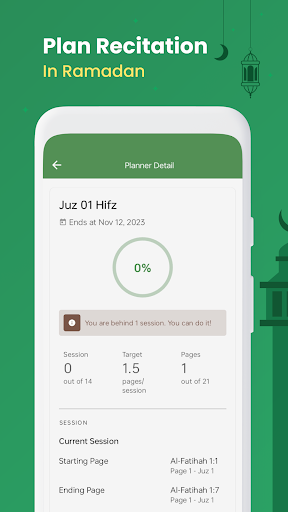
Quran Planner
● Plan your Khatmah of the Quran using the Quran Planner
Various Customization Options, Tajweed & Others
● Read in Uthmanic / Indopak script
● Read Tafsirs in Tafsir view
● Recite Tajweed colour-coded Quran with ease
● Quran Dictionary: See the list of roots for different Arabic alphabets
● Various fonts and multiple themes, including Night mode
● Autoscroll feature
● Copy & Share the verses
● All feature supports offline (Quran offline)
Download the ad-free Quran app and start your journey to a deeper understanding of the Quran!
Share and recommend this beautiful Quran app for Android to your friends and family. May Allah bless us in this world and hereafter.
"Whoever calls people to right guidance will have a reward like that of those who follow him..." - Sahih Muslim, Hadith 2674
Developed by Greentech Apps Foundation
Website: https://gtaf.org
Follow us on Social Media:
http://facebook.com/greentech0
https://twitter.com/greentechapps
Show more

1. Download MEmu installer and finish the setup

2. Start MEmu then open Google Play on the desktop

3. Search Al Quran (Tafsir & by Word) in Google Play
Install
4. Download and Install Al Quran (Tafsir & by Word)
5. On install completion click the icon to start

6. Enjoy using Al Quran (Tafsir & by Word) on PC with MEmu
MEmu Play is the best Android emulator, and 100 million users already enjoy its superb Android app experience. Powered by advanced virtualization technology, it lets you enjoy thousands of Android apps smoothly on your PC—including the most graphics-intensive ones.
Bigger screen with better graphics; Long duration, without limitation of battery or mobile data.
Full Keymapping support for precise control of keyboard and mouse or gamepad.
Multiple game accounts or tasks on single PC at one time with Multi-Instance manager.
Use Al Quran (Tafsir & by Word) on PC by following steps: