ArtFlow: Paint Draw Sketchbook
Updated
Current Version
2.9.31
Offered By

Stop worrying about high battery drain when using ArtFlow: Paint Draw Sketchbook on your phone. Free yourself from the tiny screen and enjoy the app on a much larger display. From now on, get a full-screen experience of your app with the convenience of a keyboard and mouse. MEmu offers you all the surprising features you’d expect: quick installation and easy setup, intuitive controls, and no more worries about battery life, mobile data, or unexpected calls. The all-new MEmu 9 is the choice for using ArtFlow: Paint Draw Sketchbook on your computer. With the MEmu multi-instance manager, you can run two or more accounts at the same time. Most importantly, our exclusive emulation engine unlocks your PC’s full potential, delivering smooth and enjoyable performance.
Show more
Enjoy superb experience of using ArtFlow: Paint Draw Sketchbook on PC with MEMU App Player. It's a powerful free Android emulator which provides you with thousands of android apps for their desktop version. Enjoy connecting with friends and polishing your work with higher efficiency! Convert your device into a digital sketchbook with more than 80 paint brushes, smudge, fill and an eraser tool.
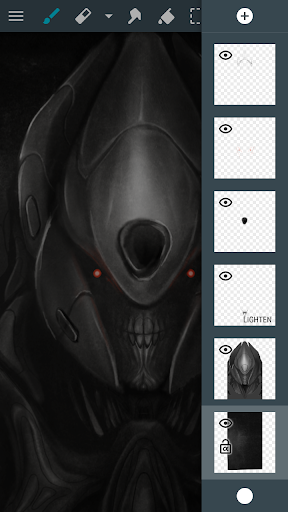
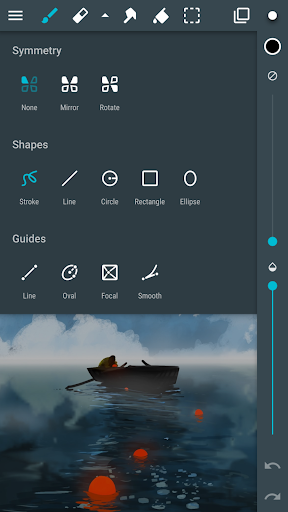
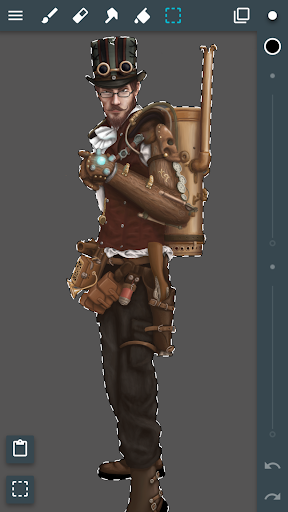
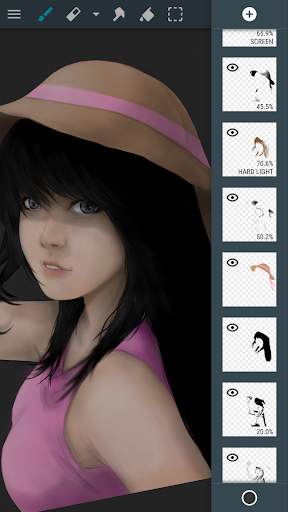
Convert your device into a digital sketchbook with more than 80 paint brushes, smudge, fill and an eraser tool. This fast and intuitive painting and drawing application will unlock the full power of your imagination. With support for pressure sensitive pens (like Samsung's S Pen) your device will be transformed into a real canvas.
Important: this is a free application with advanced features requiring a pro license in-app purchase. Single licence purchase will activate all devices associated with your Google account.
Features (some functions require pro license):
• High performance (GPU accelerated) paint engine
• Canvases up to 6144x6144 with 50 layers*
• Stylus pressure support
• Pressure simulation for touches†
• 100+ brushes and tools (including smudge tool and gradient fill)
• Create custom brushes from imported images
• Selection and selection masks
• Layer clipping mask
• 10 layer filters (HSV adjust, brightness & saturation, color curves and more)
• Material design inspired, fast, fluid, intuitive and accessible user interface
• Import and export supports PNG, JPG and PSD (Photoshop Document)
• NVIDIA DirectStylus support
• Palm rejection - no more accidental zooming and panning when drawing†
*) depending on device and available memory
†) some devices are incompatible with pressure simulation and palm rejection
You can paint, sketch and draw with ease thanks to fast and fluid brush engine. ArtFlow aims to replace your physical sketchpad and become universal art studio type application for Android™.
Artworks by:
Oleg Stepanko (https://instagram.com/rwidon)
Miguel Alvarado (https://www.instagram.com/3d.mike)
David Rivera (http://www.facebook.com/BlownHand)
Jon Mietling Portal Dragon (http://portaldragon.com)
Rob Pennycook
Marco Hurtado
Joel Ukeni (https://www.instagram.com/j.ukeni/)
Enrico Natoli
Andrew Easter
Andrei Lanuza (http://plus.google.com/+AndreiLanuza)
David Mingorance (http://davidmingorance.weebly.com)
EB Leung
Geremy Arene (http://www.youtube.com/geremy902)
ViBu (http://candynjuice.blogspot.com)
Oskar Stalberg
Unlicensed version limitation:
• 20 basic tools
• 3 layers
• Undo limited to 6 steps
• No PSD export
Show more

1. Download MEmu installer and finish the setup

2. Start MEmu then open Google Play on the desktop

3. Search ArtFlow: Paint Draw Sketchbook in Google Play
Install
4. Download and Install ArtFlow: Paint Draw Sketchbook
5. On install completion click the icon to start

6. Enjoy using ArtFlow: Paint Draw Sketchbook on PC with MEmu
MEmu Play is the best Android emulator, and 100 million users already enjoy its superb Android app experience. Powered by advanced virtualization technology, it lets you enjoy thousands of Android apps smoothly on your PC—including the most graphics-intensive ones.
Bigger screen with better graphics; Long duration, without limitation of battery or mobile data.
Full Keymapping support for precise control of keyboard and mouse or gamepad.
Multiple game accounts or tasks on single PC at one time with Multi-Instance manager.
Use ArtFlow: Paint Draw Sketchbook on PC by following steps: