BeeXprss Service
Updated
Current Version
2.9
Offered By

Stop worrying about high battery drain when using BeeXprss Service on your phone. Free yourself from the tiny screen and enjoy the app on a much larger display. From now on, get a full-screen experience of your app with the convenience of a keyboard and mouse. MEmu offers you all the surprising features you’d expect: quick installation and easy setup, intuitive controls, and no more worries about battery life, mobile data, or unexpected calls. The all-new MEmu 9 is the choice for using BeeXprss Service on your computer. With the MEmu multi-instance manager, you can run two or more accounts at the same time. Most importantly, our exclusive emulation engine unlocks your PC’s full potential, delivering smooth and enjoyable performance.
Show more
Enjoy superb experience of using BeeXprss Service on PC with MEMU App Player. It's a powerful free Android emulator which provides you with thousands of android apps for their desktop version. Enjoy connecting with friends and polishing your work with higher efficiency! How it works.
How it works
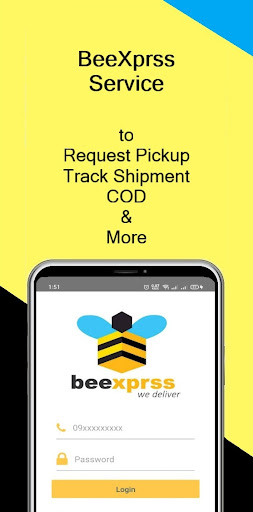
- First, register with your mobile phone number and fill the requested information including address. Then, you can start use ours app. Our app is working based on your mobile phone number to show all of the delivery transactions and activities. If you want to change your mobile phone number, please contact us.
- If you are our customer since beginning, we have your mobile phone number already recorded in our system. You can start register with this existing number, and then all of your activities will be shown.
For more info: https://beexprss.com/#ContactUs
Features
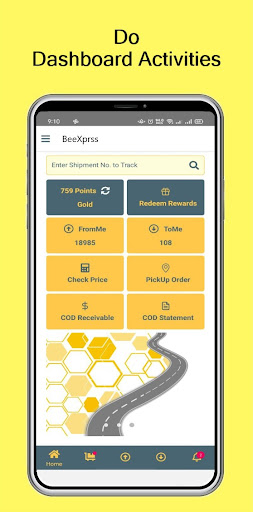
- Home screen shows total number of outgoing and incoming shipment, shortcut menu of Request Pickup Order, Tracking, COD statement, Pricing Checker, COD Receivable Dashboard, Points and Redeem Rewards.
- To Me screen shows list of shipment (called AWB) list that are delivery to us with shipment information and real time status. In here, you can track the delivery status if you have our AWB number. And also, you can modify new received date and address.
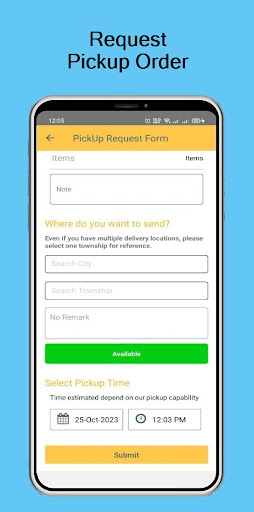
- From Me screen shows list of AWB that are delivery from us with shipment information and real time status. In here, you can check price of delivery and order to pick-up by filling in the requested pick-up form with details address. You can also make draft shipment order to send to your receivers. After you made draft shipment order (draft AWB), you also need to make pick-up order, then our courier will come and pick-up your shipment.
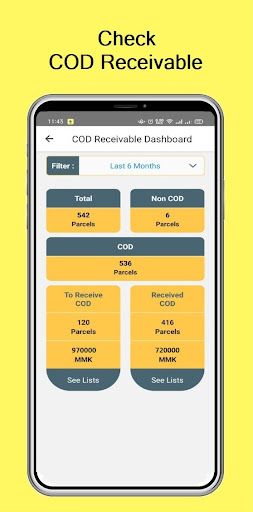
- COD Receivable screen shows the dashboard of how much amount of COD to receive or received with the shipment quantity and detail shipment lists.
- COD Statement screen shows list of your COD collected amount for each shipment from receivers with Payment date and status.
- Redeem reward screen shows the list of rewards that can claim with points.
Software Terms of Service
- Registration: You must register for our services using accurate data including address, provide your mobile phone number, and if you want to change it, contact us to update. You agree to receive text messages or phone calls from us with codes to register for our services.
- Data Policy: Your mobile phone number and information will be recorded in our system after you registered the app. Your receiver mobile phone number and others information will also be recorded in our system based on your using app function. You must access counting your data information and activities to make changes updated information from us, or for rewards, rating or other discount features.
- Acceptable Use: You must access and use our services only for legal, authorized, and acceptable purposes. You will not use or assist others in using our services in ways that: violate, misappropriate, or infringe the rights of BeeXprss. You must not use or assist others to access, use, copy, adapt, modify, prepare derivative works based upon distribute, transfer, display, perform, or otherwise exploit our services in impermissible or unauthorized manners, or in ways that impair, or harm us our services, systems, our users, or others, including that you must not directly or through automated means: (1) reverse engineer, modify, create derivative works from, decompile, or extract code from our services; (2) send, store, or transmit viruses or other harmful computer code through or onto our services; (3) gain or attempt to gain unauthorized access to our services or systems; (4) create accounts for our services through unauthorized or automated means; (5) collect the information of or about our users in any impermissible or unauthorized manner; (6) sell resell, rent, or charge for our services.
- Rights: We own all copyrights, trademarks, domains, logos, and other intellectual property rights associated with our services. You may not use our copyrights, trademarks, domains, logos, and other intellectual property rights unless you have our permission and except in accordance.
Show more

1. Download MEmu installer and finish the setup

2. Start MEmu then open Google Play on the desktop

3. Search BeeXprss Service in Google Play
Install
4. Download and Install BeeXprss Service
5. On install completion click the icon to start

6. Enjoy using BeeXprss Service on PC with MEmu
MEmu Play is the best Android emulator, and 100 million users already enjoy its superb Android app experience. Powered by advanced virtualization technology, it lets you enjoy thousands of Android apps smoothly on your PC—including the most graphics-intensive ones.
Bigger screen with better graphics; Long duration, without limitation of battery or mobile data.
Full Keymapping support for precise control of keyboard and mouse or gamepad.
Multiple game accounts or tasks on single PC at one time with Multi-Instance manager.
Use BeeXprss Service on PC by following steps: