bet365 - Sports Betting
Updated
Current Version
8.0.60.00-br
Offered By

Stop worrying about high battery drain when using bet365 - Sports Betting on your phone. Free yourself from the tiny screen and enjoy the app on a much larger display. From now on, get a full-screen experience of your app with the convenience of a keyboard and mouse. MEmu offers you all the surprising features you’d expect: quick installation and easy setup, intuitive controls, and no more worries about battery life, mobile data, or unexpected calls. The all-new MEmu 9 is the choice for using bet365 - Sports Betting on your computer. With the MEmu multi-instance manager, you can run two or more accounts at the same time. Most importantly, our exclusive emulation engine unlocks your PC’s full potential, delivering smooth and enjoyable performance.
Show more
Enjoy superb experience of using bet365 - Sports Betting on PC with MEMU App Player. It's a powerful free Android emulator which provides you with thousands of android apps for their desktop version. Enjoy connecting with friends and polishing your work with higher efficiency! Welcome to the modern bet365 sports betting app!

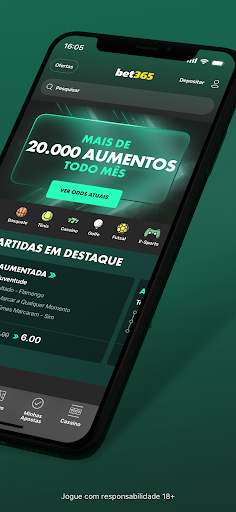


Welcome to the modern bet365 sports betting app!
Download the betting app and discover why Everything is Always Extraordinary at bet365.
Official Sponsor of the UEFA Champions League.
Bet pre-match and In-Play on a wide variety of competitions, including Serie A, La Liga, Premier League, NFL, Champions League, Formula 1, NBA, and much more. bet365 customers enjoy an unparalleled experience, including:
· Enhanced Bet: BIGGER odds on selected markets.
· Substitution+: If your player is SUBSTITUTED, your bet will be retained.
· Increased Winnings: BOOST your winnings on highlighted sports and events with Create a Bet and selected single bets - win more without increasing your stake.
· Enhanced Bets: Every day, we BOOST hundreds of markets across various sports. Events with Enhanced Bets are indicated by two green symbols.
· Create a Bet+: Combine popular markets from selected events into one bet. User-friendly, with all information centralised. This way, you create the bet you want. Available pre-match and In-Play across various sports.
· In-Play Betting: Bet on thousands of In-Play markets across a range of sports, including American Football, Football, and Basketball.
· Live Streaming: bet365 streams thousands of global events every year, bringing you top live sports action. Featuring events from major Football leagues, NBA, NFL, and more.
· Cash Out: Available on In-Play or pre-match bets, Cash Out and Partial Cash Out allow you to take a return on your bet in part or in full before an event finishes.
· Edit Bet: Add, swap, or remove selections, increase your stake, and change the type of bet on pending, In-Play, or pre-match bets.
· Live Match: Follow live events and monitor your bets and statistics during the action. Available across various sports.
· Live Golf Updates: Keep track of your favourite players' shots in the biggest golf competitions on the PGA TOUR and DP World Tour.
· Horse Racing Performance: Study the performance of participants from the UK and Ireland and watch past races in the Racing Archive.
· Sports Statistics: Analyse statistics from the major leagues, including American Football, Football, and Basketball.
· Custom Display: Browse your favourite sports with the intuitive app that shows usual bets. You can "favourite" specific sports in the Sports A-Z menu for easy access.
· My Teams: Quickly place football bets and view upcoming matches for your teams.
· Sports Betting and News: Stay updated with the latest news from a variety of sports and get betting insights from our experts and informants.
· Extra bet365: Check out our range of offers and promotions.
· Various payment methods, such as Bank Account and Pix.
· Use your bet365 account or register through the app.
You must be over 18 years old to have a bet365 account. Availability may vary depending on location.
Give your feedback, rate the app!
Please refer to bet365's Privacy Policy before installing the app. By installing and opening it, you agree to this policy.
bet365 is committed to promoting Responsible Gambling.
Gamble responsibly.
We offer a variety of tools designed to help you stay in control of your betting activity, such as Time-Outs, Deposit Limits, Activity Alerts, Self-Exclusion, among others.
Prohibited for under 18s. Gamble responsibly.
You can find more information and support at https://gamblingtherapy.org/pt-br/
Show more

1. Download MEmu installer and finish the setup

2. Start MEmu then open Google Play on the desktop

3. Search bet365 - Sports Betting in Google Play
Install
4. Download and Install bet365 - Sports Betting
5. On install completion click the icon to start

6. Enjoy using bet365 - Sports Betting on PC with MEmu
MEmu Play is the best Android emulator, and 100 million users already enjoy its superb Android app experience. Powered by advanced virtualization technology, it lets you enjoy thousands of Android apps smoothly on your PC—including the most graphics-intensive ones.
Bigger screen with better graphics; Long duration, without limitation of battery or mobile data.
Full Keymapping support for precise control of keyboard and mouse or gamepad.
Multiple game accounts or tasks on single PC at one time with Multi-Instance manager.
Use bet365 - Sports Betting on PC by following steps: