
BM Slayer - Drama Tracker
Updated
Current Version
'1.0.0'
Offered By

Stop worrying about high battery drain when using BM Slayer - Drama Tracker on your phone. Free yourself from the tiny screen and enjoy the app on a much larger display. From now on, get a full-screen experience of your app with the convenience of a keyboard and mouse. MEmu offers you all the surprising features you’d expect: quick installation and easy setup, intuitive controls, and no more worries about battery life, mobile data, or unexpected calls. The all-new MEmu 9 is the choice for using BM Slayer - Drama Tracker on your computer. With the MEmu multi-instance manager, you can run two or more accounts at the same time. Most importantly, our exclusive emulation engine unlocks your PC’s full potential, delivering smooth and enjoyable performance.
Show more
Enjoy superb experience of using BM Slayer - Drama Tracker on PC with MEMU App Player. It's a powerful free Android emulator which provides you with thousands of android apps for their desktop version. Enjoy connecting with friends and polishing your work with higher efficiency! BM Slayer is your ultimate companion for tracking and discovering Asian dramas!
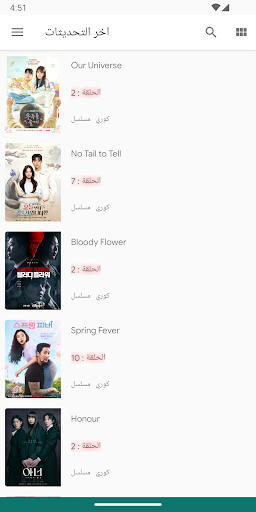

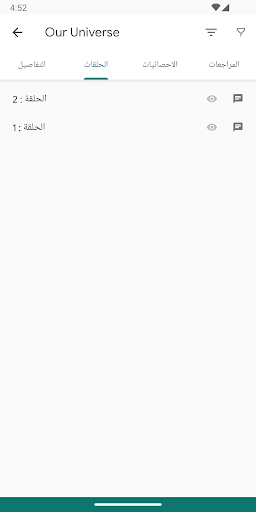

BM Slayer is your ultimate companion for tracking and discovering Asian dramas! Whether you're a K-drama enthusiast, C-drama fan, or J-drama lover, BM Slayer helps you organize your watchlist, share reviews, and connect with a passionate community of drama lovers.
COMPREHENSIVE DRAMA DATABASE • Browse extensive collection of Asian dramas from Korea, China, Japan, Thailand, and more • Discover latest drama releases and popular series • Filter by country, genre, status (ongoing/completed), and drama type • Search for your favorite dramas and actors • Access detailed drama information including synopsis, cast, ratings, and release dates
TRACK YOUR WATCHING JOURNEY • Create and manage personalized drama lists • Mark dramas as: Watching, Plan to Watch, Completed, On Hold, or Dropped • Track episode watch history • Get notifications for new episodes • View your watching statistics and drama count
⭐ REVIEWS & RATINGS • Write and share drama reviews with ratings • Read community reviews before starting a new drama • View aggregated user ratings and statistics • Like or dislike reviews to highlight helpful content
EPISODE COMMENTS & DISCUSSIONS • Comment on specific episodes • Join discussions with other drama fans • Mark comments as spoilers to protect other viewers • Reply to comments and engage with the community • Like/dislike comments • Report inappropriate content
PERSONALIZED PROFILE • Create your profile and showcase your drama journey • View detailed statistics of watched episodes • Follow your favorite drama trackers • Manage blocked users for better experience
ACTOR DATABASE • Browse comprehensive actor profiles • View actor filmography and roles • Discover dramas by your favorite actors • Filter between main and supporting roles
ADVANCED SEARCH & FILTER • Multi-filter search by genre, country, status, and type • Sort results by popularity, rating, or release date • Save search preferences • Quick access to latest episodes and updates
CUSTOMIZABLE EXPERIENCE • Grid or List view for drama displays • Smooth and intuitive user interface
SMART NOTIFICATIONS • Get notified about new episodes • Receive updates from your favorite dramas • Manage notification preferences • Mark all notifications as read
COMMUNITY FEATURES • View trending dramas in the community • See what others are watching • Share your recommendations • Block/unblock users for better experience • Flag inappropriate comments and reviews
DRAMA STATISTICS • View detailed drama statistics • See rating distributions (1-5 stars) • Track number of users watching • View episode ratings and engagement
ACCOUNT FEATURES • Secure authentication with email • Password recovery • Profile customization • Account management and privacy controls
Show more

1. Download MEmu installer and finish the setup

2. Start MEmu then open Google Play on the desktop

3. Search BM Slayer - Drama Tracker in Google Play
Install
4. Download and Install BM Slayer - Drama Tracker
5. On install completion click the icon to start

6. Enjoy using BM Slayer - Drama Tracker on PC with MEmu
MEmu Play is the best Android emulator, and 100 million users already enjoy its superb Android app experience. Powered by advanced virtualization technology, it lets you enjoy thousands of Android apps smoothly on your PC—including the most graphics-intensive ones.
Bigger screen with better graphics; Long duration, without limitation of battery or mobile data.
Full Keymapping support for precise control of keyboard and mouse or gamepad.
Multiple game accounts or tasks on single PC at one time with Multi-Instance manager.
Use BM Slayer - Drama Tracker on PC by following steps: