Calc - Desktop Mate Widgets
Updated
Current Version
1.4.2
Offered By

Stop worrying about high battery drain when using Calc - Desktop Mate Widgets on your phone. Free yourself from the tiny screen and enjoy the app on a much larger display. From now on, get a full-screen experience of your app with the convenience of a keyboard and mouse. MEmu offers you all the surprising features you’d expect: quick installation and easy setup, intuitive controls, and no more worries about battery life, mobile data, or unexpected calls. The all-new MEmu 9 is the choice for using Calc - Desktop Mate Widgets on your computer. With the MEmu multi-instance manager, you can run two or more accounts at the same time. Most importantly, our exclusive emulation engine unlocks your PC’s full potential, delivering smooth and enjoyable performance.
Show more
Enjoy superb experience of using Calc - Desktop Mate Widgets on PC with MEMU App Player. It's a powerful free Android emulator which provides you with thousands of android apps for their desktop version. Enjoy connecting with friends and polishing your work with higher efficiency! A little more joy in your calculations, every day.
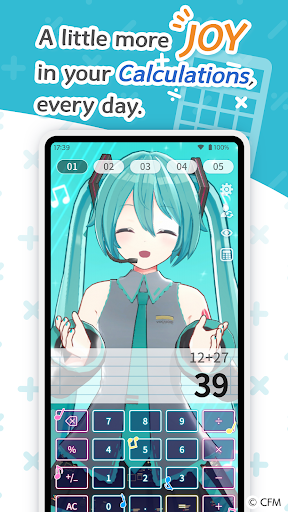
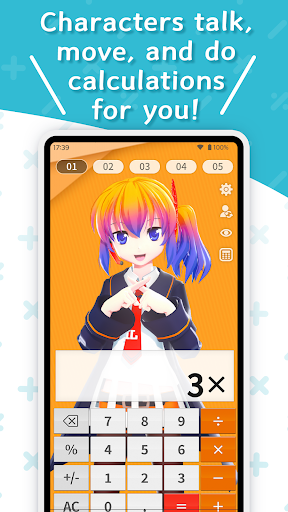
A little more joy in your calculations, every day.
A digital calculator app you can use with your favorite characters, Desktop Mate Widgets is a sister app to Desktop Mate.
Cute character reactions make every calculation a little more special, turning even a quick calc session into a fun moment with your favorite character.
■ Enjoy Cute Character Reactions
Every time you press a calculator button, the character will speak that number and strike a pose. Press "=" to get the answer — though sometimes they might struggle a little to figure it out!
Pet or poke the character's head for special reactions too. Enjoy your favorite character's movements and expressions as you calculate.
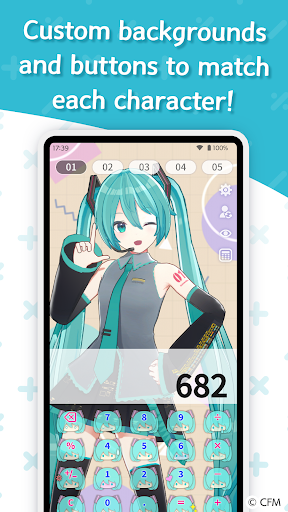
■ Customize with Character-Themed Designs
Swap out the calculator buttons and background to match your character's style. Each character comes with multiple design options, so you can mix and match to suit your mood or the moment.
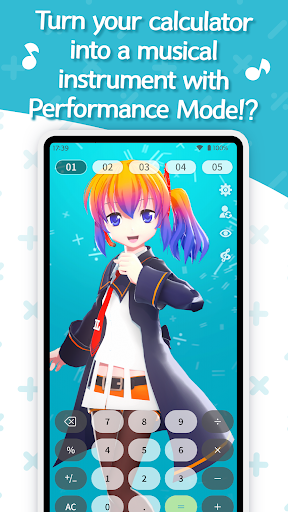
■ Performance Mode: Play Music on Your Calculator!
Tap the music note button to switch from calculator mode to Performance Mode. The calculator keys function like piano keys, and the character will sing along to whatever you press.
Hold "+" or "-" to shift notes by a semitone, and multi-key presses are supported too. With a little practice, you might be able to pull off a real performance! Share your session on social media and enjoy it with everyone.
■ SP Answer Actions: Find the Hidden Numbers
Certain calculation results trigger special character reactions. From a triple "777" to fun number combinations, each character also has their own unique numbers that set off a special response. See how many hidden reactions you can find!
■ Ready to Use Right Away: Aieru-tan
Launch the app and you're ready to go with Aieru-tan, the official mascot character of infiniteloop.
Aieru-tan is a 16-year-old high school student who works part-time at infiniteloop. She loves programming and gaming, and her occasionally sharp tongue is all part of her charm. Since her debut in 2012, she has appeared in Desktop Mate and many other projects as a beloved face of infiniteloop.
■ More Character DLCs for a More Personal Experience
This app also offers paid additional character DLC. The "Hatsune Miku DLC" will be available at launch, with more characters to be added over time in step with the Desktop Mate series lineup.
Each DLC features newly recorded voice lines tailored to each character, so you can enjoy your favorite character's voice and reactions every time you use the calculator.
More characters will be added over time, in line with the Desktop Mate series lineup. And this is just the beginning — more Desktop Mate Widgets apps are on the way. Stay tuned!
Note: When using additional character DLC, please also review the guidelines set by each character's rights holder.
Show more

1. Download MEmu installer and finish the setup

2. Start MEmu then open Google Play on the desktop

3. Search Calc - Desktop Mate Widgets in Google Play
Install
4. Download and Install Calc - Desktop Mate Widgets
5. On install completion click the icon to start

6. Enjoy using Calc - Desktop Mate Widgets on PC with MEmu
MEmu Play is the best Android emulator, and 100 million users already enjoy its superb Android app experience. Powered by advanced virtualization technology, it lets you enjoy thousands of Android apps smoothly on your PC—including the most graphics-intensive ones.
Bigger screen with better graphics; Long duration, without limitation of battery or mobile data.
Full Keymapping support for precise control of keyboard and mouse or gamepad.
Multiple game accounts or tasks on single PC at one time with Multi-Instance manager.
Use Calc - Desktop Mate Widgets on PC by following steps:































