Calorie Counter - MyNetDiary
Updated
Current Version
1735066622
Offered By

Stop worrying about high battery drain when using Calorie Counter - MyNetDiary on your phone. Free yourself from the tiny screen and enjoy the app on a much larger display. From now on, get a full-screen experience of your app with the convenience of a keyboard and mouse. MEmu offers you all the surprising features you’d expect: quick installation and easy setup, intuitive controls, and no more worries about battery life, mobile data, or unexpected calls. The all-new MEmu 9 is the choice for using Calorie Counter - MyNetDiary on your computer. With the MEmu multi-instance manager, you can run two or more accounts at the same time. Most importantly, our exclusive emulation engine unlocks your PC’s full potential, delivering smooth and enjoyable performance.
Show more
Enjoy superb experience of using Calorie Counter - MyNetDiary on PC with MEMU App Player. It's a powerful free Android emulator which provides you with thousands of android apps for their desktop version. Enjoy connecting with friends and polishing your work with higher efficiency! Are you looking for a calorie counter or food log with a free barcode scanner, macros tracking and intermittent fasting tracker?
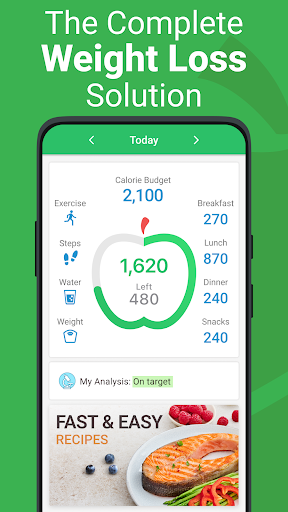
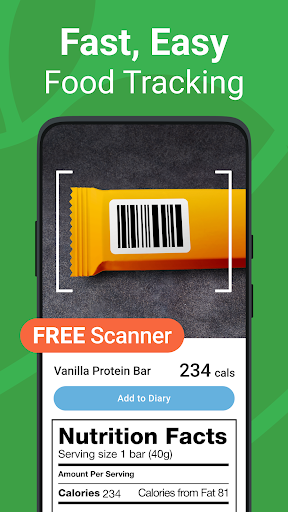
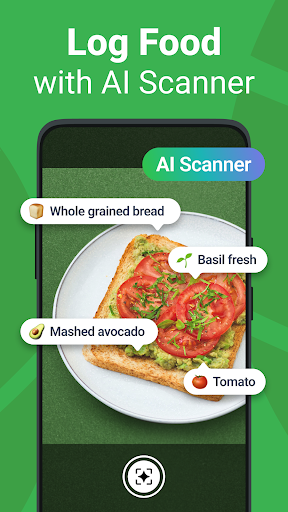
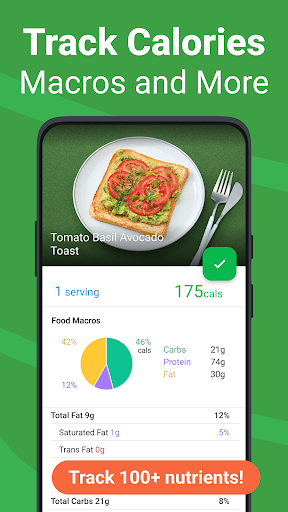
Are you looking for a calorie counter or food log with a free barcode scanner, macros tracking and intermittent fasting tracker?
Meet MyNetDiary - your personal assistant for weight loss, diet and nutrition.
Ranked #1 by Forbes Health ahead of all Calorie Counter apps in 2022.
Rated #1 by the American Journal of Preventive Medicine. The best all-around healthy lifestyle app. The New York Times calls it “simpler, quicker, nicer” compared to similar apps.
Selected by Today's Dietitian Magazine for its Popular Weight Loss Apps list alongside WW and Noom. Dietitians and personal trainers choose MyNetDiary Professional Connect to work with their clients.
Unlike other diet apps, MyNetDiary is easy to navigate, includes generous free features, and has no ads. The free calorie counter is totally sufficient for successful weight loss.
MyNetDiary forces nothing on you. You can choose one of the popular diets, follow the tips prepared by our Registered Dietitians, consider personalized advice offered by Virtual Coach, or simply enjoy the best calorie counter app on your smartphone and smartwatch.
MyNetDiary has the largest verified food database - over 1.7 million items and 107 nutrients, making it the most reliable food tracker ever! Your food diary will show the most accurate nutrition, for all macros, vitamins, minerals, omega fats - all nutrients considered.
PROVEN SUCCESS
• Active members achieve average weight loss of 1.4 lb each week
• Over 25 million members, a great number of experienced dieters switch from other apps
Free Calorie Tracker features include:
• Lightning-fast food journal with barcode scanner, instant search, and AI-powered Voice Food Log taking only seconds to enter your foods
• Robust mega-database of food labels verified and updated daily with restaurants, grocery stores, special diets, and ethnic foods
• Exercise tracker supporting over 500 types of exercise and recreation
• Daily coaching advice
• Customizable dashboard: you control how the app looks and works
• Wear OS app with tiles & complications: log foods and amount by saying what you ate, track consumed water and body weight. Keep an eye on daily carbs / fat / protein breakdown and a quick daily summary.
• Health Connect, Google Fit and Samsung Health integration
• Custom Food Editor and Recipe Editor
• Water Tracker
• Steps Tracker
• Configurable Reminders
• Shopping list for foods and any other grocery items
• Motivating diet and nutrition articles written by our Registered Dietitians
• Professional Connect: free and easy - connect with your dietitian or trainer via MyNetDiary to share your data and use their professional guidance
• Community of people supporting each other in their weight loss journey
• Total data privacy and protection - no account required
MyNetDiary Premium provides all the guidance and features you may need for the best results:
• Premium Diets, including Low-Carb, Keto, High-Protein, Mediterranean, Vegetarian, Vegan and more - with a diet plan, guides and feedback.
• Intermittent fasting tracker: popular and custom protocols, special timer and reports
• Autopilot adjusts your calorie budget automatically, guiding you to your goal weight
• Up to 50 Health Trackers: blood pressure, cholesterol, blood glucose, A1C, ketones, medications, symptoms, and body measurements
• 600 Premium Recipes and 200 Premium Meals developed by our Registered Dietitians - delicious, easy to cook and customize
• Premium Menus (Meal Plans) help you plan and balance your nutrition throughout the week
• Recipe Import loads your favorite recipes from the web and calculates complete nutrition automatically
• Recipe Database with over 370,000 dishes and detailed nutrition facts
• Integrations with Fitbit, Garmin, and Withings
• Track up to 107 nutrients, set custom targets, get the recommendations for optimal nutrition.
Show more

1. Download MEmu installer and finish the setup

2. Start MEmu then open Google Play on the desktop

3. Search Calorie Counter - MyNetDiary in Google Play
Install
4. Download and Install Calorie Counter - MyNetDiary
5. On install completion click the icon to start

6. Enjoy using Calorie Counter - MyNetDiary on PC with MEmu
MEmu Play is the best Android emulator, and 100 million users already enjoy its superb Android app experience. Powered by advanced virtualization technology, it lets you enjoy thousands of Android apps smoothly on your PC—including the most graphics-intensive ones.
Bigger screen with better graphics; Long duration, without limitation of battery or mobile data.
Full Keymapping support for precise control of keyboard and mouse or gamepad.
Multiple game accounts or tasks on single PC at one time with Multi-Instance manager.
Use Calorie Counter - MyNetDiary on PC by following steps: