
킹콩티비 - 인기방송 가득한 실시간 라이브방송
Updated
Current Version
9.3.004
Offered By

Stop worrying about high battery drain when using 킹콩티비 - 인기방송 가득한 실시간 라이브방송 on your phone. Free yourself from the tiny screen and enjoy the app on a much larger display. From now on, get a full-screen experience of your app with the convenience of a keyboard and mouse. MEmu offers you all the surprising features you’d expect: quick installation and easy setup, intuitive controls, and no more worries about battery life, mobile data, or unexpected calls. The all-new MEmu 9 is the choice for using 킹콩티비 - 인기방송 가득한 실시간 라이브방송 on your computer. With the MEmu multi-instance manager, you can run two or more accounts at the same time. Most importantly, our exclusive emulation engine unlocks your PC’s full potential, delivering smooth and enjoyable performance.
Show more
Enjoy superb experience of using 킹콩티비 - 인기방송 가득한 실시간 라이브방송 on PC with MEMU App Player. It's a powerful free Android emulator which provides you with thousands of android apps for their desktop version. Enjoy connecting with friends and polishing your work with higher efficiency! Meet the popcorn BJs and new new BJs on the hot internet broadcasting King Kong TV!
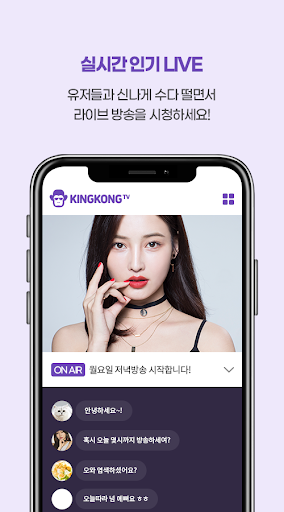
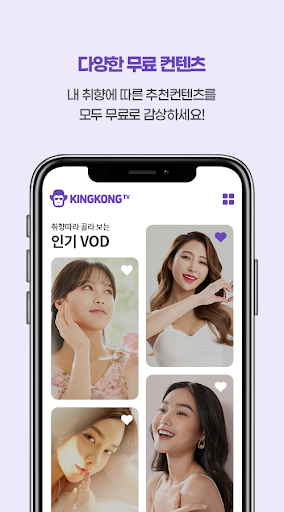
Meet the popcorn BJs and new new BJs on the hot internet broadcasting King Kong TV!
You can watch each broadcast of popcorn that you have never felt anywhere else.
- 24 hours real-time broadcasting and subscription is also free! Watching is also free!
- Live broadcasting that can be watched anytime, anywhere without space restrictions with PC or mobile applications!
- Live communication with sexy popular female cams and attractive BJs!
-King Kong TV with a wide variety of contents such as mukbang, chatbang, gamebang, yabang (outdoor broadcasting), communication room, etc.
▶ Introducing the new King Kong TV launch ◀
- Added broadcast anniversary function
- Fixed police freeze function
- Advancement of automatic gift function (continuous popcorn/ Doosan popcorn, etc...)
- Broadcaster setting prohibited word function OPEN
- Response to foldable phone issue
- Fixed some split screen errors
- Change player
※ Various items ※
* Full Room Admission Ticket - This item allows you to watch broadcasts that exceed the number of viewers. Even when the number of viewers is exceeded, you can enter directly without waiting.
* Listup - This item is always located in the top 9 lists in the broadcasting list so that all members can see my broadcasting first.
* Broadcast Entry Effect - This item is entered with a special effect when entering the broadcast. Enter the broadcast and present yourself with special effects.
In addition, we provide a list of broadcasts that are differentiated from other broadcasts, such as premium nicknames, manager additions, and list decoration.
King Kong TV App Access Permission Guide
[Required access rights]
※ Permission to save: Permission to upload photos/pictures or to save data registered on the server.
※ Phone permission: Permission to change the audio status when a call occurs while watching a broadcast.
(Check terminal status)
[Optional access rights]
※ SMS Permission: Permission to automatically enter the received SMS authentication number
※ Camera Permission: Permission for camera shooting when broadcasting.
※ Microphone permission: Permission to use audio when broadcasting.
※ Drawing over other apps: Permission to use pop-up mode when watching broadcasts
※ Notifications: Permission to notify favorite broadcasts and announcements
[How to withdraw access rights]
-Android 6.0 or later: Can be withdrawn from the ‘Settings > Application Manager > Select an app > Permissions > Access Permissions’ menu.
-Under Android 6.0: It is impossible to revoke the access right, so it can be withdrawn by deleting the app
Show more

1. Download MEmu installer and finish the setup

2. Start MEmu then open Google Play on the desktop

3. Search 킹콩티비 - 인기방송 가득한 실시간 라이브방송 in Google Play
Install
4. Download and Install 킹콩티비 - 인기방송 가득한 실시간 라이브방송
5. On install completion click the icon to start

6. Enjoy using 킹콩티비 - 인기방송 가득한 실시간 라이브방송 on PC with MEmu
MEmu Play is the best Android emulator, and 100 million users already enjoy its superb Android app experience. Powered by advanced virtualization technology, it lets you enjoy thousands of Android apps smoothly on your PC—including the most graphics-intensive ones.
Bigger screen with better graphics; Long duration, without limitation of battery or mobile data.
Full Keymapping support for precise control of keyboard and mouse or gamepad.
Multiple game accounts or tasks on single PC at one time with Multi-Instance manager.
Use 킹콩티비 - 인기방송 가득한 실시간 라이브방송 on PC by following steps:































