
MagicCall – Voice Changer App
Updated
Current Version
2.2.1
Offered By

Stop worrying about high battery drain when using MagicCall – Voice Changer App on your phone. Free yourself from the tiny screen and enjoy the app on a much larger display. From now on, get a full-screen experience of your app with the convenience of a keyboard and mouse. MEmu offers you all the surprising features you’d expect: quick installation and easy setup, intuitive controls, and no more worries about battery life, mobile data, or unexpected calls. The all-new MEmu 9 is the choice for using MagicCall – Voice Changer App on your computer. With the MEmu multi-instance manager, you can run two or more accounts at the same time. Most importantly, our exclusive emulation engine unlocks your PC’s full potential, delivering smooth and enjoyable performance.
Show more
Enjoy superb experience of using MagicCall – Voice Changer App on PC with MEMU App Player. It's a powerful free Android emulator which provides you with thousands of android apps for their desktop version. Enjoy connecting with friends and polishing your work with higher efficiency! Using the MagicCall App you can make fun calls, prank your friends, and surprise your friends on call.



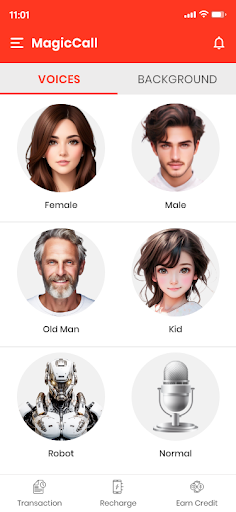
Using the MagicCall App you can make fun calls, prank your friends, and surprise your friends on call. MagicCall lets you change your voice during phone calls in real-time. You may want to call in a female voice, or the voice of a male, a kid, or even a cartoon character, this app is there for you.
Our voice changing effects and background sounds like traffic noise and birthday song can fake the whole environment background of the call. Once you choose the background effect, anyone you call will believe that you are trapped in a traffic jam, enjoying a concert or you can wish your friend with the birthday song background.
“The funniest and smoothest way to ask a girl out!”
The sound emoticons feature of MagicCall works in real time during a phone call. We have sound emoticons like kiss, slap, clap, fart, and many more emojis that give extra effects to your calls to make your friends laugh out loud or maybe blush. Any call can become magic by choosing a unique combination of voice or background and sound emojis!
“MagicCall’s traffic noise helps me make excuses to my boss whenever I am running late”
“Wishing people on their birthdays is a hit with MagicCall’s birthday background!”
“Pranked my classmates by sounding like my professor! Total chaos!”
With MagicCall, making your call enjoyable, increase the joy of speaking to a friend or loved one. It is not only a voice changer for calls, but a bucket full of fun with our female voice changer, AI robot voice kid voice that not only allows you to select and speak in a funny voice but also gives you the freedom to switch your voice during the call. MagicCall generates a human voice for any character you select and surprises the call receiver.
“Thank you MagicCall! You made me the best parodist ever.”
Features of MagicCall App - Voice changer during call
1. Enjoy a real-time voice changer on call. Use female voice changer, kid voice changer, cartoon voice changer, etc.
2. Switch between voices during the call
3. Test your voice before making the call
4. The cheapest way to make a funny call
5. Play sound emoticons like kiss, clap, etc. during the call
6. Make funny international calls for nominal rates
Voices and Backgrounds available on MagicCall:
1. Male to female voice changer
2. Female to male voice changer
3. Kid voice
4. Grandpa voice
5. Robot voice changer
6. Rain background
7. Concert background
8. Birthday Song
9. Traffic Background
10. RaceCar Background
11. Mountain Background
How to make a call using MagicCall Voice Changer:
1. Select a voice type: Male, Female, Cartoon, or others. Or pick a background theme: Happy Birthday song, Traffic, Raining Background, or Music Concert.
2. Choose the person you want to laugh with by selecting a contact or dialing a specific number.
3. Initiate the call using MagicCall Voice Changer.
4. Once connected, your voice will change into the selected voice or background theme.
5. Use any of our sound emojis to add extra fun to your call
6. Have a blast listening to your friends' unexpected and funny reactions!
Enjoy making funny calls with the MagicCall voice changer on call. Give yourself a chance to be silly again!
Show more

1. Download MEmu installer and finish the setup

2. Start MEmu then open Google Play on the desktop

3. Search MagicCall – Voice Changer App in Google Play
Install
4. Download and Install MagicCall – Voice Changer App
5. On install completion click the icon to start

6. Enjoy using MagicCall – Voice Changer App on PC with MEmu
MEmu Play is the best Android emulator, and 100 million users already enjoy its superb Android app experience. Powered by advanced virtualization technology, it lets you enjoy thousands of Android apps smoothly on your PC—including the most graphics-intensive ones.
Bigger screen with better graphics; Long duration, without limitation of battery or mobile data.
Full Keymapping support for precise control of keyboard and mouse or gamepad.
Multiple game accounts or tasks on single PC at one time with Multi-Instance manager.
Use MagicCall – Voice Changer App on PC by following steps:































