DuckDuckGo Privacy Browser
Updated
Current Version
5.282.0
Offered By

Stop worrying about high battery drain when using DuckDuckGo Privacy Browser on your phone. Free yourself from the tiny screen and enjoy the app on a much larger display. From now on, get a full-screen experience of your app with the convenience of a keyboard and mouse. MEmu offers you all the surprising features you’d expect: quick installation and easy setup, intuitive controls, and no more worries about battery life, mobile data, or unexpected calls. The all-new MEmu 9 is the choice for using DuckDuckGo Privacy Browser on your computer. With the MEmu multi-instance manager, you can run two or more accounts at the same time. Most importantly, our exclusive emulation engine unlocks your PC’s full potential, delivering smooth and enjoyable performance.
Show more
Enjoy superb experience of using DuckDuckGo Privacy Browser on PC with MEMU App Player. It's a powerful free Android emulator which provides you with thousands of android apps for their desktop version. Enjoy connecting with friends and polishing your work with higher efficiency! At DuckDuckGo, we believe the best way to protect your personal information from hackers, scammers, and privacy-invasive companies is to stop it from being collected at all.
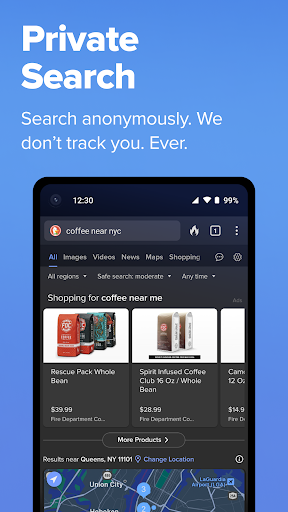
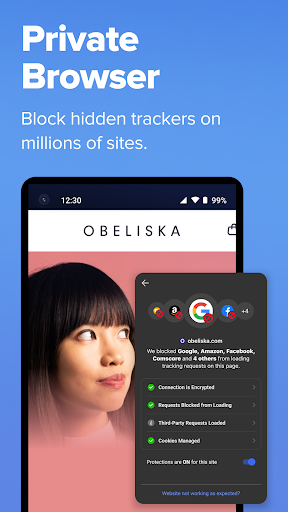
At DuckDuckGo, we believe the best way to protect your personal information from hackers, scammers, and privacy-invasive companies is to stop it from being collected at all. That's why millions of people choose DuckDuckGo over Chrome and other browsers to search and browse online. Our built-in search engine is like Google but never tracks your searches. Our browsing protections, such as ad tracker blocking and cookie blocking, help stop other companies from collecting your data. While our optional integrated AI features, Search Assist and Duck.ai, are private and never use your data to train AI. Oh, and our browser is free — we make money from privacy-respecting search ads, not by exploiting your data. Take back control of your personal information with the browser designed for data protection, not data collection.
FEATURE HIGHLIGHTS
Protect Your Searches by Default: DuckDuckGo Search comes built-in, so you can easily search online without being tracked.
Shield Your Browsing History: Our 3rd-Party Tracker Loading Protection blocks most trackers before they load, greatly exceeding what most popular browsers offer by default.
Chat Privately With AI: Duck.ai lets you have private conversations with 3rd-party AI models, anonymized by us and never used to train AI.
Secure Your Email (Optional): Use Email Protection to block most email trackers and hide your existing email address with @duck.com addresses.
Watch YouTube Videos Without Targeted Ads: Duck Player protects you from targeted ads and cookies with a distraction-free interface that incorporates YouTube’s strictest privacy settings for embedded video.
Automatically Enforce Encryption: Shield your data from network and Wi-Fi snoopers by forcing many sites to use an HTTPS connection.
Protect Your Personal Information in Other Apps: Block most hidden trackers in other apps around the clock (even while you’re sleeping) and prevent 3rd-party companies from invading your privacy with App Tracking Protection. This feature uses a VPN connection but is not a VPN. It works locally on your device and does not collect personal data.
Escape Fingerprinting: Make it harder for companies to create a unique identifier for you by blocking attempts to combine info about your browser and device.
Sync and Back Up Securely (Optional): Sync encrypted bookmarks and passwords across your devices.
Clear your tabs and browsing data in a flash with the Fire Button.
Banish cookie pop-ups and automatically set your preferences to minimize cookies and maximize privacy.
DUCKDUCKGO SUBSCRIPTION
Subscribers get:
- Our VPN: Secure your connection on up to 5 devices.
- Advanced AI Models in Duck.ai: Chat privately with AI models built for complex tasks.
- Personal Information Removal: Find and remove personal info from sites that store and sell it (access on desktop).
- Identity Theft Restoration: If your identity is stolen, we’ll help restore it.
DuckDuckGo Subscription Pricing & Terms
Payment will be charged automatically to your Google Account until you cancel, which you can do in app settings. You have the option to provide an email address to activate your subscription on other devices, and we will only use that email address to verify your subscription. For terms of service and privacy policy, visit https://duckduckgo.com/pro/privacy-terms
Read more about our free Tracking Protections at https://help.duckduckgo.com/privacy/web-tracking-protections
Privacy Policy: https://duckduckgo.com/privacy/
Terms of Service: https://duckduckgo.com/terms
Note about 3rd-Party Tracker Protection and Search Ads: while there are some limitations following search ad clicks, viewing ads on DuckDuckGo search is anonymous. Learn more here https://help.duckduckgo.com/privacy/web-tracking-protections
Privacy. Simplified. ™
Show more

1. Download MEmu installer and finish the setup

2. Start MEmu then open Google Play on the desktop

3. Search DuckDuckGo Privacy Browser in Google Play
Install
4. Download and Install DuckDuckGo Privacy Browser
5. On install completion click the icon to start

6. Enjoy using DuckDuckGo Privacy Browser on PC with MEmu
MEmu Play is the best Android emulator, and 100 million users already enjoy its superb Android app experience. Powered by advanced virtualization technology, it lets you enjoy thousands of Android apps smoothly on your PC—including the most graphics-intensive ones.
Bigger screen with better graphics; Long duration, without limitation of battery or mobile data.
Full Keymapping support for precise control of keyboard and mouse or gamepad.
Multiple game accounts or tasks on single PC at one time with Multi-Instance manager.
Use DuckDuckGo Privacy Browser on PC by following steps: