Мой Дом.ру
Updated
Current Version
4.7.3
Offered By

Stop worrying about high battery drain when using Мой Дом.ру on your phone. Free yourself from the tiny screen and enjoy the app on a much larger display. From now on, get a full-screen experience of your app with the convenience of a keyboard and mouse. MEmu offers you all the surprising features you’d expect: quick installation and easy setup, intuitive controls, and no more worries about battery life, mobile data, or unexpected calls. The all-new MEmu 9 is the choice for using Мой Дом.ру on your computer. With the MEmu multi-instance manager, you can run two or more accounts at the same time. Most importantly, our exclusive emulation engine unlocks your PC’s full potential, delivering smooth and enjoyable performance.
Show more
Enjoy superb experience of using Мой Дом.ру on PC with MEMU App Player. It's a powerful free Android emulator which provides you with thousands of android apps for their desktop version. Enjoy connecting with friends and polishing your work with higher efficiency! Free application for Dom.
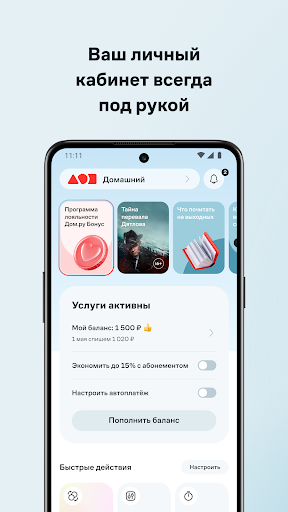
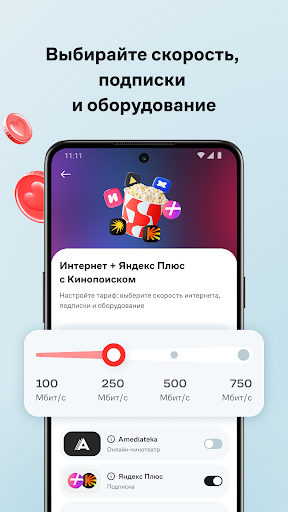

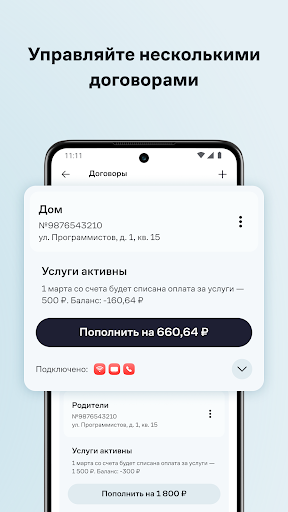
Free application for Dom.ru clients. What you can do through the application:
CONNECT SERVICES ONLINE
Fill out an application for Internet and TV connection completely online in a few steps - without unnecessary calls to the operator. Monitor the status of your application and manage your contract after connecting services in one application.
MANAGE THE CONTRACT
Log in to the application using your contract number and password. Authorization using a linked phone number or email is also available. If you have several contracts, add everything to the My Dom.ru application and switch between them without entering your login and password again.
MANAGE SERVICES
See the characteristics of your tariff: Internet speed, number of TV channels, what services are connected and their cost.
If you are not satisfied with the current characteristics, change the tariff, connect and disconnect additional services, or suspend them during your vacation. The application allows you to manage speed bonuses, antiviruses, TV channels, subscriptions to online cinemas and services - Litres, VK Play, Yandex 360 and others.
MANAGE ROUTER DOM.RU
Reboot your TP-Link EC220-G5 router or turn off Wi-Fi on it directly through the application. You can control the router from home and remotely via mobile Internet. Also in the application you can view information about connected devices and change Wi-Fi network settings.
RUN DIAGNOSTICS AND INTERNET SPEED TEST
Run diagnostics to find out if everything is ok with the Internet and TV. If something is found, we will fix the problem or offer a solution. Test your Internet speed to make sure it matches your plan.
PAY FOR SERVICES
Keep track of what you paid for and when using your payment history.
Pay for Dom.ru services in any convenient way - by credit card, through the fast payment system or SberPay.
Set up automatic balance replenishment - services will always be available, and you will not waste time paying for them. If the service is needed, but you cannot top up your account yet, connect the promised payment.
LEARN ABOUT PERSONAL OFFERS
Take advantage of offers that are only available in the mobile application. New bonuses from Dom.ru await you every month.
CONTACT SUPPORT
Write to the chat or email stores.support@r1.team - we will answer any question. Receive notifications about maintenance work and network emergencies in the application.
Leave your feedback and suggestions - they will help us make My Dom.ru better.
Show more

1. Download MEmu installer and finish the setup

2. Start MEmu then open Google Play on the desktop

3. Search Мой Дом.ру in Google Play
Install
4. Download and Install Мой Дом.ру
5. On install completion click the icon to start

6. Enjoy using Мой Дом.ру on PC with MEmu
MEmu Play is the best Android emulator, and 100 million users already enjoy its superb Android app experience. Powered by advanced virtualization technology, it lets you enjoy thousands of Android apps smoothly on your PC—including the most graphics-intensive ones.
Bigger screen with better graphics; Long duration, without limitation of battery or mobile data.
Full Keymapping support for precise control of keyboard and mouse or gamepad.
Multiple game accounts or tasks on single PC at one time with Multi-Instance manager.
Use Мой Дом.ру on PC by following steps: