Умный Дом.ру
Updated
Current Version
1733320399
Offered By

Stop worrying about high battery drain when using Умный Дом.ру on your phone. Free yourself from the tiny screen and enjoy the app on a much larger display. From now on, get a full-screen experience of your app with the convenience of a keyboard and mouse. MEmu offers you all the surprising features you’d expect: quick installation and easy setup, intuitive controls, and no more worries about battery life, mobile data, or unexpected calls. The all-new MEmu 9 is the choice for using Умный Дом.ру on your computer. With the MEmu multi-instance manager, you can run two or more accounts at the same time. Most importantly, our exclusive emulation engine unlocks your PC’s full potential, delivering smooth and enjoyable performance.
Show more
Enjoy superb experience of using Умный Дом.ру on PC with MEMU App Player. It's a powerful free Android emulator which provides you with thousands of android apps for their desktop version. Enjoy connecting with friends and polishing your work with higher efficiency! Безопасность вашего дома начинается с подъезда — контролируйте её сами, прямо на экране смартфона.
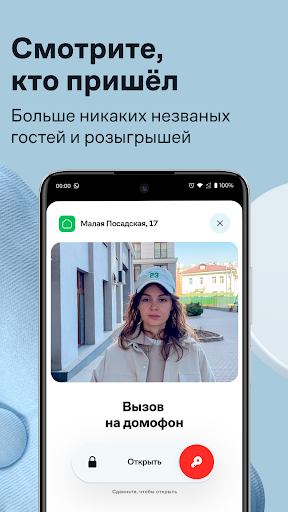
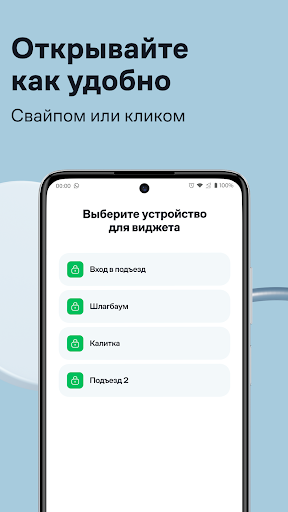
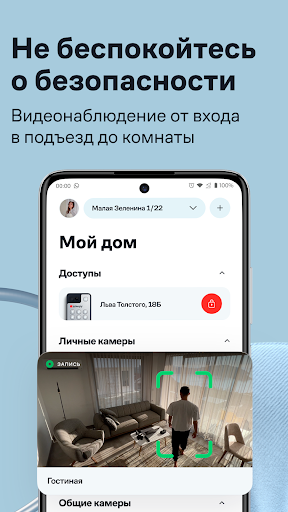
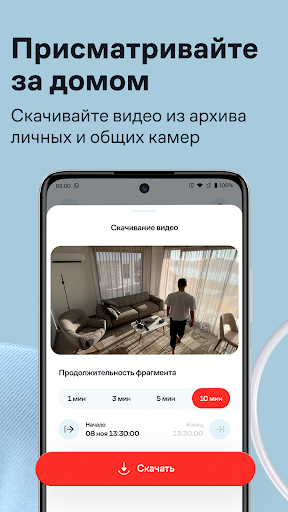
Безопасность вашего дома начинается с подъезда — контролируйте её сами, прямо на экране смартфона.
Смотрите, кто пришёл в гости, общайтесь по видеосвязи, открывайте дверь из любой точки мира и просматривайте записи с видеокамеры.
Что ещё умеет приложение? Рассказываем:
Открывайте дверь одним нажатием на экран смартфона — просто установите виджет «Умный Дом.ру».
Отвечайте на входящие видеозвонки с телефона, не используя трубку домофона. Вы можете принять вызов и пообщаться, открыть дверь или отклонить вызов.
Смотрите историю звонков — как принятых, так и отклонённых.
Будьте спокойны за свою квартиру — ваши дети не откроют дверь посторонним, ведь звонок поступит сразу на ваш телефон.
Смотрите онлайн-видео с камеры в отличном качестве — если вы паркуетесь недалеко от подъезда, то сможете присмотреть за своим автомобилем.
Узнайте, что произошло у подъезда. Камера реагирует на движения, а все события в видеоархиве отмечены специальной меткой — вам не придется просматривать весь архив.
Пользуйтесь семейным доступом — к одному домофону можно подключить сразу несколько человек.
Подключайтесь к разным адресам. Это удобно, если вы сдаёте несколько квартир или хотите отслеживать, кто звонит в домофон вашим пожилым родственникам.
Подключайте и настраивайте камеры видеонаблюдения.
Теперь приложение "Умный Дом.ру" доступно для пользователей с умными часами на Wear OS и вы сможете использовать их для управления домофоном прямо с запястья. Переходите в Google Play на ваших умных часах и скачивайте приложение!
Show more

1. Download MEmu installer and finish the setup

2. Start MEmu then open Google Play on the desktop

3. Search Умный Дом.ру in Google Play
Install
4. Download and Install Умный Дом.ру
5. On install completion click the icon to start

6. Enjoy using Умный Дом.ру on PC with MEmu
MEmu Play is the best Android emulator, and 100 million users already enjoy its superb Android app experience. Powered by advanced virtualization technology, it lets you enjoy thousands of Android apps smoothly on your PC—including the most graphics-intensive ones.
Bigger screen with better graphics; Long duration, without limitation of battery or mobile data.
Full Keymapping support for precise control of keyboard and mouse or gamepad.
Multiple game accounts or tasks on single PC at one time with Multi-Instance manager.
Use Умный Дом.ру on PC by following steps: