Lazada Grand Year End Sale 10-12 Dec
Updated
Current Version
7.99.5
Offered By

Stop worrying about high battery drain when using Lazada Grand Year End Sale 10-12 Dec on your phone. Free yourself from the tiny screen and enjoy the app on a much larger display. From now on, get a full-screen experience of your app with the convenience of a keyboard and mouse. MEmu offers you all the surprising features you’d expect: quick installation and easy setup, intuitive controls, and no more worries about battery life, mobile data, or unexpected calls. The all-new MEmu 9 is the choice for using Lazada Grand Year End Sale 10-12 Dec on your computer. With the MEmu multi-instance manager, you can run two or more accounts at the same time. Most importantly, our exclusive emulation engine unlocks your PC’s full potential, delivering smooth and enjoyable performance.
Show more
Enjoy superb experience of using Lazada Grand Year End Sale 10-12 Dec on PC with MEMU App Player. It's a powerful free Android emulator which provides you with thousands of android apps for their desktop version. Enjoy connecting with friends and polishing your work with higher efficiency! Don't miss out — The Lazada 6.
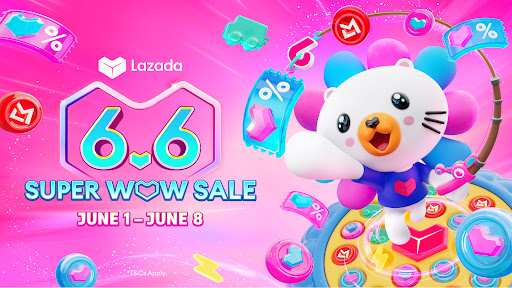

Don't miss out — The Lazada 6.6 Super Wow Sale!
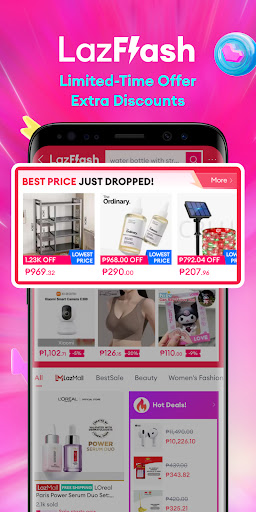
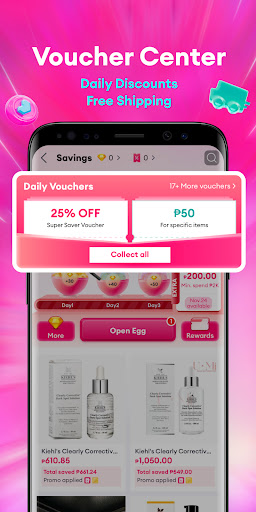
Get exclusive discounts! Limited-time price drops on LazFlash, your favorite brands on sale on LazMall, the trendiest items on LazBeauty, and enjoy FREE shipping!
NEW USERS also get special promos and discounts!
Shop now and save more with limited-time deals and offers!
Featured updates:
Free Shipping for All
Vouchers for First Orders
Exclusive LazMall Offers
Limited-time LazFlash Deals
What are you waiting for? Download the Lazada App and start shopping for the best quality deals at amazing prices! Grab your essential and favorite items with exclusive deals to make the most out of your purchase!
AUTHENTICITY GUARANTEED
LazMall – Lazada's flagship offering for branded products ensure genuine and authentic brands – sold by brands on Lazada through Brand Stores. 100% Authentic – Directly from brands to you. Enjoy 10,000+ global brands at your fingertips like Nike, Adidas, Maybelline, L'Oréal, and more.
FIRST ORDER BENEFITS
Get exclusive discount vouchers for your first purchase*. Get coins when you check in daily, and collect vouchers from Lazada and sellers every time you use the Lazada app! *T&Cs Apply
SECURE PAYMENT
Pay securely through multiple payment options;
Cash on Delivery
Secure Bank Transactions
Buy Now, Pay Later with LazPayLater
Shop now on Lazada and pay later—choose a 1-month deferral or installments over 3, 6, 9, or 12 months.
Monthly interest: 1%–5% (APR: 12%–60%).
Fees: Documentary Stamp Tax (DST) of ₱1.50 per ₱200 borrowed.
Representative Example: A ₱2,000 loan over 3 months at 5% monthly interest (60% APR) totals ₱2,315.00, including ₱300 interest and ₱15.00 DST.
APP HIGHLIGHTS
App-Exclusive Notifications for Daily Offers, Deals, & Discounts
Personalized Recommendations of Products, Categories, & Brands
Full-scale Search Filters by Category, Brand, Price, Rating, Color, and More
Customer Ratings & Reviews
Q&A for Direct Customer – Seller Interaction
Order Tracking
Fast Shipping
Log in via Facebook and Google
Sharing via Facebook, X (Twitter), Whatsapp, and more
PERSONALIZED RECOMMENDATIONS
Shopping is made easy for you. Lazada uses superior products recommendation algorithm to ensure personalized products, deals, and vouchers created just for YOU.
LAZFLASH & VOUCHERS
Shop more and save more with exclusive app-only offers, promo codes, bank vouchers, and discounts at the best prices, updated every day.
BEST CATEGORIES
Enjoy effortless online shopping and home delivery coming from a huge variety of products in electronics, sports, beauty, digital, groceries, toys, cars & motorcycles, shoes, fragrances, health, men's & women's fashion, and much more.
***Most Trusted Online Shopping Destination in Southeast Asia!***
Indonesia
Marketeers 2017 – Best WOW Brand for E-Commerce
Thailand
2016-2017 Marketeer No.1 Brand Thailand – Online Shopping
Singapore
Asia One People's Choice Awards 2015: Top 3 E-Retailers
Philippines
Readers Digest Most Trusted Brand Award 2014 – Gold Standard
Countries supported
Indonesia, Malaysia, Philippines, Singapore, Thailand, and Vietnam
*DISCLAIMER*
Recently, we've been notified of several cases where our app is promoted fraudulently by some third-party advertisers, usually in the form of site redirection, fake vouchers, and games. These types of ads are being promoted without our consent and we strictly condemn this type of behavior. If you encounter any of these issues, please help us and copy the page URL found and report it to help@lazada.com with subject AAV so that we can put an end to this.
Show more

1. Download MEmu installer and finish the setup

2. Start MEmu then open Google Play on the desktop

3. Search Lazada Grand Year End Sale 10-12 Dec in Google Play
Install
4. Download and Install Lazada Grand Year End Sale 10-12 Dec
5. On install completion click the icon to start

6. Enjoy using Lazada Grand Year End Sale 10-12 Dec on PC with MEmu
MEmu Play is the best Android emulator, and 100 million users already enjoy its superb Android app experience. Powered by advanced virtualization technology, it lets you enjoy thousands of Android apps smoothly on your PC—including the most graphics-intensive ones.
Bigger screen with better graphics; Long duration, without limitation of battery or mobile data.
Full Keymapping support for precise control of keyboard and mouse or gamepad.
Multiple game accounts or tasks on single PC at one time with Multi-Instance manager.
Use Lazada Grand Year End Sale 10-12 Dec on PC by following steps:






















![[3D Platformer] Super Bear Adventure PC](https://dl.memuplay.com/new_market/img/com.Earthkwak.Platformer.icon.2024-09-08-15-16-43.png)









