ポケカラ-Pokekara本格採点カラオケ・ミニゲームアプリ
Updated
Current Version
J
Offered By

Stop worrying about high battery drain when using ポケカラ-Pokekara本格採点カラオケ・ミニゲームアプリ on your phone. Free yourself from the tiny screen and enjoy the app on a much larger display. From now on, get a full-screen experience of your app with the convenience of a keyboard and mouse. MEmu offers you all the surprising features you’d expect: quick installation and easy setup, intuitive controls, and no more worries about battery life, mobile data, or unexpected calls. The all-new MEmu 9 is the choice for using ポケカラ-Pokekara本格採点カラオケ・ミニゲームアプリ on your computer. With the MEmu multi-instance manager, you can run two or more accounts at the same time. Most importantly, our exclusive emulation engine unlocks your PC’s full potential, delivering smooth and enjoyable performance.
Show more
Enjoy superb experience of using ポケカラ-Pokekara本格採点カラオケ・ミニゲームアプリ on PC with MEMU App Player. It's a powerful free Android emulator which provides you with thousands of android apps for their desktop version. Enjoy connecting with friends and polishing your work with higher efficiency! Pokekara is a karaoke scoring app that allows you to sing karaoke for free, allowing you to sing as much as you like without ads, from new songs to hit songs such as Vocaloid, J-POP, anime songs, hit songs, Western music, and rock.
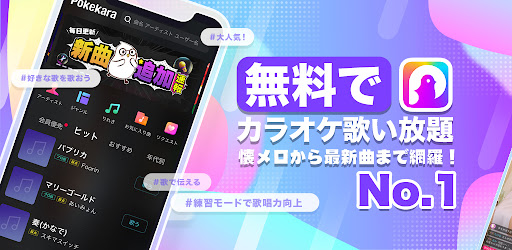
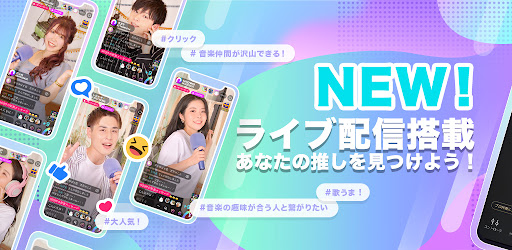
Pokekara is a karaoke scoring app that allows you to sing karaoke for free, allowing you to sing as much as you like without ads, from new songs to hit songs such as Vocaloid, J-POP, anime songs, hit songs, Western music, and rock. It also has a recording function, so you can listen to your own singing voice and improve your singing ability. In addition to having a good time here, you can also meet many music-loving friends. If you have free time, you can sing karaoke anytime and anywhere with just your smartphone!
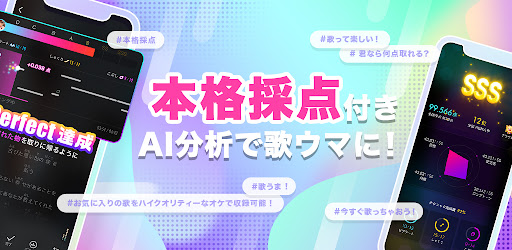
[Full-scale scoring]
Improve your singing ability with the built-in scoring function! Show off your skills in the national ranking!
[Recommended for these people! ]
*I love karaoke! I'm the type who can't help but sing anytime, anywhere!
*I want to practice karaoke! For those who aim to become an advanced karaoke expert!
*For those who want to live stream and sing and chat with everyone in real time!
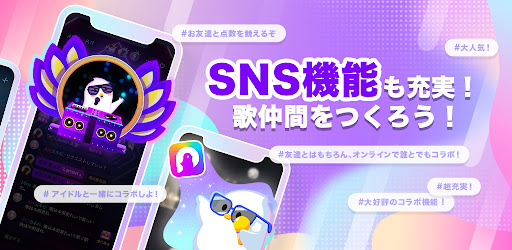
*For those who want to enjoy karaoke with others!
*I want to connect with people who have the same musical tastes!
*People who are confident in their singing ability and want to rise to the top of the rankings!
*I want to listen to karaoke by people who sing well!
*I want to meet various people while playing games and enjoy karaoke even more!
[Function introduction]
*Sing as much as you like, from the latest hits to Vocaloid, anime songs, and nostalgic melodies!
*Authentic scoring system! Cool scoring video! Not only pitch, but also stability, intonation, long tone, and technique can be analyzed and scored! Show your skills here!
*Let's sing together in the same space with everyone! Create a room like a karaoke box and have fun singing and chatting with everyone!
*There are many ways to play! In addition to Hitokara, you can enjoy karaoke with others through live streaming, Poke match lyrics games, and request functions!
* Sharpen your skills in practice mode! Turn on practice mode and sing repeatedly to improve your singing skills!
*Various voice effects! Color your singing voice with just one touch, such as "Pop", "Rock", "Tokidori", and "R&B"!
*Create a unique MV video! After recording is finished, you can create a unique video with your favorite photos! Upload local videos easily!
*Throw free items at your favorite works, talk via DM, and have fun together!
*Share your creations to your friends on Twitter, Facebook, and Line! Find your favorite music friends within the app!
[Pokekara Premium Member]
You can enjoy karaoke even more with member-exclusive features such as live streaming, professional accompaniment, new song flags, color comments, limited icon frames, limited effects, pin fixing, etc. Participation is voluntary.
[About Pokekara Premium membership automatic renewal option]
1.1 month automatic renewal plan
--Contract period: 1 month
--Price: 780 yen (tax included)
2.3-month automatic renewal plan
--Contract period: 3 months
--Price: 2200 yen (tax included)
3. Annual automatic renewal plan
--Contract period: one year
--Price: 7500 yen (tax included)
4.Student discount plan
--Contract period: 1 month
--Price: 480 yen (tax included)
4.Others
---Payment: After confirming your purchase, payment will be made from your Google Account.
---Automatic renewal: Your membership will be automatically renewed in your Google account within 24 hours of expiration. It will be automatically renewed unless you cancel automatic renewal at least 24 hours before the expiration date.
---For canceling auto-renewal: Open Google Play Store and tap Menu icon -> Subscriptions. You can cancel by selecting Pokekara, tapping Cancel Subscription, and following the on-screen instructions.
--Pokekara VIP Service Terms of Use:
https://www.pokekara.com/static/online/privacy_vip.html
--Pokekara Terms of Use:
https://www.pokekara.com/static/online/user_agreement.html?screen_id=user_agreement
--privacy policy:
https://www.pokekara.com/static/online/privacy.html?screen_id=privacy
[Copyright license number]
Jasrac:
Video posting permission number: 9018110006Y45122
Karaoke distribution license number: 9018110005Y58350
Nextone:
License number: ID000007927
Follow us to get the latest information on Pokekara!
Official Twitter: @pokekara_jp
Official Instagram: @pokekara_jp
Show more

1. Download MEmu installer and finish the setup

2. Start MEmu then open Google Play on the desktop

3. Search ポケカラ-Pokekara本格採点カラオケ・ミニゲームアプリ in Google Play
Install
4. Download and Install ポケカラ-Pokekara本格採点カラオケ・ミニゲームアプリ
5. On install completion click the icon to start

6. Enjoy using ポケカラ-Pokekara本格採点カラオケ・ミニゲームアプリ on PC with MEmu
MEmu Play is the best Android emulator, and 100 million users already enjoy its superb Android app experience. Powered by advanced virtualization technology, it lets you enjoy thousands of Android apps smoothly on your PC—including the most graphics-intensive ones.
Bigger screen with better graphics; Long duration, without limitation of battery or mobile data.
Full Keymapping support for precise control of keyboard and mouse or gamepad.
Multiple game accounts or tasks on single PC at one time with Multi-Instance manager.
Use ポケカラ-Pokekara本格採点カラオケ・ミニゲームアプリ on PC by following steps: