ГдеБЕНЗ
Updated
Current Version
1.0.0
Offered By

Stop worrying about high battery drain when using ГдеБЕНЗ on your phone. Free yourself from the tiny screen and enjoy the app on a much larger display. From now on, get a full-screen experience of your app with the convenience of a keyboard and mouse. MEmu offers you all the surprising features you’d expect: quick installation and easy setup, intuitive controls, and no more worries about battery life, mobile data, or unexpected calls. The all-new MEmu 9 is the choice for using ГдеБЕНЗ on your computer. With the MEmu multi-instance manager, you can run two or more accounts at the same time. Most importantly, our exclusive emulation engine unlocks your PC’s full potential, delivering smooth and enjoyable performance.
Show more
Enjoy superb experience of using ГдеБЕНЗ on PC with MEMU App Player. It's a powerful free Android emulator which provides you with thousands of android apps for their desktop version. Enjoy connecting with friends and polishing your work with higher efficiency! ГдеБЕНЗ — приложение для просмотра карты АЗС, статусов топлива и ближайших заправок в Москве.
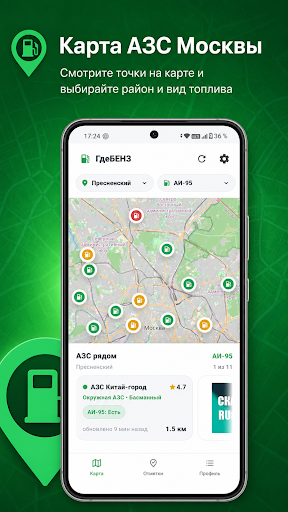
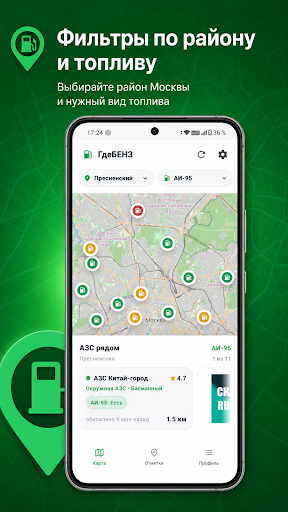
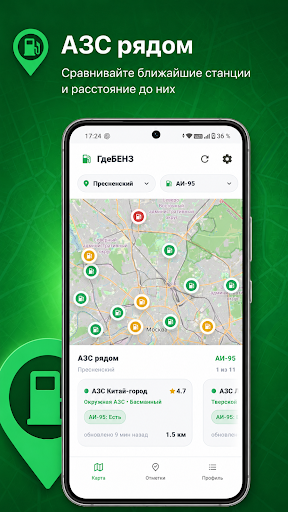
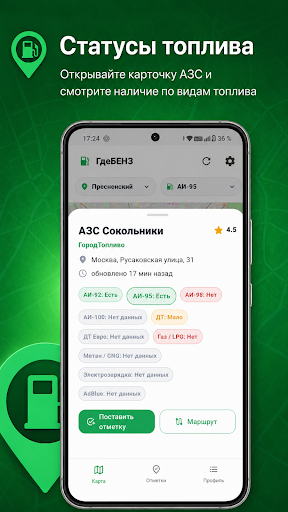
ГдеБЕНЗ — приложение для просмотра карты АЗС, статусов топлива и ближайших заправок в Москве.
Приложение помогает быстро открыть карту, выбрать район, выбрать нужный вид топлива и посмотреть карточки АЗС рядом. В карточках отображаются статусы топлива, отметки, рейтинг, время обновления и быстрый переход к маршруту.
Основные возможности:
• карта АЗС;
• выбор района;
• выбор вида топлива;
• карточки ближайших заправок;
• статусы топлива;
• пользовательские отметки;
• построение маршрута до выбранной АЗС;
• настройки приложения;
• режим демонстрации данных;
• рекламные и промо-блоки.
В приложении можно выбрать нужный тип топлива и быстро посмотреть доступные точки на карте. Карточки АЗС помогают оценить ситуацию по выбранной заправке и перейти к маршруту через внешние карты.
Отказ от ответственности:
ГдеБЕНЗ не является официальным сервисом АЗС, топливных компаний, государственных органов или картографических сервисов. Информация о наличии топлива, статусах АЗС, рейтингах и отметках может быть демонстрационной, неполной, устаревшей или неточной. Приложение не гарантирует наличие топлива на конкретной АЗС. Перед поездкой пользователь самостоятельно принимает решение и несёт ответственность за проверку актуальности информации.
Конфиденциальность:
Приложение не требует регистрации и не создаёт аккаунт. Часть настроек и отметок может храниться локально на устройстве пользователя. Для показа рекламы используются рекламные блоки Яндекса / РСЯ. Подробнее см. Политику конфиденциальности.
Show more

1. Download MEmu installer and finish the setup

2. Start MEmu then open Google Play on the desktop

3. Search ГдеБЕНЗ in Google Play
Install
4. Download and Install ГдеБЕНЗ
5. On install completion click the icon to start

6. Enjoy using ГдеБЕНЗ on PC with MEmu
MEmu Play is the best Android emulator, and 100 million users already enjoy its superb Android app experience. Powered by advanced virtualization technology, it lets you enjoy thousands of Android apps smoothly on your PC—including the most graphics-intensive ones.
Bigger screen with better graphics; Long duration, without limitation of battery or mobile data.
Full Keymapping support for precise control of keyboard and mouse or gamepad.
Multiple game accounts or tasks on single PC at one time with Multi-Instance manager.
Use ГдеБЕНЗ on PC by following steps: