
Joyread
Updated
Current Version
3.16.1
Offered By

Stop worrying about high battery drain when using Joyread on your phone. Free yourself from the tiny screen and enjoy the app on a much larger display. From now on, get a full-screen experience of your app with the convenience of a keyboard and mouse. MEmu offers you all the surprising features you’d expect: quick installation and easy setup, intuitive controls, and no more worries about battery life, mobile data, or unexpected calls. The all-new MEmu 9 is the choice for using Joyread on your computer. With the MEmu multi-instance manager, you can run two or more accounts at the same time. Most importantly, our exclusive emulation engine unlocks your PC’s full potential, delivering smooth and enjoyable performance.
Show more
Enjoy superb experience of using Joyread on PC with MEMU App Player. It's a powerful free Android emulator which provides you with thousands of android apps for their desktop version. Enjoy connecting with friends and polishing your work with higher efficiency! Don't miss the hit novels and captivating stories on Joyread - your premium reading paradise!
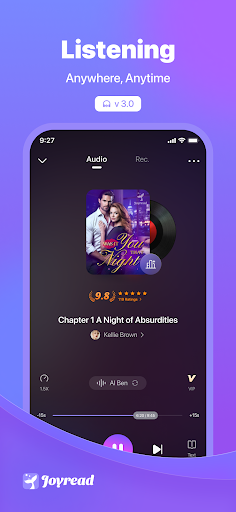



Don't miss the hit novels and captivating stories on Joyread - your premium reading paradise! Escape into fantastical realms with our extensive Fantasy collection, or indulge in heart-fluttering Romance tales. Joyread brings the best in storytelling across genres to novel lovers worldwide. Discover unforgettable reading experiences and unlock a world of literary adventures. Download Joyread now and immerse yourself in extraordinary narratives!
Why Joyread?
1. With abundant hot online novels, Joyread is the best choice for you to wander in a world of fiction!
2. You can always find your favorites in our plentiful stories!
3. With personalized reading recommendations & quick updates for new arrivals, you will have a great experience in following ongoing stories~
4. Your reading journey starts with a simple swipe, in an easy & comfortable way
5. Free stories as many as you want~
Genres
Joyread has all kinds of books loved and embraced by our readers, from Romance with CEOs to Fantasy to Paranormal.
We have:
1. Romance
2. Fantasy
3. LGBTQ+
4. Werewolf & vampire
5. Billionaire
6. Action and Adventure
...
Find more interesting and fascinating stories on Joyread and start your reading journey right now!
Top Picks
1. Editor's Picks - our latest hits, which are so excellent that you don't want to miss
2. Ranking - our most popular books/ trending new arrivals. There will away be one which is for your taste
3. Features - stay up-to-date on our hit genres, help you find your dream fictions
4. Selected Genre - genres most favored by our readers, give it a try when you don't know which story to read
5. Trending Tags - Billionaire, Werewolf & Vampire, Alpha, Mafia... Waiting for you to find more!
Read With Ease
1. Personalized page-turning setting: sroll, flip or slide the pages as you want
2. Eye-caring mode: personalized background color will never let your read become dull
3. Font size setting: big or small, all at your disposal
4. Reading model: Daytime Mode and Night Mode for you to choose,you can enjoy an easy read at any time
5. Build Your Own Library: enjoy your favorites in your own world
Joyread VIP
1. Coins and Pearls are available everyday
2. Join a VIP group for Exclusive Pearls
3. Double free chances for Lucky Draw
4. Special Profile Picture Frame
5. Price:$9.99/ month,$19.99/ month,$29.99/ month, $49.99/ quarter (three months)
6. The subscription will be made automatically and can be canceled at any time.
7. Privacy policy: https://www.joyreadings.com/privacy_policy_en.html
8. Terms of use: https://www.joyreadings.com/user_agreement_en.html
Join Joyread, more benefits and functions waiting for you in the near future!
Show more

1. Download MEmu installer and finish the setup

2. Start MEmu then open Google Play on the desktop

3. Search Joyread in Google Play
Install
4. Download and Install Joyread
5. On install completion click the icon to start

6. Enjoy using Joyread on PC with MEmu
MEmu Play is the best Android emulator, and 100 million users already enjoy its superb Android app experience. Powered by advanced virtualization technology, it lets you enjoy thousands of Android apps smoothly on your PC—including the most graphics-intensive ones.
Bigger screen with better graphics; Long duration, without limitation of battery or mobile data.
Full Keymapping support for precise control of keyboard and mouse or gamepad.
Multiple game accounts or tasks on single PC at one time with Multi-Instance manager.
Use Joyread on PC by following steps: