
DayVideo HD Player
Updated
Current Version
1.1.0
Offered By

Stop worrying about high battery drain when using DayVideo HD Player on your phone. Free yourself from the tiny screen and enjoy the app on a much larger display. From now on, get a full-screen experience of your app with the convenience of a keyboard and mouse. MEmu offers you all the surprising features you’d expect: quick installation and easy setup, intuitive controls, and no more worries about battery life, mobile data, or unexpected calls. The all-new MEmu 9 is the choice for using DayVideo HD Player on your computer. With the MEmu multi-instance manager, you can run two or more accounts at the same time. Most importantly, our exclusive emulation engine unlocks your PC’s full potential, delivering smooth and enjoyable performance.
Show more
Enjoy superb experience of using DayVideo HD Player on PC with MEMU App Player. It's a powerful free Android emulator which provides you with thousands of android apps for their desktop version. Enjoy connecting with friends and polishing your work with higher efficiency! Are you a movie enthusiast looking for an elegant way to organize and enjoy your personal film collection?
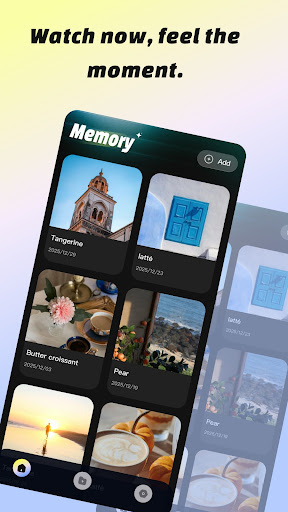
Are you a movie enthusiast looking for an elegant way to organize and enjoy your personal film collection? DayVideo rebuilds your media viewing experience with a minimalist design, turning your local device into a beautifully organized digital theater.
Whether you are managing your favorite cinematic masterpieces, daily vlogs, or personal recordings, DayVideo optimizes your content management with precise tag classification and stunning visual layouts.
Key Features:
Your Private Cinema Gallery
Say goodbye to messy file folders. The homepage features a sleek, card-based layout that abandons redundant elements. It presents all your video content intuitively and orderly—just like browsing a premium movie catalog. No complicated operations required; your target film or video is just a glance away.
Precise Genre & Tag Classification
Organize your media library like a pro. Use our precise tag classification to sort your videos. Create custom tags for your favorite genres—whether it's an action-packed blockbuster, a mind-bending sci-fi, a heartwarming indie film, or simply your family memories. Finding the right mood for your movie night has never been easier.
Cinematic Covers & Custom Metadata
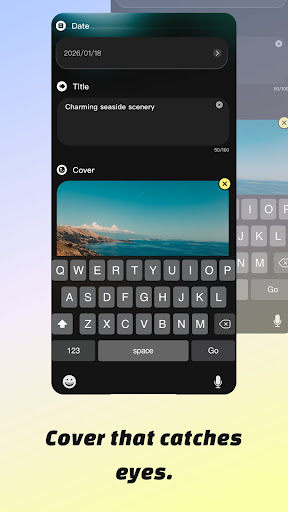
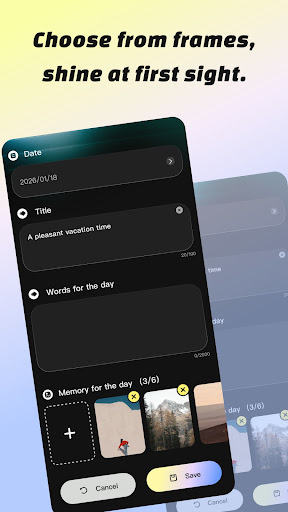
Every great movie deserves a great poster. Each video in DayVideo can be paired with a carefully framed, stunning cover that accurately captures the highlight moments of the footage. Combined with the free-editable video name and date function, you can easily log movie titles, release years, or your personal watch dates. Key information is clearly displayed at a glance, making media management a breeze.
HD Playback Technology
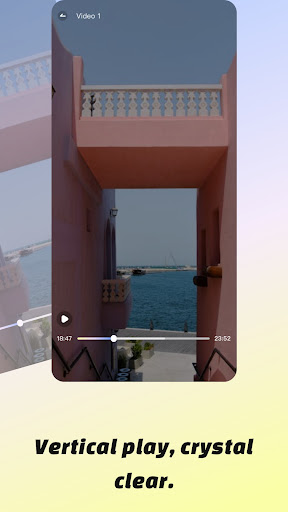
Experience stunning visual clarity for all your media files. Equipped with HD decoding technology, it restores ultra-clear image quality for video playback, with every subtle detail of the frame vividly presented.
Smooth & Seamless Playback
Enjoy your videos without interruption. What’s more, it supports lag-free and stutter-free playback throughout, delivering a smooth and seamless viewing experience that meets all your daily needs for video playback and management.
Download DayVideo today, organize your local film collection, and enjoy the ultimate HD viewing experience right in the palm of your hand!
Show more

1. Download MEmu installer and finish the setup

2. Start MEmu then open Google Play on the desktop

3. Search DayVideo HD Player in Google Play
Install
4. Download and Install DayVideo HD Player
5. On install completion click the icon to start

6. Enjoy using DayVideo HD Player on PC with MEmu
MEmu Play is the best Android emulator, and 100 million users already enjoy its superb Android app experience. Powered by advanced virtualization technology, it lets you enjoy thousands of Android apps smoothly on your PC—including the most graphics-intensive ones.
Bigger screen with better graphics; Long duration, without limitation of battery or mobile data.
Full Keymapping support for precise control of keyboard and mouse or gamepad.
Multiple game accounts or tasks on single PC at one time with Multi-Instance manager.
Use DayVideo HD Player on PC by following steps: