
Delimobil. Your carsharing
Updated
Current Version
9.5.0, build 65df66ff
Offered By

Stop worrying about high battery drain when using Delimobil. Your carsharing on your phone. Free yourself from the tiny screen and enjoy the app on a much larger display. From now on, get a full-screen experience of your app with the convenience of a keyboard and mouse. MEmu offers you all the surprising features you’d expect: quick installation and easy setup, intuitive controls, and no more worries about battery life, mobile data, or unexpected calls. The all-new MEmu 9 is the choice for using Delimobil. Your carsharing on your computer. With the MEmu multi-instance manager, you can run two or more accounts at the same time. Most importantly, our exclusive emulation engine unlocks your PC’s full potential, delivering smooth and enjoyable performance.
Show more
Enjoy superb experience of using Delimobil. Your carsharing on PC with MEMU App Player. It's a powerful free Android emulator which provides you with thousands of android apps for their desktop version. Enjoy connecting with friends and polishing your work with higher efficiency! Delimobil is a convenient carsharing for the city.
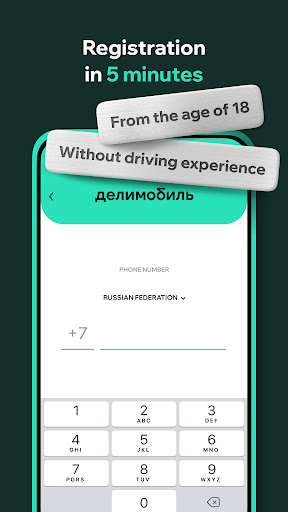
Delimobil is a convenient carsharing for the city. Carsharing is cars that can be rented through the app for a minute, hour, or day. Suitable for drivers over 18 years old, you will need a passport and driving license to sign up.
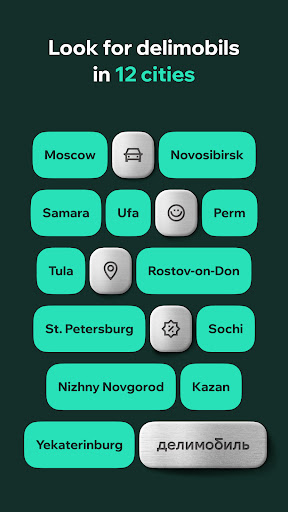
Our cars are already available in Moscow, St. Petersburg, Yekaterinburg, Kazan, Nizhny Novgorod, Novosibirsk, Rostov-on-Don, Samara, Tula, Sochi, Ufa and Perm.
Here's how it works
You open the app, choose the nearest car and go where you want. Then you park and lock the car from your smartphone. And the cost of the rent is deducted from the card.
What's especially good
Minimum driving experience
Let our cars be your first cars. Continue to practice after obtaining rights to maintain your skills. We know how important this is.
Personal price
The cost of a minute depends on how you behave while driving. If you drive carefully, the price will be lower.
Business access
Cars like BMW, Audi, and Mercedes-Benz open up to good drivers, regardless of the numbers in the passport and license. We hope you are one of those.
Ability to travel
Wherever you are planning to go, you can most likely get there by a delimobil. And if you are going to travel around the country, you will meet our cars in 12 cities.
What's just good
Independence
It is easier to have a lot of delimobils than to buy just one of your own cars. They do not need to be refueled, washed, repaired, and you do not need to pay for anything other than driving time.
Impressions
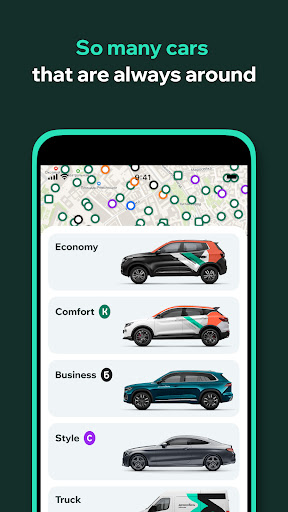
Trying different cars all the time is very exciting. Where do you want to start: with popular models like the Volkswagen Polo, BMW 3, Mercedes-Benz E-class or with the rather exclusive Fiat 500, MINI Cooper, Kia Stinger?
Saving
We have especially thought out a lot of tariffs so that every trip is profitable. With no exceptions.
When you download the app, we ask you to go through a simple registration. Leave your phone number, email and take a photo of two documents: passport and license.
You can rest assured that the data is encrypted and stored securely with us. And documents are needed only to draw up a contract at a distance and check whether you can drive.
Show more

1. Download MEmu installer and finish the setup

2. Start MEmu then open Google Play on the desktop

3. Search Delimobil. Your carsharing in Google Play
Install
4. Download and Install Delimobil. Your carsharing
5. On install completion click the icon to start

6. Enjoy using Delimobil. Your carsharing on PC with MEmu
MEmu Play is the best Android emulator, and 100 million users already enjoy its superb Android app experience. Powered by advanced virtualization technology, it lets you enjoy thousands of Android apps smoothly on your PC—including the most graphics-intensive ones.
Bigger screen with better graphics; Long duration, without limitation of battery or mobile data.
Full Keymapping support for precise control of keyboard and mouse or gamepad.
Multiple game accounts or tasks on single PC at one time with Multi-Instance manager.
Use Delimobil. Your carsharing on PC by following steps: