eNetViet
Updated
Current Version
J
Offered By

Stop worrying about high battery drain when using eNetViet on your phone. Free yourself from the tiny screen and enjoy the app on a much larger display. From now on, get a full-screen experience of your app with the convenience of a keyboard and mouse. MEmu offers you all the surprising features you’d expect: quick installation and easy setup, intuitive controls, and no more worries about battery life, mobile data, or unexpected calls. The all-new MEmu 9 is the choice for using eNetViet on your computer. With the MEmu multi-instance manager, you can run two or more accounts at the same time. Most importantly, our exclusive emulation engine unlocks your PC’s full potential, delivering smooth and enjoyable performance.
Show more
Enjoy superb experience of using eNetViet on PC with MEMU App Player. It's a powerful free Android emulator which provides you with thousands of android apps for their desktop version. Enjoy connecting with friends and polishing your work with higher efficiency! eNetViet is an online application that helps connect Families and Schools, supporting the communication and administration work of the Department of Education and Training, the Department of Education and Training, the School Board of Directors and the professional work of teachers and staff in schools.
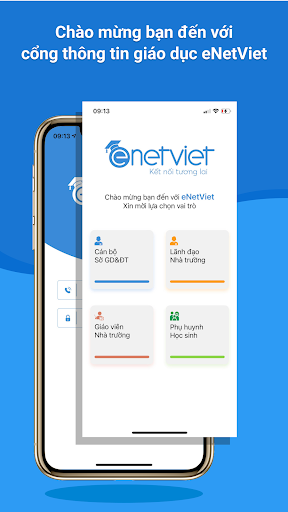
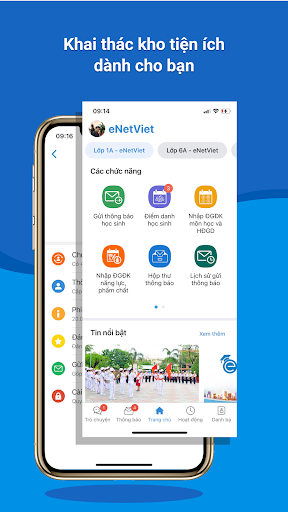
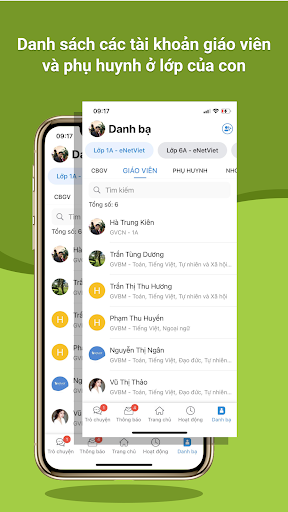
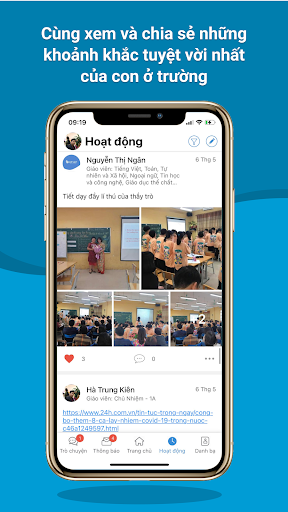
eNetViet is an online application that helps connect Families and Schools, supporting the communication and administration work of the Department of Education and Training, the Department of Education and Training, the School Board of Directors and the professional work of teachers and staff in schools. .
eNetViet is a mobile version of School Management software - suitable for the following subjects: Managers, Teachers, Parents, opening all levels of education: from Preschool to High School.
To use this product, teachers and parents of the school must be using the school management software provided by the Company. At that time, the school will give each teacher and parent an account to track their child's information.
eNetViet application provides information:
1. For Managers:
- Look up Online Contacts.
- Send/Receive notifications, operating information.
- Send/Receive, Look up real-time reports and statistics for management.
- Online attendance at meetings and conferences using QR code.
2. For school teachers:
- Input data, daily comments and other data from school management software.
- Connect with parents through sending/receiving notifications, responding via text messages, multimedia messages, and online chat on the application.
- Post and share meaningful images and activities of the school, class and beloved students to create a cohesive community.
- Post announcements about class schedules, review plans, and exam schedules; Share knowledge and skills education experiences for students with parents.
- Submit study plan documents to parents.
- Conduct attendance, approve online leave applications and keep attendance statistics for students.
3. For Parents:
- Connect and chat with teachers in school/class.
- Please take a break from online school for your child.
- Track your child's online attendance in class each day and each class period.
- Grasp your child's schedule, study plan, daily meal menu...
- Receive online announcements and news from the School.
- Send/receive files and homework from students.
- Look up your child's learning and training results online.
- Feel and save the images and wonderful moments of your child at school.
Show more

1. Download MEmu installer and finish the setup

2. Start MEmu then open Google Play on the desktop

3. Search eNetViet in Google Play
Install
4. Download and Install eNetViet
5. On install completion click the icon to start

6. Enjoy using eNetViet on PC with MEmu
MEmu Play is the best Android emulator, and 100 million users already enjoy its superb Android app experience. Powered by advanced virtualization technology, it lets you enjoy thousands of Android apps smoothly on your PC—including the most graphics-intensive ones.
Bigger screen with better graphics; Long duration, without limitation of battery or mobile data.
Full Keymapping support for precise control of keyboard and mouse or gamepad.
Multiple game accounts or tasks on single PC at one time with Multi-Instance manager.
Use eNetViet on PC by following steps: