Fonts - Logo Maker
Updated
Current Version
191
Offered By

Stop worrying about high battery drain when using Fonts - Logo Maker on your phone. Free yourself from the tiny screen and enjoy the app on a much larger display. From now on, get a full-screen experience of your app with the convenience of a keyboard and mouse. MEmu offers you all the surprising features you’d expect: quick installation and easy setup, intuitive controls, and no more worries about battery life, mobile data, or unexpected calls. The all-new MEmu 9 is the choice for using Fonts - Logo Maker on your computer. With the MEmu multi-instance manager, you can run two or more accounts at the same time. Most importantly, our exclusive emulation engine unlocks your PC’s full potential, delivering smooth and enjoyable performance.
Show more
Enjoy superb experience of using Fonts - Logo Maker on PC with MEMU App Player. It's a powerful free Android emulator which provides you with thousands of android apps for their desktop version. Enjoy connecting with friends and polishing your work with higher efficiency! Logo design has never been easier on your mobile.
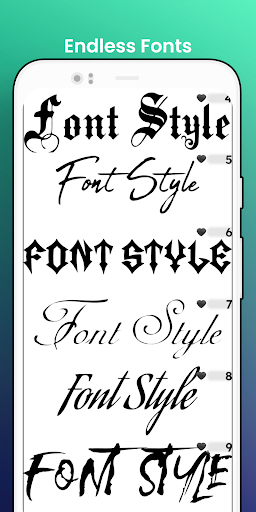
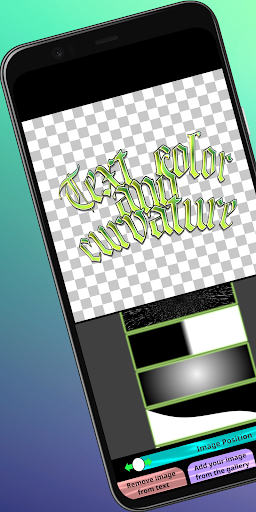
Logo design has never been easier on your mobile.
With a wide selection of calligraphy logo fonts and vast word art options, the user can now make his own business name in minutes.
We have delivered a simple and elegant font application user interface that does not obstruct your creative flow.
Simply by sliding your finger across the screen you can customize your next social media logo, poster, business card logo, or brand name.
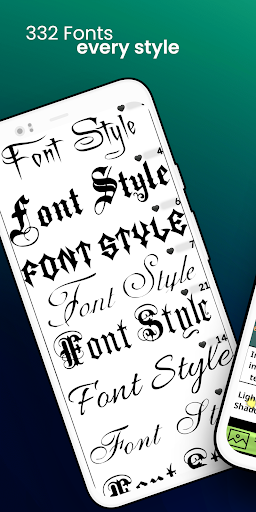
With this logo creator app, you can design a logo with over 250 handwritten fonts and text art textures.
Features:
•250+ Beautiful typefaces you can combine with text effects for customizable original logo typography, our new fonts will make your creativity flow
•Every style of logo font is covered such as tattoo, script, handwritten, etc.
•A logo designer app made for Facebook covers, Twitter posts, Pinterest graphics, posters, flyers, social media graphics
•You can export your name logo in 3K resolution with transparent background if you wish so that you can add text to photos
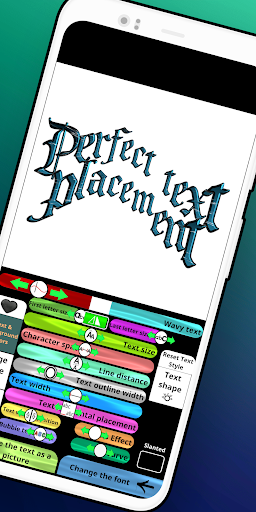
•Bend text to adapt the best logo design
•Add text art textures for colorful text. This feature is perfect for blog logo and website logo
• High-resolution font sampling technology ensures accurate cool logo designs
•Variable outline text option allows professional logo makers to adjust their own logos as they please. The text outline option is available for all font styles
•Letter space adjustment and line height adjustment gives you the ultimate control over the final text image
•A special wave font effect slider allows for fine text editing so that you can have an original font logo image not seen elsewhere
Your next business name art maker with the most advanced logo editing tools is here for you to make logo. But wait!
This lettering app is not a simple logo generator!
You can also find many different uses such as
•Designing a text tattoo
•Calligraphy font paper tracing
•Make book covers
•Design better graphics for your company brands
It is such a convenient little text designer for word art. We have selected only the most beautiful fonts for all your text lettering design needs.
We have genuinely tried to make the easiest-to-use text logo designing software out there.
Try it and create your own text logo in minutes with free fonts.
Show more

1. Download MEmu installer and finish the setup

2. Start MEmu then open Google Play on the desktop

3. Search Fonts - Logo Maker in Google Play
Install
4. Download and Install Fonts - Logo Maker
5. On install completion click the icon to start

6. Enjoy using Fonts - Logo Maker on PC with MEmu
MEmu Play is the best Android emulator, and 100 million users already enjoy its superb Android app experience. Powered by advanced virtualization technology, it lets you enjoy thousands of Android apps smoothly on your PC—including the most graphics-intensive ones.
Bigger screen with better graphics; Long duration, without limitation of battery or mobile data.
Full Keymapping support for precise control of keyboard and mouse or gamepad.
Multiple game accounts or tasks on single PC at one time with Multi-Instance manager.
Use Fonts - Logo Maker on PC by following steps: