Happiest Baby, makers of SNOO
Updated
Current Version
2.1.8
Offered By

Stop worrying about high battery drain when using Happiest Baby, makers of SNOO on your phone. Free yourself from the tiny screen and enjoy the app on a much larger display. From now on, get a full-screen experience of your app with the convenience of a keyboard and mouse. MEmu offers you all the surprising features you’d expect: quick installation and easy setup, intuitive controls, and no more worries about battery life, mobile data, or unexpected calls. The all-new MEmu 9 is the choice for using Happiest Baby, makers of SNOO on your computer. With the MEmu multi-instance manager, you can run two or more accounts at the same time. Most importantly, our exclusive emulation engine unlocks your PC’s full potential, delivering smooth and enjoyable performance.
Show more
Enjoy superb experience of using Happiest Baby, makers of SNOO on PC with MEMU App Player. It's a powerful free Android emulator which provides you with thousands of android apps for their desktop version. Enjoy connecting with friends and polishing your work with higher efficiency! The Happiest Baby App is the mobile companion to your Happiest Baby devices.
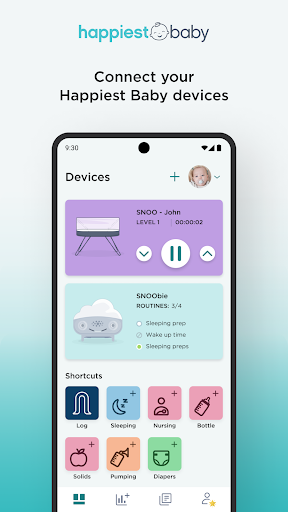
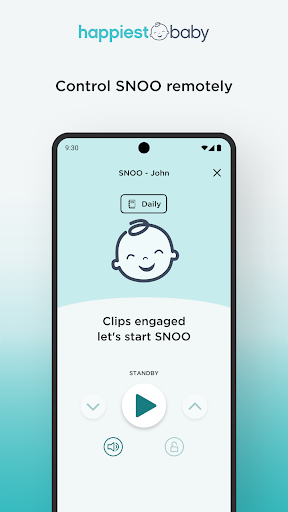
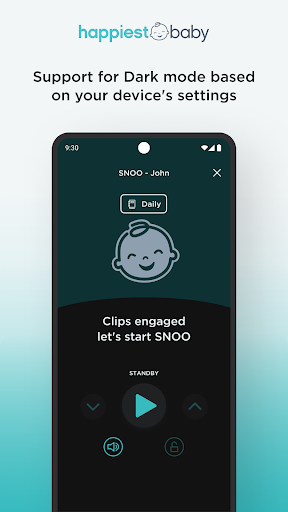
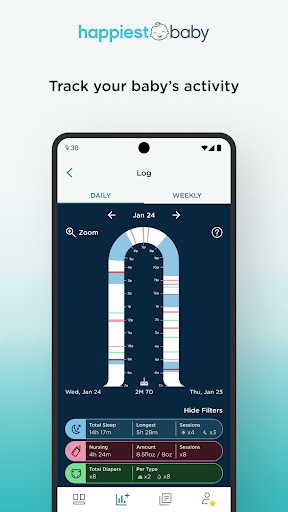
The Happiest Baby App is the mobile companion to your Happiest Baby devices. This includes SNOO Smart Sleeper—a safer and more effective baby bed—and SNOObie Smart Soother—the sound machine, nightlight, and sleep trainer.
Created by Dr. Harvey Karp, renowned pediatrician and sleep expert, SNOO intelligently responds to your baby’s needs and, within just days, helps the whole family get more sleep. It calms crying and boosts sleep with the rhythmic sound and motion that babies find so soothing in the womb.
SNOObie is an all-in-one white noise machine and nightlight system! It helps settle your sweetie, keep scaries at bay, teach calming breathing, and create easy-peasy sleep routines. This portable bedtime buddy features customizable nightlight colors and special soothing sounds.
SNOO Features:
SNOO Log: Tracks your baby's sleep every day...automatically.
Alerts: Lets you know if your baby needs more than SNOO's soothing (due to hunger or discomfort).
Remote Control: You can quickly respond to your baby's needs by adjusting SNOO’s levels up and down.
Customize: Pick the best motion and white noise settings for your baby.
Adapt: Lets you boost the level of rhythmic sensation—like riding in a car all night (reduces sleep disruptions from stuffy noses, growth spurts, sleep regressions, teething, etc.)
Easy Weaning: Special setting helps babies learn to sleep without motion, to prepare for moving to a crib.
SNOObie Features:
Connect and have fun with your SNOObie routines! Choose your favorite SNOObie light + sound cues to create up to 4 routines at a time that fit your family. To create a routine, pick your preferred light color, sound, time, and day(s) of the week. Once you save the routine, set it by tapping your device to SNOObie, and your routine will be ready to play when the scheduled day and time arrives.
A Wi-Fi® connection is required to connect the App to your Happiest Baby products. An NFC-enabled device is required to connect the App to SNOObie. For more info, visit HappiestBaby.com or connect with us at customercare@happiestbaby.com if you have any questions!
Show more

1. Download MEmu installer and finish the setup

2. Start MEmu then open Google Play on the desktop

3. Search Happiest Baby, makers of SNOO in Google Play
Install
4. Download and Install Happiest Baby, makers of SNOO
5. On install completion click the icon to start

6. Enjoy using Happiest Baby, makers of SNOO on PC with MEmu
MEmu Play is the best Android emulator, and 100 million users already enjoy its superb Android app experience. Powered by advanced virtualization technology, it lets you enjoy thousands of Android apps smoothly on your PC—including the most graphics-intensive ones.
Bigger screen with better graphics; Long duration, without limitation of battery or mobile data.
Full Keymapping support for precise control of keyboard and mouse or gamepad.
Multiple game accounts or tasks on single PC at one time with Multi-Instance manager.
Use Happiest Baby, makers of SNOO on PC by following steps: