iLMeteo: weather forecast
Updated
Current Version
1734030123
Offered By

Stop worrying about high battery drain when using iLMeteo: weather forecast on your phone. Free yourself from the tiny screen and enjoy the app on a much larger display. From now on, get a full-screen experience of your app with the convenience of a keyboard and mouse. MEmu offers you all the surprising features you’d expect: quick installation and easy setup, intuitive controls, and no more worries about battery life, mobile data, or unexpected calls. The all-new MEmu 9 is the choice for using iLMeteo: weather forecast on your computer. With the MEmu multi-instance manager, you can run two or more accounts at the same time. Most importantly, our exclusive emulation engine unlocks your PC’s full potential, delivering smooth and enjoyable performance.
Show more
Enjoy superb experience of using iLMeteo: weather forecast on PC with MEMU App Player. It's a powerful free Android emulator which provides you with thousands of android apps for their desktop version. Enjoy connecting with friends and polishing your work with higher efficiency! From now on, it will be enough to take a look at our radar, forecasts and Protezione Civile alerts to know with accuracy and certainty what the weather will be like.
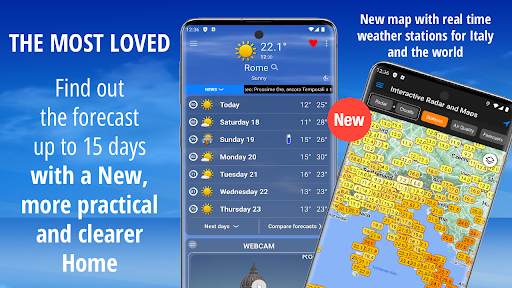
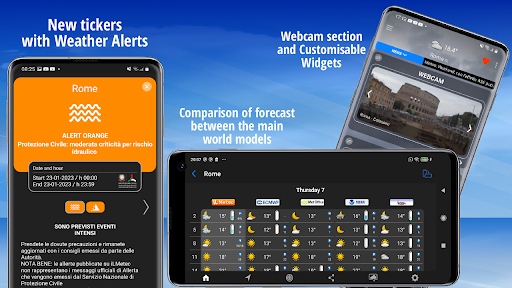
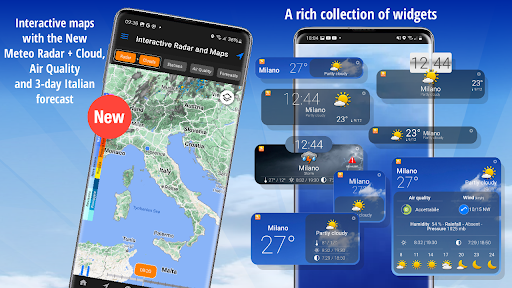
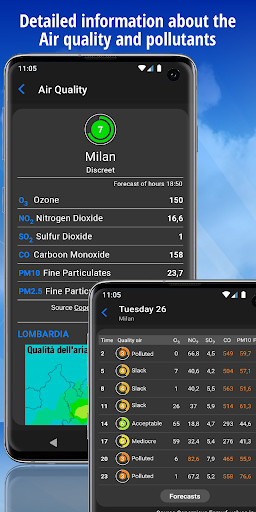
From now on, it will be enough to take a look at our radar, forecasts and Protezione Civile alerts to know with accuracy and certainty what the weather will be like.
Maximum reliability and accuracy thanks to the new "Compare Forecasts" feature with which you can compare iLMeteo forecasts with the main world models.
Our reliable and precise weather forecasts, thanks to the Nowcasting technique, are perfect to plan and enjoy your day, without being surprised by sudden weather changes. Thanks to the metheograms and the new webcams, details about sea, wind, air quality, radar and customizable widget, the app iLMeteo will provide you with all the information you look for and you will be never surprised by weather changes.
In a nutshell:
-Weather forecast for all the world, especially for Europe and Italy (in Italian).
-Current conditions and forecasts for next days with hourly details.
-Thousands of locations available, from big cities to small villages.
-High precision forecast for sea and wind, a “must” for sailors, surfers and beach tourists.
Reports, news and advertising:
- In case of wrong weather forecast, we invite you to contact us at android@ilmeteo.it, indicating the name of the city and the day of the forecast; in this way, we will be able to verify the forecast and improve it for the future.
- It is possible to disable the news on the “Setting” menu
- To get rid of the advertising, it is possible to download the app iLMeteo Plus, directly from the Google Play Store
You can watch forecast for Italy and all World and specifically:
-weather forecasts for all Italian municipalities and hundreds touristic places
-weather forecasts for thousand European and International cities
-updated weather news for Italy and World via our meteo newspaper
-snow forecast and information about sky tracks for mountains municipalities
-sea and wind forecast for Italian and Mediterranean sea sectors
-detailed forecasts about sea and wind for seaside places and for surfers (waves period)
-video and webcam forecast
-real-time warning with picture and videos from users
Innovative functions:
- widgets and webcam section
- air quality index with interactive details on pollutants
- interactive weather radar
- metheograms
- satellite images
Other services:
- traffic information
- weather animated video backgrounds
- widget to customize your home screen
- dark Mode per la gestione dell'aspetto dell'applicazione (light o dark) all'interno del menù Impostazioni
The app can determine your position and allow you to save your favorite locations and seas.
* IMPORTANT
The circle symbol on the left of the forecast, indicate the reliability of the forecast for a given day in percentage. The red color means low reliability.
Privacy policy available at https://www.ilmeteo.it/portale/privacy/
Show more

1. Download MEmu installer and finish the setup

2. Start MEmu then open Google Play on the desktop

3. Search iLMeteo: weather forecast in Google Play
Install
4. Download and Install iLMeteo: weather forecast
5. On install completion click the icon to start

6. Enjoy using iLMeteo: weather forecast on PC with MEmu
MEmu Play is the best Android emulator, and 100 million users already enjoy its superb Android app experience. Powered by advanced virtualization technology, it lets you enjoy thousands of Android apps smoothly on your PC—including the most graphics-intensive ones.
Bigger screen with better graphics; Long duration, without limitation of battery or mobile data.
Full Keymapping support for precise control of keyboard and mouse or gamepad.
Multiple game accounts or tasks on single PC at one time with Multi-Instance manager.
Use iLMeteo: weather forecast on PC by following steps: