
Invoice Prize Redemption
Updated
Current Version
6.800.8
Offered By

Stop worrying about high battery drain when using Invoice Prize Redemption on your phone. Free yourself from the tiny screen and enjoy the app on a much larger display. From now on, get a full-screen experience of your app with the convenience of a keyboard and mouse. MEmu offers you all the surprising features you’d expect: quick installation and easy setup, intuitive controls, and no more worries about battery life, mobile data, or unexpected calls. The all-new MEmu 9 is the choice for using Invoice Prize Redemption on your computer. With the MEmu multi-instance manager, you can run two or more accounts at the same time. Most importantly, our exclusive emulation engine unlocks your PC’s full potential, delivering smooth and enjoyable performance.
Show more
Enjoy superb experience of using Invoice Prize Redemption on PC with MEMU App Player. It's a powerful free Android emulator which provides you with thousands of android apps for their desktop version. Enjoy connecting with friends and polishing your work with higher efficiency! Redesigned with the core values of Convenience, Security, and User-Friendliness, the Uniform Invoice Prize Redemption App provides a comprehensive solution for invoice management, automatic prize checking, and online prize claiming.
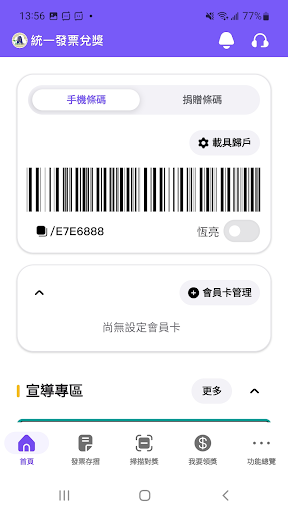
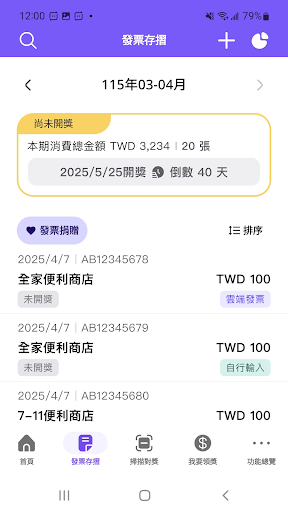
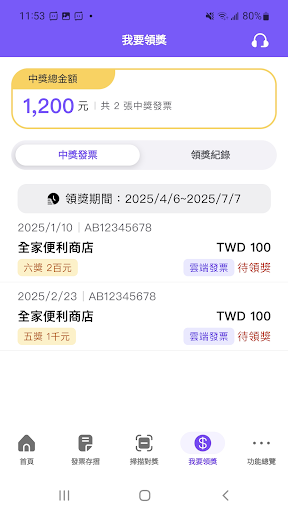
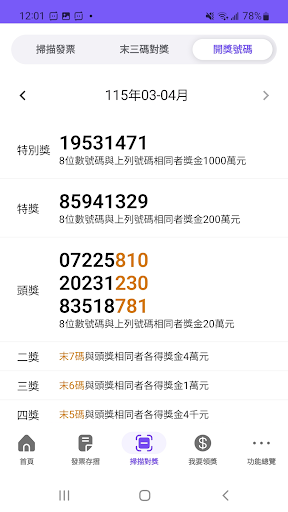
Redesigned with the core values of Convenience, Security, and User-Friendliness, the Uniform Invoice Prize Redemption App provides a comprehensive solution for invoice management, automatic prize checking, and online prize claiming.
This latest version significantly enhances the user experience and introduces an Automatic Prize Transfer feature. By linking your invoice carriers and setting up a designated bank account before the prize draw, any prize winnings will be automatically deposited into your account each drawing period. In addition, new features such as Spending Analytics and Carbon Reduction Tracking make invoice management smarter while supporting a more sustainable lifestyle.
Key Features
• Mobile Barcode Service
Register for a Mobile Barcode instantly through the app or log in with your existing account. Simply present your barcode at checkout to store invoices electronically.
• Automatic Prize Checking
After each lottery draw, open the Invoice Wallet and the system will automatically compare your invoices against the winning numbers and display prize information, ensuring you never miss a winning invoice.
• Automatic Prize Transfers
Set up automatic transfers for cloud invoice prizes. As long as your carriers are linked and a designated bank account is registered before the draw date, any winnings will be automatically deposited into your account—no queuing and no stamp tax required.
• Instant Prize Claiming
For electronic invoice certificates that win the Fifth or Sixth Prize, simply scan the invoice using the app to verify and transfer the prize money. For winning cloud invoices, prize funds can be claimed and transferred online instantly—no need to visit redemption locations and no stamp tax required.
• Comprehensive Carrier Management
Supports Mobile Barcode, credit cards, EasyCard, iPASS cards, and cross-border e-commerce email carriers, making invoice and spending management more convenient.
• Spending Analysis Dashboard
View spending trends over the past six months through intuitive charts and identify your top five merchants by monthly spending, helping you better manage personal finances.
• Carbon Reduction Ledger
In support of ESG sustainability initiatives, the app automatically records the amount of paper saved and carbon emissions reduced through the use of cloud invoices, allowing users to contribute to environmental protection.
• Charity Donations Made Easy
Save frequently used donation codes for quick access during purchases, or donate unclaimed cloud invoices directly from your Invoice Wallet to designated charitable organizations anytime, anywhere.
• Nearby Prize Redemption Locations
Using GPS location services, the app can instantly search for nearby physical prize redemption locations and provide navigation assistance for convenient prize collection.
Show more

1. Download MEmu installer and finish the setup

2. Start MEmu then open Google Play on the desktop

3. Search Invoice Prize Redemption in Google Play
Install
4. Download and Install Invoice Prize Redemption
5. On install completion click the icon to start

6. Enjoy using Invoice Prize Redemption on PC with MEmu
MEmu Play is the best Android emulator, and 100 million users already enjoy its superb Android app experience. Powered by advanced virtualization technology, it lets you enjoy thousands of Android apps smoothly on your PC—including the most graphics-intensive ones.
Bigger screen with better graphics; Long duration, without limitation of battery or mobile data.
Full Keymapping support for precise control of keyboard and mouse or gamepad.
Multiple game accounts or tasks on single PC at one time with Multi-Instance manager.
Use Invoice Prize Redemption on PC by following steps: