
JR東日本アプリ【公式】乗換案内・運行情報・時刻表・構内図
Updated
Current Version
3.9.5
Offered By

Stop worrying about high battery drain when using JR東日本アプリ【公式】乗換案内・運行情報・時刻表・構内図 on your phone. Free yourself from the tiny screen and enjoy the app on a much larger display. From now on, get a full-screen experience of your app with the convenience of a keyboard and mouse. MEmu offers you all the surprising features you’d expect: quick installation and easy setup, intuitive controls, and no more worries about battery life, mobile data, or unexpected calls. The all-new MEmu 9 is the choice for using JR東日本アプリ【公式】乗換案内・運行情報・時刻表・構内図 on your computer. With the MEmu multi-instance manager, you can run two or more accounts at the same time. Most importantly, our exclusive emulation engine unlocks your PC’s full potential, delivering smooth and enjoyable performance.
Show more
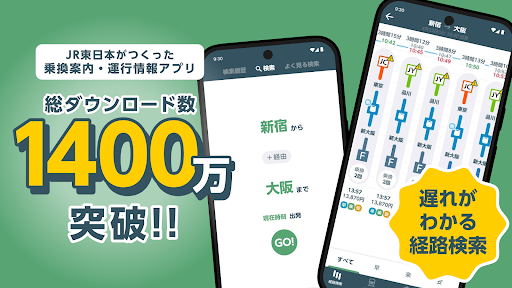
Enjoy superb experience of using JR東日本アプリ【公式】乗換案内・運行情報・時刻表・構内図 on PC with MEMU App Player. It's a powerful free Android emulator which provides you with thousands of android apps for their desktop version. Enjoy connecting with friends and polishing your work with higher efficiency! \Over 14 million downloads!
\Over 14 million downloads!/
This is the official JR East app, making your daily commute, school trip, and travel more safe and comfortable.
"How many minutes until the next train?" "Is this train crowded?"
All of those travel worries and concerns can be resolved with this one app.
What you can do with the JR East app】
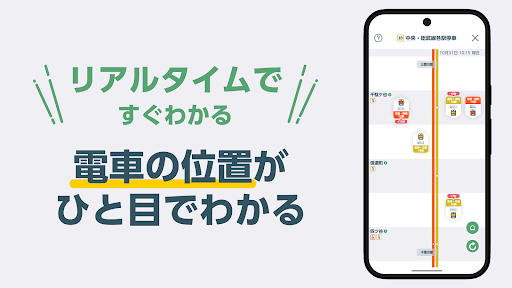
① Get peace of mind by checking train locations in real time
No more waiting on the platform, wondering if your train is coming.
See at a glance where your planned train is currently located and how long it's delayed. You'll also receive real-time notifications of delays, cancellations, and other service information.
② Make complex transfers smoother
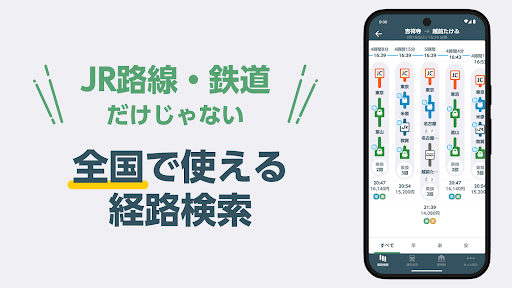
Transfer information is available for all trains and buses nationwide.
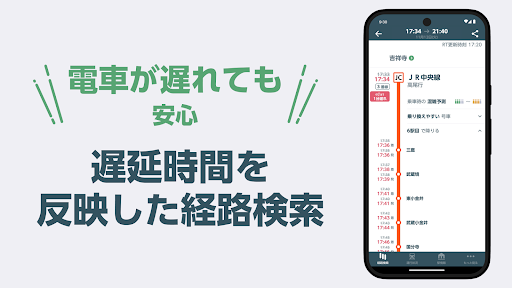
It's linked to train schedules, so it guides you to the optimal route, taking delays into account. You can also search for Shinkansen and limited express trains.
③ Station Information in Your Pocket
"Are there coin lockers available?" "Where are the restrooms and elevators?"
You can check station maps and locker availability on your smartphone before arriving at the station.
【Key Features and Benefits】
Train Location (Real-Time Tracking)
You can check the location information of not only major JR East lines, but also direct private railways and subways (Tokyo Metro, Tokyu, Odakyu, Keio, Seibu, Tobu, Sotetsu, etc.).
Check Suica Balance and History
Simply hold your Suica card over your smartphone to quickly check your charge balance and recent transaction history. No need to worry about being stopped at the ticket gate.
Check crowding status
"Get the empty car you want!" Make your dream car a reality. On some lines, such as the Yamanote Line, you'll receive real-time information on the crowding status of each car.
Integration with "Eki-net"
You can also smoothly reserve Shinkansen and limited express tickets (Azusa, Hitachi, etc.) right from the app.
[Do you have these concerns? 】
・My commuter train is often delayed, so I want to know the exact train status before I leave home.
・I want to visually see "where the train is currently running" on a route map.
・I want to find the cheapest route, taking my commuter pass section into account.
・I want to know the timetable and station map of a station I'm visiting for the first time on a business trip or vacation.
・I want to be able to issue a delay certificate on my smartphone in case of a delay.
-----------------------
【Service Area, Route, and Station Details】
■ Train Location and Operation Information Compatible Lines
(Kanto Area/Tokyo Metropolitan Area)
Yamanote Line, Keihin-Tohoku Line/Negishi Line, Tokaido Line, Yokosuka Line/Sobu Line Rapid, Shonan-Shinjuku Line, Chuo Line Rapid, Chuo/Sobu Line Local, Chuo Main Line, Yokohama Line, Nambu Line, Saikyo Line, Kawagoe Line, Joban Line (Rapid/Local), Keiyo Line, Musashino Line, Utsunomiya Line, Takasaki Line, Ueno-Tokyo Line, Ome Line, Itsukaichi Line, Sotetsu Line Direct, etc.
(Shinkansen)
Tohoku Shinkansen, Hokkaido Shinkansen, Joetsu Shinkansen, Hokuriku Shinkansen, Yamagata Shinkansen, Akita Shinkansen, Tokaido Shinkansen
(Limited Express/Other)
Narita Express (N'EX), Odoriko, Saphir Odoriko, Azusa, Kaiji, Hitachi, Tokiwa, Akagi, Kusatsu/Shimanami etc.
*You can also check some line information for JR Central (such as the Tokaido Shinkansen) and JR West (such as the Hokuriku Line).
*We also partner with the following private railway and subway companies to provide links to their train locations:
Tokyo Metro, Tokyu Corporation, Keio Corporation, Odakyu Electric Railway, Seibu Railway, Tobu Railway, Keisei Electric Railway, Keikyu Corporation, Sagami Railway (Sotetsu), Toei Subway, Tsukuba Express
■ Major Supported Stations (Station Maps, Timetables, etc.)
You can view station information for terminal stations in the Tokyo metropolitan area and throughout Japan.
Tokyo Station, Shinjuku Station, Shinagawa Station, Shibuya Station, Ikebukuro Station, Ueno Station, Yokohama Station, Omiya Station, Chiba Station, Tachikawa Station, Hachioji Station, Mito Station, Sendai Station, Morioka Station, Aomori Station, Akita Station, Yamagata Station, Fukushima Station, Niigata Station, Nagano Station, Matsumoto Station, Kofu Station, Shin-Yokohama Station, Shizuoka Station, Nagoya Station, Kyoto Station, Shin-Osaka Station, Osaka Station, Okayama Station, Hiroshima Station, Himeji Station, Hakata Station, Kanazawa Station, etc.
-----------------------
We will continue to improve our features based on your feedback.
Please send your comments and suggestions via the "Feedback" option in the app.
Show more

1. Download MEmu installer and finish the setup

2. Start MEmu then open Google Play on the desktop

3. Search JR東日本アプリ【公式】乗換案内・運行情報・時刻表・構内図 in Google Play
Install
4. Download and Install JR東日本アプリ【公式】乗換案内・運行情報・時刻表・構内図
5. On install completion click the icon to start

6. Enjoy using JR東日本アプリ【公式】乗換案内・運行情報・時刻表・構内図 on PC with MEmu
MEmu Play is the best Android emulator, and 100 million users already enjoy its superb Android app experience. Powered by advanced virtualization technology, it lets you enjoy thousands of Android apps smoothly on your PC—including the most graphics-intensive ones.
Bigger screen with better graphics; Long duration, without limitation of battery or mobile data.
Full Keymapping support for precise control of keyboard and mouse or gamepad.
Multiple game accounts or tasks on single PC at one time with Multi-Instance manager.
Use JR東日本アプリ【公式】乗換案内・運行情報・時刻表・構内図 on PC by following steps: