
Yahoo!ショッピング-アプリでおトクで便利にお買い物
Updated
Current Version
D
Offered By

Stop worrying about high battery drain when using Yahoo!ショッピング-アプリでおトクで便利にお買い物 on your phone. Free yourself from the tiny screen and enjoy the app on a much larger display. From now on, get a full-screen experience of your app with the convenience of a keyboard and mouse. MEmu offers you all the surprising features you’d expect: quick installation and easy setup, intuitive controls, and no more worries about battery life, mobile data, or unexpected calls. The all-new MEmu 9 is the choice for using Yahoo!ショッピング-アプリでおトクで便利にお買い物 on your computer. With the MEmu multi-instance manager, you can run two or more accounts at the same time. Most importantly, our exclusive emulation engine unlocks your PC’s full potential, delivering smooth and enjoyable performance.
Show more
Enjoy superb experience of using Yahoo!ショッピング-アプリでおトクで便利にお買い物 on PC with MEMU App Player. It's a powerful free Android emulator which provides you with thousands of android apps for their desktop version. Enjoy connecting with friends and polishing your work with higher efficiency! Japan's largest mail order mall with 300 million products!


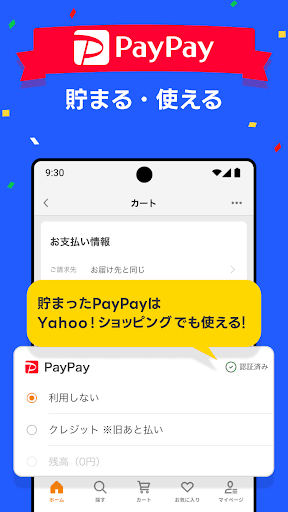
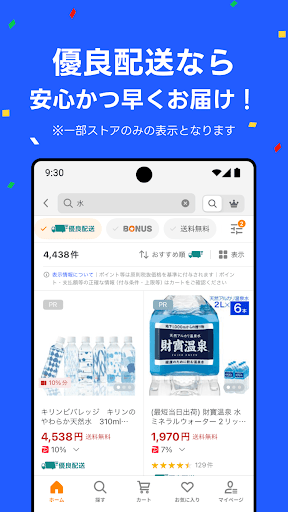
Japan's largest mail order mall with 300 million products!
The Yahoo! Shopping app is convenient for shopping!
-----
■Earn 5% every day no matter who buys or what you buy!
*PayPay points cannot be withdrawn or transferred. It can also be used at the PayPay official store.
*Some stores and products are not eligible for the campaign.
*The conditions for awarding PayPay points and the method for calculating the multiplier vary depending on the campaign.
-----
■You can also use the smartphone payment service “PayPay” on Yahoo! Shopping!
・PayPay, a smartphone payment service provided by PayPay Co., Ltd., can now be used as a payment method when purchasing products.
・You can earn 1% PayPay points when making payments.
・The amount charged to PayPay can also be used for shopping on Yahoo! Shopping.
*Some stores may not be available.
*In addition to credit card payment, carrier payment, mobile Suica, and convenience store payment, you can also pay with PayPay.
-----
■Great shopping coupons every day!
You can save even more money by using coupons that you can get within the Yahoo! Shopping app.
You can check popular coupons by ranking format and category, so don't miss out!
-----
■Yahoo! Shopping app is recommended for these people
・If you are looking for a mail order app with a wide variety of products
・Those who want to shop at a discount using PayPay
・People who want to purchase fashion items and daily necessities with one app
・If you are looking for a shopping app that offers great deals, campaigns, and coupons, and features seasonal products.
-----
■Features of Yahoo! Shopping
You can choose the perfect product for you from over 860,000 stores, one of the largest in Japan, and PayPay Mall products, including approximately 300 million products, LOHACO products, and ZOZOTOWN.
[List of product categories]
ladies fashion
men's fashion
T-shirts, Y-shirts
watches, accessories
food
Sweets, Western confectionery
drinks, water, alcohol
home appliances
TV, audio, camera
Smartphone, tablet, computer
furniture, interior
Kitchen, daily necessities, stationery
Outdoor, fishing, travel supplies
diet, health
Contact lenses, care products
Cosmetics, beauty, hair care
Baby, kids, maternity
pet supplies, living things
flowers, gardening
DIY, tools
cars, bikes, bicycles
sports
games, toys
Musical instruments, handicrafts, collections
CDs, music software, tickets
DVD, video software
books, magazines, comics
Rental and various services
In addition, we recommend the following products!
Seasonal products (Osechi, Valentine's Day, White Day, swimsuits, mid-year gifts, Halloween, Christmas)
Gourmet food to order
Commercial size products
Brand goods such as bags and shoes
[Useful new feature! ]
・You can also use “PayPay” on Yahoo! Shopping! You can get it!
・When the product is shipped, you will be notified by push notification.
- You can easily search and access your favorites from the widget.
・We will notify you of useful information by push notification.
-You can now find cheaper products from the product details.
・We will notify you within the app so that you do not miss out on valuable information such as coupons.
-Added the ability to register desired delivery dates and campaigns in the calendar.
PayPay points can be used at Yahoo! JAPAN services such as Yahoo! Shopping and Yahoo! Auctions, services such as LOHACO, and physical stores that accept PayPay.
In addition, we will notify you of useful information such as the start and end of campaigns, as well as the expiry date of coupons, through push notifications. Don't miss out on great deals!
[Lots of great sales and special features! ]
・Don't miss out on campaigns limited to targeted stores!
-----
[You can also search for products on LOHACO and Yahoo! Auctions! ]
With Yahoo! Shopping, you can also search for products from LOHACO, an online shopping site for individuals, and Yahoo! Auctions, an auction flea market site.
At LOHACO, you can not only buy daily necessities such as groceries, but also interior furniture and miscellaneous goods.
Also, on Yahoo! Auctions, you can search for various products in auction format, and in flea market mode, you can only search for items that you can buy right away, which is very convenient!
-----
■Others
Please check the Yahoo! JAPAN Terms of Use before using this application.
■Yahoo! JAPAN Terms of Use
https://www.lycorp.co.jp/ja/company/terms/
■Privacy policy
https://www.lycorp.co.jp/ja/company/privacypolicy/
■Rules (guidelines) regarding software
https://www.lycorp.co.jp/ja/company/terms/#anc2
■Disclaimer
https://shopping.yahoo.co.jp/notice/shopinfo/security/
■Note
・The logged-in Yahoo! JAPAN ID may be different between the Yahoo! Shopping app and the browser. When purchasing products, etc., please check the ID you are logged in to.
- Barcode search cannot be used on devices that do not have a camera function.
Photo: Afro
Show more

1. Download MEmu installer and finish the setup

2. Start MEmu then open Google Play on the desktop

3. Search Yahoo!ショッピング-アプリでおトクで便利にお買い物 in Google Play
Install
4. Download and Install Yahoo!ショッピング-アプリでおトクで便利にお買い物
5. On install completion click the icon to start

6. Enjoy using Yahoo!ショッピング-アプリでおトクで便利にお買い物 on PC with MEmu
MEmu Play is the best Android emulator, and 100 million users already enjoy its superb Android app experience. Powered by advanced virtualization technology, it lets you enjoy thousands of Android apps smoothly on your PC—including the most graphics-intensive ones.
Bigger screen with better graphics; Long duration, without limitation of battery or mobile data.
Full Keymapping support for precise control of keyboard and mouse or gamepad.
Multiple game accounts or tasks on single PC at one time with Multi-Instance manager.
Use Yahoo!ショッピング-アプリでおトクで便利にお買い物 on PC by following steps: