
Komikcast ID - Baca Komik
Updated
Current Version
1.4.7
Offered By

Stop worrying about high battery drain when using Komikcast ID - Baca Komik on your phone. Free yourself from the tiny screen and enjoy the app on a much larger display. From now on, get a full-screen experience of your app with the convenience of a keyboard and mouse. MEmu offers you all the surprising features you’d expect: quick installation and easy setup, intuitive controls, and no more worries about battery life, mobile data, or unexpected calls. The all-new MEmu 9 is the choice for using Komikcast ID - Baca Komik on your computer. With the MEmu multi-instance manager, you can run two or more accounts at the same time. Most importantly, our exclusive emulation engine unlocks your PC’s full potential, delivering smooth and enjoyable performance.
Show more
Enjoy superb experience of using Komikcast ID - Baca Komik on PC with MEMU App Player. It's a powerful free Android emulator which provides you with thousands of android apps for their desktop version. Enjoy connecting with friends and polishing your work with higher efficiency! Aplikasi Komikcast adalah aplikasi yang dibuat oleh developer website Komikcast.
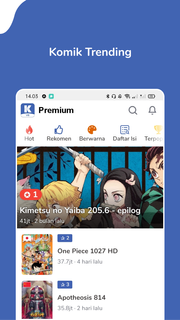
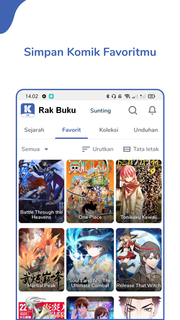
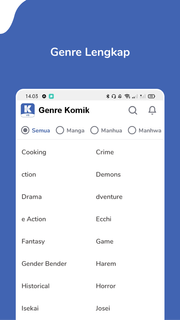
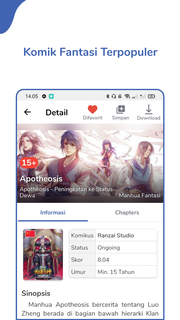
Aplikasi Komikcast adalah aplikasi yang dibuat oleh developer website Komikcast.co.idKomik adalah media yang digunakan untuk mengekspresikan ide dengan gambar, sering dikombinasikan dengan teks atau informasi visual lainnya.Manga adalah komik atau novel grafik yang dibuat di Jepang atau menggunakan bahasa Jepang, sesuai dengan gaya yang dikembangkan di sana pada akhir abad ke-19. Manga memiliki sejarah awal yang panjang dan kompleks dalam seni Jepang terdahulu.Didalam aplikasi Komikcast kalian bisa membaca Komik, Manga, Manhwa, dan Manhua didalam satu aplikasi.Apa saja fitur yang tersedia di Komikcast?1. Bookmark Komik FavoritmuKalian bisa menyimpan atau membookmark komik favorit dengan mudah. Gak perlu takut lagi lupa judul komik yang kalian baca!2. Notifikasi Komik UpdateTerkadang kalian lupa mengecek komik terbaru yang update, nah di Komikcast kalian akan mendapatkan notifikasi update dari komik-komik yang sudah dibookmark.3. Download Komik dan Baca Tanpa InternetPengen mengkoleksi komik-komik yang kalian suka? Atau mau membaca komik tanpa perlu internet? Hmm mungkin juga males nunggu loading gambar satu persatu?Di Komikcast kalian bisa mengunduh komik sebanyak mungkin dan membacanya tanpa perlu koneksi. Loading cepat, unduhan cepat, semua mudah!4. Fitur Koleksi KustomBuat koleksi komik-komik yang kalian mau, contohnya koleksi "Fantasi Favoritku", mudah dan gampang dibuat!5. History KomikGak perlu takut lupa komik yang terakhir kamu baca, bisa dicek diriwayat bacaan kamu kok.6. Mode CepatLoading gambar dengan cepat di mode cepat!7. Mode TurboLoading gambar wuzzz di mode turbo, loadingnya super cepat lohh!8. Pilihan Resolusi GambarTersedia resolusi HD, Normal, dan Irit. Pilih sesuai koneksi internet kalian ya!DISCLAIMER - Komikcast does not own or host any content. It simply aggregates links in a convenient, user-friendly interface. Please email any questions or concerns to us.
Show more

1. Download MEmu installer and finish the setup

2. Start MEmu then open Google Play on the desktop

3. Search Komikcast ID - Baca Komik in Google Play
Install
4. Download and Install Komikcast ID - Baca Komik
5. On install completion click the icon to start

6. Enjoy using Komikcast ID - Baca Komik on PC with MEmu
MEmu Play is the best Android emulator, and 100 million users already enjoy its superb Android app experience. Powered by advanced virtualization technology, it lets you enjoy thousands of Android apps smoothly on your PC—including the most graphics-intensive ones.
Bigger screen with better graphics; Long duration, without limitation of battery or mobile data.
Full Keymapping support for precise control of keyboard and mouse or gamepad.
Multiple game accounts or tasks on single PC at one time with Multi-Instance manager.
Use Komikcast ID - Baca Komik on PC by following steps: