Meme Instant Buttons
Updated
Current Version
5.13.8
Offered By

Stop worrying about high battery drain when using Meme Instant Buttons on your phone. Free yourself from the tiny screen and enjoy the app on a much larger display. From now on, get a full-screen experience of your app with the convenience of a keyboard and mouse. MEmu offers you all the surprising features you’d expect: quick installation and easy setup, intuitive controls, and no more worries about battery life, mobile data, or unexpected calls. The all-new MEmu 9 is the choice for using Meme Instant Buttons on your computer. With the MEmu multi-instance manager, you can run two or more accounts at the same time. Most importantly, our exclusive emulation engine unlocks your PC’s full potential, delivering smooth and enjoyable performance.
Show more
Enjoy superb experience of using Meme Instant Buttons on PC with MEMU App Player. It's a powerful free Android emulator which provides you with thousands of android apps for their desktop version. Enjoy connecting with friends and polishing your work with higher efficiency! Bring instant fun to any moment with a meme soundboard full of viral sounds, meme sounds, instant buttons, funny sound effects, and prank clips made for quick reactions.
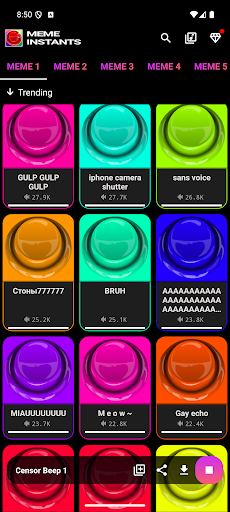
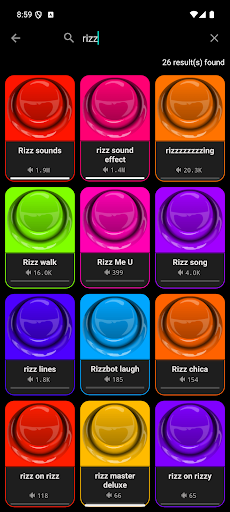
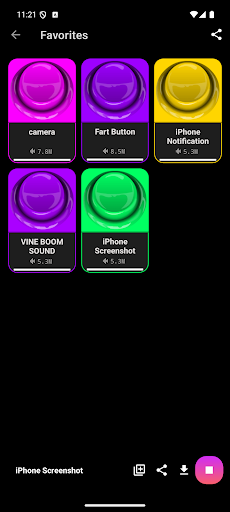
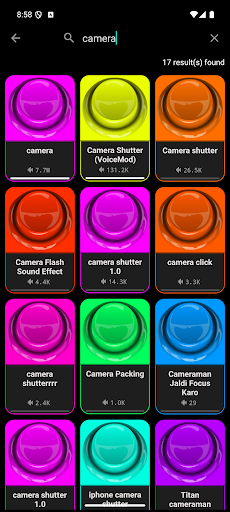
Bring instant fun to any moment with a meme soundboard full of viral sounds, meme sounds, instant buttons, funny sound effects, and prank clips made for quick reactions. Tap your favorite sound buttons, open the fart soundboard, explore the meme board, and enjoy funny sounds anytime. Start the fun now and keep the best reactions just one tap away!
The app loads fast, feels smooth, and brings meme sound buttons to life with clean categories, loud reactions, realistic fart effects, and nonstop funny noises. You can scroll through meme sounds, unlock viral hits, save your favorites, and hit every moment with the perfect reaction. Try the funniest soundboard meme experience today and enjoy instant entertainment every time you tap!
⭐ Viral Meme Sounds and Funny Reactions
You can browse a huge mix of meme sounds, classic soundboard meme moments, funny noises, fail reactions, joke sounds, prank clips, and viral memes that people enjoy every day. The library is simple to explore, so you can move from funny memes to cool effects, switch to buzzer hits, tap a punch effect, try poop effects, or press the bruh button when the moment calls for it.
Huge Library of Instant Buttons
Browse hundreds of instant buttons and button effects that deliver quick reactions anytime you need them. From meme sound buttons to loud viral hits and softer reactions, the app keeps every funny moment close. If you enjoy realistic effects, you can open fart sounds, explore fart noises that sound real, try prank fart sounds, or simply play classic funny soundboard hits that never get old.
Prank Sounds for Every Occasion
Enjoy a full mix of prank sounds and sound pranks made for friendly jokes and lighthearted moments. Many users love switching between fart soundboard options, funny prank sounds, goofy ahh moments, troll effects, whip effects, and weird effects. The airhorn button and OMG button deliver loud reactions, while smaller meme sound buttons help you create perfect timing during chats or streams.
Custom Soundboard and Personal Meme Board
Save your favorite meme sounds and build a custom soundboard that matches your style. Pin the funniest sound buttons, collect viral hits that stand out, organize your meme board, and keep your best funny sound effects in one place. The app makes it simple to move between categories, tap through effects, and enjoy new content without slowing down.
Meme Sounds That Stay Fresh
New meme sounds, funny noises, effects, and viral memes are added regularly. You can explore popular sections, discover trending sound buttons, or jump into classic funny soundboard areas that users love the most. If you enjoy the energy of MyInstants, you will feel right at home here, with a bigger library and cleaner navigation.
Perfect for Laughter Anytime
The meme soundboard fits naturally into chats, group calls, game sessions, or any moment when you want to drop a funny reaction or a small prank. Thanks to meme sound buttons, instant buttons, and the rest of the soundboard meme collection, it always feels easy to tap the right reaction at the right time.
Download our app and jump into a world of meme sounds, instant buttons, prank sounds, funny sound effects, viral hits, custom soundboard fun, and nonstop laughs. Tap your favorite reactions, enjoy quick moments of humor anytime, and make every day a little more fun!
Show more

1. Download MEmu installer and finish the setup

2. Start MEmu then open Google Play on the desktop

3. Search Meme Instant Buttons in Google Play
Install
4. Download and Install Meme Instant Buttons
5. On install completion click the icon to start

6. Enjoy using Meme Instant Buttons on PC with MEmu
MEmu Play is the best Android emulator, and 100 million users already enjoy its superb Android app experience. Powered by advanced virtualization technology, it lets you enjoy thousands of Android apps smoothly on your PC—including the most graphics-intensive ones.
Bigger screen with better graphics; Long duration, without limitation of battery or mobile data.
Full Keymapping support for precise control of keyboard and mouse or gamepad.
Multiple game accounts or tasks on single PC at one time with Multi-Instance manager.
Use Meme Instant Buttons on PC by following steps:































