Noir: USB Camera HDMI Monitor
Updated
Current Version
6
Offered By

Stop worrying about high battery drain when using Noir: USB Camera HDMI Monitor on your phone. Free yourself from the tiny screen and enjoy the app on a much larger display. From now on, get a full-screen experience of your app with the convenience of a keyboard and mouse. MEmu offers you all the surprising features you’d expect: quick installation and easy setup, intuitive controls, and no more worries about battery life, mobile data, or unexpected calls. The all-new MEmu 9 is the choice for using Noir: USB Camera HDMI Monitor on your computer. With the MEmu multi-instance manager, you can run two or more accounts at the same time. Most importantly, our exclusive emulation engine unlocks your PC’s full potential, delivering smooth and enjoyable performance.
Show more
Enjoy superb experience of using Noir: USB Camera HDMI Monitor on PC with MEMU App Player. It's a powerful free Android emulator which provides you with thousands of android apps for their desktop version. Enjoy connecting with friends and polishing your work with higher efficiency! To use your device as a portable display for Camera, Gaming Console, Laptop, PC or others with HDMI output, you need an HDMI to USB C dongle (aka UVC capture device or Video Capture Card, not USB C hub nor USB C to HDMI cable).
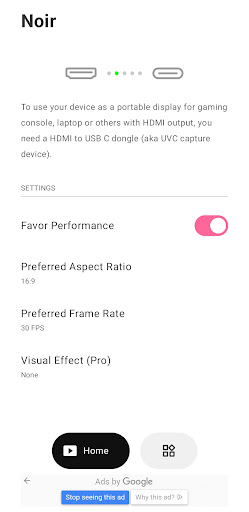
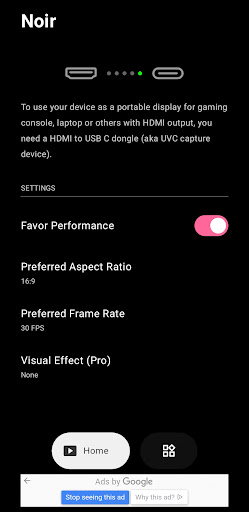
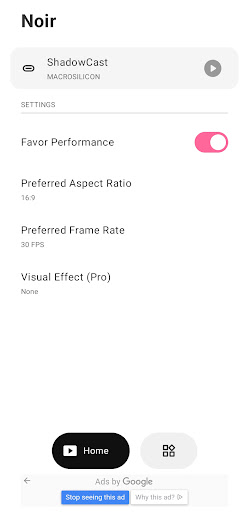
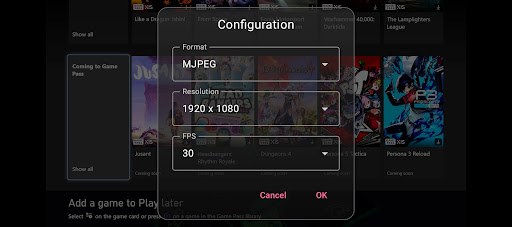
To use your device as a portable display for Camera, Gaming Console, Laptop, PC or others with HDMI output, you need an HDMI to USB C dongle (aka UVC capture device or Video Capture Card, not USB C hub nor USB C to HDMI cable).
Camera, Endoscope and Microscope with USB streaming feature are also supported.
Noir supports UVC video streaming and UAC audio streaming, offering a choice between OpenGL ES and Vulkan for the graphics backend.
The free version offers basic functions and immersive experience (It contains ads but not in the preview). Purchase the pro version for more features and support continuous development and maintenance of Noir.
COMMON USE CASES
1. Camera Monitor: Pro Features include LUTs, Histogram and Edge Detection.
2. Primary Monitor for Gaming Console & PC: Pro Features include Visual Effects, Brightness & Contrast Adjustment, App-specific Volume Control and FSR 1.0.
3. Secondary Monitor for Laptop.
4. Compatible with any device with HDMI Output or USB Streaming.
RECOMMEND VIDEO CAPTURE CARD
Hagibis UHC07(P) #AD
Rec. Reasons: Affordable, I recommend the UHC07P if available. It supports convenient PD charging.
https://bit.ly/noir-hagibis-uhc07
Genki ShadowCast 2 #AD
Rec. Reasons: Portable, Elegant, and Beautiful.
https://bit.ly/noir-genki-shadowcast-2
MORE PRO VERSION FEATURES
1. No Ads, Zero Tracking
2. Visual Effects
3. Picture in Picture Mode
4. Brightness & Contrast Adjustment
5. Stretch to Fullscreen
6. 3D LUTs
7. App-specific Volume Control
8. Luminance Histogram & Color Histogram
9. Edge Detection
10. FSR 1.0
FAQ
1. Why doesn't Noir recognize my device?
Possible reasons are that your phone or tablet does not support USB Host (OTG) or the device you are using isn't a Video Capture Card.
In some cases, your phone or tablet may not be able to provide the power needed for the capture card, in which case you need a usb hub to supply additional power.
2. Why is the preview so laggy?
This is often due to the USB version.
If you are using a USB 3.0 capture card, please ensure that the USB data cable you are using and the USB port on your phone or tablet are both USB 3.0.
If you are using a USB 2.0 capture card, please ensure that the video format is MJPEG and does not exceed the specification of 1080p30fps. Some capture cards can support up to 1080p50fps.
3. Why did my capture card, which was working fine, suddenly fail to connect?
This is often caused by system issues. The simplest and most direct solution is to restart your phone or tablet and try again.
4. Why does my gaming console or Video playback device show a black screen when connected?
This issue is more common among PS5 and PS4 users and is caused by the gaming console enabling HDCP. Please go to the PS console interface: Settings -> System -> HDMI, and turn off Enable HDCP. PS3 does not support turning off HDCP. Other devices may also automatically enable HDCP when playing video content, causing the screen to go black. Some HDMI splitters support bypassing HDCP restrictions and can serve as a solution; however, this is not recommended here, so please look into it on your own.
5. Why are resolutions other than 16:9 and 4:3 not supported?
As far as I know, there are no capture cards on the market that support ratios other than these. You can specify the desired ratio through Noir's built-in Stretch feature. This requires that your capture card's EDID supports the ratio, and you need to set the output resolution of your laptop or computer to that ratio.
LINKS
Special thanks to Genki for helping Noir grow
https://www.genkithings.com/
Special thanks to Hagibis for recommending Noir
https://www.shophagibis.com/
Pixel Font
https://www.fontspace.com/munro-font-f14903
Bottom Bar Design
https://dribbble.com/shots/11372003-Bottom-Bar-Animation
Show more

1. Download MEmu installer and finish the setup

2. Start MEmu then open Google Play on the desktop

3. Search Noir: USB Camera HDMI Monitor in Google Play
Install
4. Download and Install Noir: USB Camera HDMI Monitor
5. On install completion click the icon to start

6. Enjoy using Noir: USB Camera HDMI Monitor on PC with MEmu
MEmu Play is the best Android emulator, and 100 million users already enjoy its superb Android app experience. Powered by advanced virtualization technology, it lets you enjoy thousands of Android apps smoothly on your PC—including the most graphics-intensive ones.
Bigger screen with better graphics; Long duration, without limitation of battery or mobile data.
Full Keymapping support for precise control of keyboard and mouse or gamepad.
Multiple game accounts or tasks on single PC at one time with Multi-Instance manager.
Use Noir: USB Camera HDMI Monitor on PC by following steps: