
Onluyen.vn
Updated
Current Version
8.6.24
Offered By

Stop worrying about high battery drain when using Onluyen.vn on your phone. Free yourself from the tiny screen and enjoy the app on a much larger display. From now on, get a full-screen experience of your app with the convenience of a keyboard and mouse. MEmu offers you all the surprising features you’d expect: quick installation and easy setup, intuitive controls, and no more worries about battery life, mobile data, or unexpected calls. The all-new MEmu 9 is the choice for using Onluyen.vn on your computer. With the MEmu multi-instance manager, you can run two or more accounts at the same time. Most importantly, our exclusive emulation engine unlocks your PC’s full potential, delivering smooth and enjoyable performance.
Show more
Enjoy superb experience of using Onluyen.vn on PC with MEMU App Player. It's a powerful free Android emulator which provides you with thousands of android apps for their desktop version. Enjoy connecting with friends and polishing your work with higher efficiency! Onluyen.

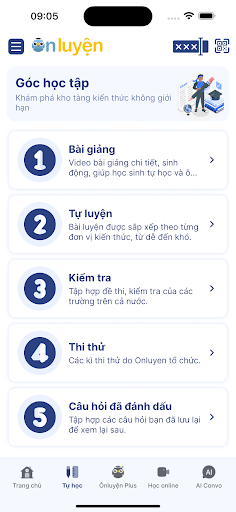

Onluyen.vn offers a suitable exercise mode for all types of students:
- Conquer 9 -10 with application question bank - high application is for you who are quite good
- Improve capacity with compound exercises for average - good students
- Regain the roots by correcting the weak knowledge
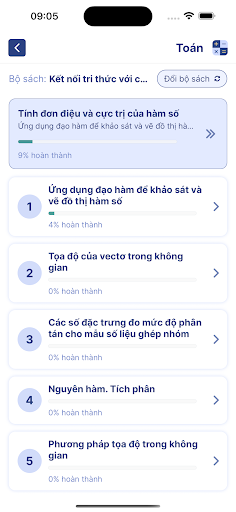
* Self-practice: Self-practice lessons are arranged according to each unit of knowledge, helping them to consolidate immediately after they finish studying.
- Students actively arrange appropriate learning progress
- Question bank +120,000 with detailed answers and instructions
- Each question is accompanied by a summary of relevant knowledge; related video lectures; difficult sentences with video correction
- Questions are intelligently arranged from easy to difficult, suitable for each student's level
* Test: Help students prepare better for 45-minute tests, semester exams, high school graduation exams, 10 entrance exams, Competency Assessment exams, National High School Exams...
- Thousands of exam questions are randomly generated from the question bank, each to ensure the adherence to the curriculum and a reasonable ratio of difficult questions.
- Hundreds of topics collected from specialized schools
- Each test comes with detailed instructions for solving each question and detailed analysis of test results
* Supported features:
- Bookmark: save good/difficult questions for future reference
- Q&A: ask and get answers for each practice question
- Learning progress: a detailed history of each self-practice and test to help students track their own progress
Feedback/suggestions should be sent to admin@edmicro.vn.
---
On Luyen - Test prep and practice app for Vietnamese senior high school students. The app covers all subjects: Maths, Physics, Chemistry, English, Biology, History, Geography and Civic Education.
This app is designed to assist all students regardless of academic level:
* Self-pacing practices
- One practice for each learning unit
- Students take as much as they need to finish each unit
- Question bank consists of +120,000 items with detailed instructions
- Theory flashcards and video lectures for each question
- Questions are listed by difficulty level
* Testing:
- Help students prepare better for 45 minutes, end term exams and national high school exams
- Thousand automatically created tests in according to standard national curriculum
- List of previous tests from gifted school all over Vietnam
- Detailed instructions and Report for each test paper
* Supporting functions
- Bookmark: save interesting/hard question for next attempts
- Doubt: raise doubt and receive answer for any test item
- Learning progress: detailed report of every attempt to help student record their progress
Please do not hesitate to send your feedback to admin@edmicro.vn
Show more

1. Download MEmu installer and finish the setup

2. Start MEmu then open Google Play on the desktop

3. Search Onluyen.vn in Google Play
Install
4. Download and Install Onluyen.vn
5. On install completion click the icon to start

6. Enjoy using Onluyen.vn on PC with MEmu
MEmu Play is the best Android emulator, and 100 million users already enjoy its superb Android app experience. Powered by advanced virtualization technology, it lets you enjoy thousands of Android apps smoothly on your PC—including the most graphics-intensive ones.
Bigger screen with better graphics; Long duration, without limitation of battery or mobile data.
Full Keymapping support for precise control of keyboard and mouse or gamepad.
Multiple game accounts or tasks on single PC at one time with Multi-Instance manager.
Use Onluyen.vn on PC by following steps: