
OnPhone - Second Phone Number
Updated
Current Version
1.1.6
Offered By

Stop worrying about high battery drain when using OnPhone - Second Phone Number on your phone. Free yourself from the tiny screen and enjoy the app on a much larger display. From now on, get a full-screen experience of your app with the convenience of a keyboard and mouse. MEmu offers you all the surprising features you’d expect: quick installation and easy setup, intuitive controls, and no more worries about battery life, mobile data, or unexpected calls. The all-new MEmu 9 is the choice for using OnPhone - Second Phone Number on your computer. With the MEmu multi-instance manager, you can run two or more accounts at the same time. Most importantly, our exclusive emulation engine unlocks your PC’s full potential, delivering smooth and enjoyable performance.
Show more
Enjoy superb experience of using OnPhone - Second Phone Number on PC with MEMU App Player. It's a powerful free Android emulator which provides you with thousands of android apps for their desktop version. Enjoy connecting with friends and polishing your work with higher efficiency! OnPhone makes it possible to have different phone numbers for your personal and business needs without an extra SIM, as well as call and text internationally at no additional cost.

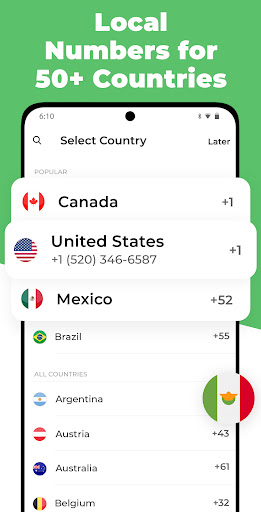


OnPhone makes it possible to have different phone numbers for your personal and business needs without an extra SIM, as well as call and text internationally at no additional cost. The app allows you to choose a custom phone number and make phone calls without displaying your real number.
Support for many international phone numbers including United States US, United Kingdom UK, France FR, Brazil BR, Canada CA, Spain ES, Mexico MX, Australia AU, South Korea KR, Japan JP and over 40+ countries!
There is no need to buy an additional SIM card and swap it when you want to call from another number. Now you can make calls from different numbers quickly and easily!
Features:
- VOICEMAIL. Inform the callers why you cannot respond. Set Business Hours and have incoming calls outside this time period go directly to Voicemail.
- CALL RECORDING. Record incoming and outgoing calls.
- CALL FORWARDING. Use call forwarding to hide your real number.
- BLOCK CALLS.
- SEND TO FUTURE. Send delayed texts at the date and time of your choice.
Based on eSIM (embedded SIM card) technology, our app makes the Internet more accessible, provides a secure and stable Internet connection, and offers the biggest global coverage. Take a step into the future with eSIM, a next-generation solution that parts ways with traditional physical SIM cards!
Advantages of OnPhone eSIM:
- Money-saving: OnPhone eSIM offers data plans at a fair price, making it a far more advantageous solution compared to roaming!
- Easy to manage: purchase an unlimited number of eSIM profiles and manage them easily within your account;
- Easy to install: just a few taps, and you’re good to go;
- Global coverage: get a seamless Internet connection in virtually every corner of the world;
- No need to swap SIM cards: switch effortlessly between our data plans and your current mobile carrier;
- No contracts or long-term commitments. Cancel anytime!
- Additional SIM cards are no longer necessary: all the acquired data plans and profiles are available on one eSIM card;
Privacy Policy https://onphone.app/privacy.html
Terms of Use https://onphone.app/terms.html
Show more

1. Download MEmu installer and finish the setup

2. Start MEmu then open Google Play on the desktop

3. Search OnPhone - Second Phone Number in Google Play
Install
4. Download and Install OnPhone - Second Phone Number
5. On install completion click the icon to start

6. Enjoy using OnPhone - Second Phone Number on PC with MEmu
MEmu Play is the best Android emulator, and 100 million users already enjoy its superb Android app experience. Powered by advanced virtualization technology, it lets you enjoy thousands of Android apps smoothly on your PC—including the most graphics-intensive ones.
Bigger screen with better graphics; Long duration, without limitation of battery or mobile data.
Full Keymapping support for precise control of keyboard and mouse or gamepad.
Multiple game accounts or tasks on single PC at one time with Multi-Instance manager.
Use OnPhone - Second Phone Number on PC by following steps: