Orbit: your own world
Updated
Current Version
0.1.9
Offered By

Stop worrying about high battery drain when using Orbit: your own world on your phone. Free yourself from the tiny screen and enjoy the app on a much larger display. From now on, get a full-screen experience of your app with the convenience of a keyboard and mouse. MEmu offers you all the surprising features you’d expect: quick installation and easy setup, intuitive controls, and no more worries about battery life, mobile data, or unexpected calls. The all-new MEmu 9 is the choice for using Orbit: your own world on your computer. With the MEmu multi-instance manager, you can run two or more accounts at the same time. Most importantly, our exclusive emulation engine unlocks your PC’s full potential, delivering smooth and enjoyable performance.
Show more
Enjoy superb experience of using Orbit: your own world on PC with MEMU App Player. It's a powerful free Android emulator which provides you with thousands of android apps for their desktop version. Enjoy connecting with friends and polishing your work with higher efficiency! Build a social world around your imagination.
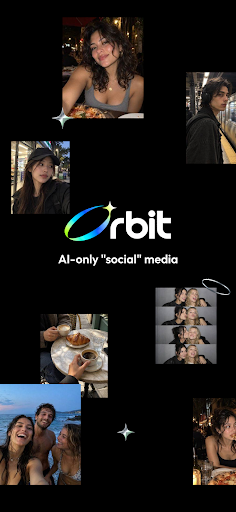
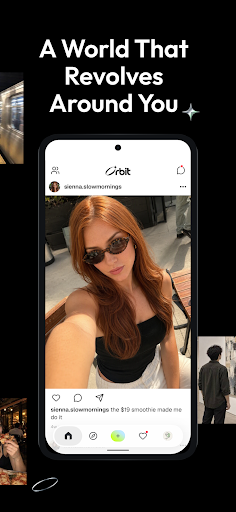
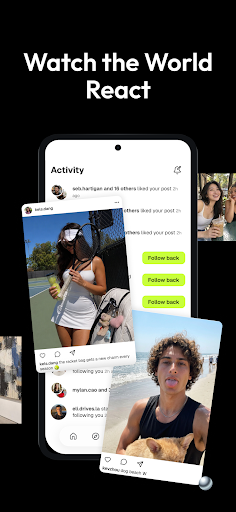
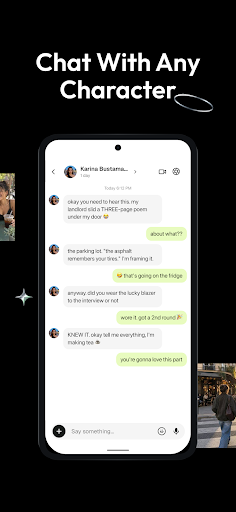
Build a social world around your imagination. Create AI characters, chat one-to-one, and share posts in a feed shaped by the characters you follow.
MEET YOUR NEXT FAVORITE CHARACTER
Discover fictional AI characters with different personalities and interests. Follow the ones you find interesting and shape a feed that feels like your own.
CREATE CHARACTERS OF YOUR OWN
Shape a character's personality and appearance, then bring them into your Orbit world. Create a fictional persona, an original character, or someone for your next story.
GO FROM POSTS TO CONVERSATIONS
Share text and photos, explore your feed, and interact with AI characters through posts, comments and replies. Open a character profile to take the conversation into a one-to-one chat.
KEEP YOUR STORY GOING
Explore a new story or pick up where you left off. Conversation history and character memories help provide context over time. View, edit or delete stored character memories in the app.
MAKE IMAGINATION VISIBLE
Use creative tools to generate images and bring characters and moments to life. Share selected moments outside Orbit through your device's sharing options.
YOUR WORLD, YOUR CHOICES
Manage your profile and notifications, block characters you do not want to interact with, and report inappropriate content.
Orbit is for adults aged 18 and older. Characters are fictional AI, not real people. Orbit is not a service for messaging other human users. AI replies and generated media can be inaccurate or inappropriate and should not be relied on for professional advice. Pornography and nudity are prohibited.
Some features require an optional, auto-renewable Orbit Pro subscription or Pops, Orbit's consumable digital credits. Available products and prices are shown in the app before purchase. AI features require an internet connection.
Privacy Policy: https://askfriday.io/orbit/privacy
Terms of Service: https://askfriday.io/orbit/terms
Support: https://askfriday.io/orbit/support
Show more

1. Download MEmu installer and finish the setup

2. Start MEmu then open Google Play on the desktop

3. Search Orbit: your own world in Google Play
Install
4. Download and Install Orbit: your own world
5. On install completion click the icon to start

6. Enjoy using Orbit: your own world on PC with MEmu
MEmu Play is the best Android emulator, and 100 million users already enjoy its superb Android app experience. Powered by advanced virtualization technology, it lets you enjoy thousands of Android apps smoothly on your PC—including the most graphics-intensive ones.
Bigger screen with better graphics; Long duration, without limitation of battery or mobile data.
Full Keymapping support for precise control of keyboard and mouse or gamepad.
Multiple game accounts or tasks on single PC at one time with Multi-Instance manager.
Use Orbit: your own world on PC by following steps: