
Watch Duty (Wildfire)
Updated
Current Version
2026.7.30
Offered By

Stop worrying about high battery drain when using Watch Duty (Wildfire) on your phone. Free yourself from the tiny screen and enjoy the app on a much larger display. From now on, get a full-screen experience of your app with the convenience of a keyboard and mouse. MEmu offers you all the surprising features you’d expect: quick installation and easy setup, intuitive controls, and no more worries about battery life, mobile data, or unexpected calls. The all-new MEmu 9 is the choice for using Watch Duty (Wildfire) on your computer. With the MEmu multi-instance manager, you can run two or more accounts at the same time. Most importantly, our exclusive emulation engine unlocks your PC’s full potential, delivering smooth and enjoyable performance.
Show more
Enjoy superb experience of using Watch Duty (Wildfire) on PC with MEMU App Player. It's a powerful free Android emulator which provides you with thousands of android apps for their desktop version. Enjoy connecting with friends and polishing your work with higher efficiency! Watch Duty is the only disaster mapping and alert app powered by real people giving you real-time information on wildfires and floods vetted by trained professionals, not robots or AI.
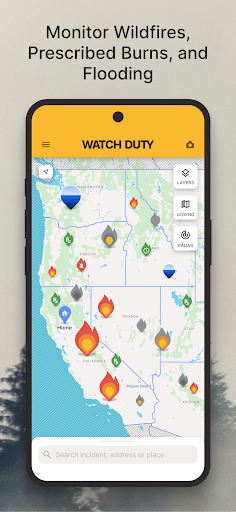
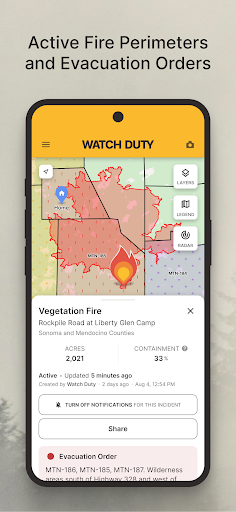
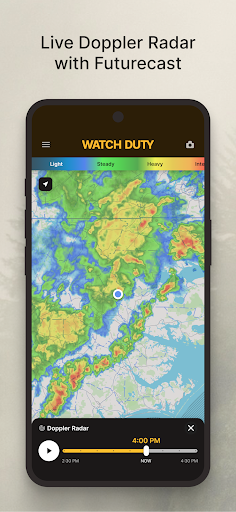
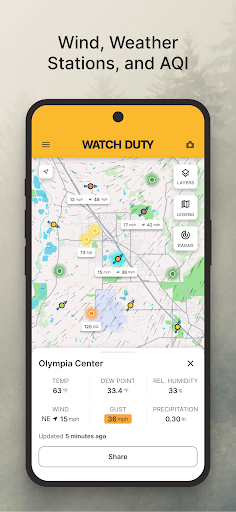
Watch Duty is the only disaster mapping and alert app powered by real people giving you real-time information on wildfires and floods vetted by trained professionals, not robots or AI. While many other apps rely solely on government alerts, which can often be delayed, Watch Duty provides up-to-the-minute, life-saving information through a dedicated team of active and retired firefighters, dispatchers, first responders, and reporters who monitor radio scanners around the clock. We aim to keep you informed and safe with real-time updates and alerts.
Disaster Tracking Features:
- Push notifications about nearby safety impacting floods, wildfires, and firefighting or emergency response efforts
- Real-time updates as conditions change
- Evacuation orders & shelter information
- Active fire perimeters and progress
- Flash flood warnings and threat levels
- Current and projected river gauge flooding levels
- Infrared satellite hotspots from VIIRS and MODIS
- Wind speed and direction
- Power outage size and estimated resolution time
- Historical wildfire perimeters
- Air quality readings
- Street and satellite maps
- Air attack and air tanker flight tracker
- Save locations for quick access on the map
Watch Duty is a 501(c)(3) non-profit organization. Our service will always remain free of charge and free of ads. You can support our mission with a $25/year membership, which grants access to special features as a token of our appreciation.
Disclaimer: Watch Duty is not affiliated with any government agency. The information provided in this app is sourced from publicly available and trusted sources, including but not limited to government agencies, radio transmissions, and satellite data. Specific government sources include:
- National Oceanic and Atmospheric Administration: https://www.noaa.gov/
- VIIRS: https://www.earthdata.nasa.gov/data/instruments/viirs
- MODIS: https://modis.gsfc.nasa.gov
- National Interagency Fire Center (NIFC): https://www.nifc.gov
- California Department of Forestry and Fire Protection (CAL FIRE): https://www.fire.ca.gov
- California Governor's Office of Emergency Services (Cal OES): https://www.caloes.ca.gov
- National Weather Service (NWS): https://www.weather.gov/
- Environmental Protection Agency (EPA): https://www.epa.gov/
- Bureau of Land Management: https://www.blm.gov/
- Department of Defense: https://www.defense.gov/
- National Park Service: https://www.nps.gov/
- US Fish and Wildlife Service: https://www.fws.gov/
- US Forest Service: https://www.fs.usda.gov/
For more information or support, feel free to contact us at support.watchduty.org.
Privacy Policy: https://www.watchduty.org/legal/privacy-policy
Show more

1. Download MEmu installer and finish the setup

2. Start MEmu then open Google Play on the desktop

3. Search Watch Duty (Wildfire) in Google Play
Install
4. Download and Install Watch Duty (Wildfire)
5. On install completion click the icon to start

6. Enjoy using Watch Duty (Wildfire) on PC with MEmu
MEmu Play is the best Android emulator, and 100 million users already enjoy its superb Android app experience. Powered by advanced virtualization technology, it lets you enjoy thousands of Android apps smoothly on your PC—including the most graphics-intensive ones.
Bigger screen with better graphics; Long duration, without limitation of battery or mobile data.
Full Keymapping support for precise control of keyboard and mouse or gamepad.
Multiple game accounts or tasks on single PC at one time with Multi-Instance manager.
Use Watch Duty (Wildfire) on PC by following steps: