Parental Control App- FamiSafe
Updated
Current Version
8.2.3.10434
Offered By

Stop worrying about high battery drain when using Parental Control App- FamiSafe on your phone. Free yourself from the tiny screen and enjoy the app on a much larger display. From now on, get a full-screen experience of your app with the convenience of a keyboard and mouse. MEmu offers you all the surprising features you’d expect: quick installation and easy setup, intuitive controls, and no more worries about battery life, mobile data, or unexpected calls. The all-new MEmu 9 is the choice for using Parental Control App- FamiSafe on your computer. With the MEmu multi-instance manager, you can run two or more accounts at the same time. Most importantly, our exclusive emulation engine unlocks your PC’s full potential, delivering smooth and enjoyable performance.
Show more
Enjoy superb experience of using Parental Control App- FamiSafe on PC with MEMU App Player. It's a powerful free Android emulator which provides you with thousands of android apps for their desktop version. Enjoy connecting with friends and polishing your work with higher efficiency! FamiSafe – Parental Control App is designed for caring parents to control their children's screen time, track location, and monitor digital habits.
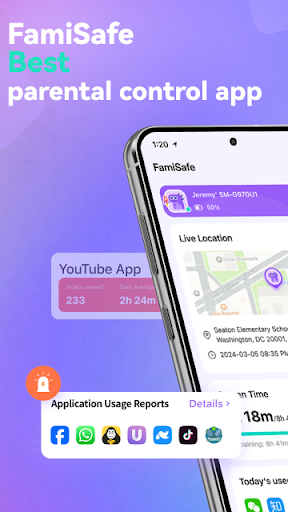
FamiSafe – Parental Control App is designed for caring parents to control their children's screen time, track location, and monitor digital habits. This versatile app ensures your child’s safety with reliable tools to manage app usage, block inappropriate content, and monitor calls and messages.
The latest version includes upgraded sensitive content monitoring. We support monitoring of sensitive emojis. emojis can convey as much meaning as words, and this feature ensures that your child’s online interactions are safe.
How can FamiSafe – Parental Control App help protect your child?
Monitor Online Activities – Want to know what your child does with their phone every day? Concerned they might visit dangerous content? FamiSafe can help you monitor their online activities, including how much time they spend on each app and which websites they visit, What videos do they watch on youtube and tiktok.
Calls & Messages Monitoring
- Stay informed by monitoring your child's calls and texts, with keyword detection to ensure their safety from potential dangers.
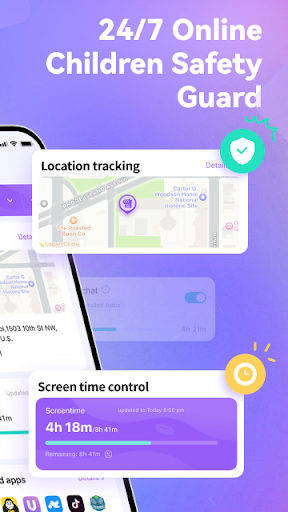
Location Tracker – Worried when your child doesn’t respond, or when they're not by your side? FamiSafe's highly accurate GPS location tracker can help you know where they are and their historical whereabouts.
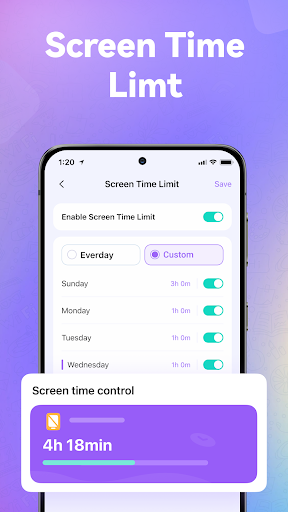
Screen Time Control – Concerned about your child becoming addicted to mobile phones? FamiSafe’s screen time controller can help you customize screen time limits, such as less screen time on school days and more on weekends.
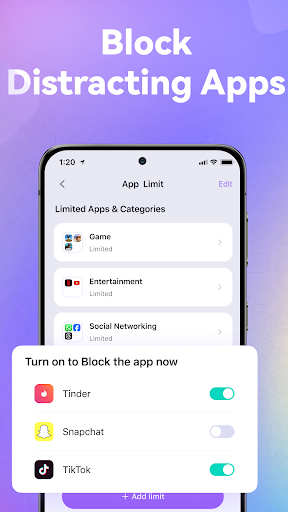
Blocksite & App Blocker – FamiSafe – App Blocker helps guide your child to age-appropriate content by filtering inappropriate web pages and blocking adult apps, such as porn, dating apps, and certain gaming apps.
Screen Viewer - Parents can remotely capture their children's screenshots to monitor and enforce appropriate phone usage. Remote screen capture is available for mobile devices, Windows and Mac.
One-Way Audio – This newly released function allows you to listen to your child's surroundings, the location sound tracker feature now lets you know what’s happening around your kids to ensure they stay safe. This function empowers parents to stay connected and informed.
Panic Button – If your child feels threatened when they are alone, they can use the SOS button on FamiSafe Kids. You will receive an SOS alert with their accurate location information, so you can help them right away.
Sensitive words & sexual picture detection - with FamiSafe Parental Control App you can easily detect sensitive content on your child’s phone, including keywords & associated emojis (such as drugs, addiction, depression, suicide, etc.) and sensitive pictures across various platforms like WhatsApp, Facebook, Snapchat, Discord, YouTube, Instagram, Twitter, and other apps.
Compared to a spy app, FamiSafe is more like a family link, allowing parents to understand their child better and help them develop good digital device usage habits.
To start protecting your child
1.Download the Parental Control App – FamiSafe on your phone.
2.Download FamiSafe Kids on your child’s phone.
3.Pair the devices with the code to monitor your child remotely.
A paid parent account can bind more than 5 children's devices at the same time, and parents can be added for co-parenting.
FamiSafe does not contain any advertisement.
Why should you choose FamiSafe- Parental Control App?
Recognized and trusted by many organizations and associations
* Best Products for Elementary Kids 2024
* National Parenting Product Awards Winner 2024
* Best Middle & High School Products 2024
* Best Family Health & Safety Products 2024
---POLICIES & TERMS OF USE---
Privacy Policy: https://www.wondershare.com/privacy.html
Terms of Use: https://famisafe.wondershare.com/terms-of-use.html
Website: https://famisafe.wondershare.com/
Contact US: customer_service@wondershare.com
Show more

1. Download MEmu installer and finish the setup

2. Start MEmu then open Google Play on the desktop

3. Search Parental Control App- FamiSafe in Google Play
Install
4. Download and Install Parental Control App- FamiSafe
5. On install completion click the icon to start

6. Enjoy using Parental Control App- FamiSafe on PC with MEmu
MEmu Play is the best Android emulator, and 100 million users already enjoy its superb Android app experience. Powered by advanced virtualization technology, it lets you enjoy thousands of Android apps smoothly on your PC—including the most graphics-intensive ones.
Bigger screen with better graphics; Long duration, without limitation of battery or mobile data.
Full Keymapping support for precise control of keyboard and mouse or gamepad.
Multiple game accounts or tasks on single PC at one time with Multi-Instance manager.
Use Parental Control App- FamiSafe on PC by following steps: