Picrew Character Creator&Maker
Updated
Current Version
1.0.6
Offered By

Stop worrying about high battery drain when using Picrew Character Creator&Maker on your phone. Free yourself from the tiny screen and enjoy the app on a much larger display. From now on, get a full-screen experience of your app with the convenience of a keyboard and mouse. MEmu offers you all the surprising features you’d expect: quick installation and easy setup, intuitive controls, and no more worries about battery life, mobile data, or unexpected calls. The all-new MEmu 9 is the choice for using Picrew Character Creator&Maker on your computer. With the MEmu multi-instance manager, you can run two or more accounts at the same time. Most importantly, our exclusive emulation engine unlocks your PC’s full potential, delivering smooth and enjoyable performance.
Show more
Enjoy superb experience of using Picrew Character Creator&Maker on PC with MEMU App Player. It's a powerful free Android emulator which provides you with thousands of android apps for their desktop version. Enjoy connecting with friends and polishing your work with higher efficiency! With Picrew's intuitive character creator, anyone can easily design their own characters.
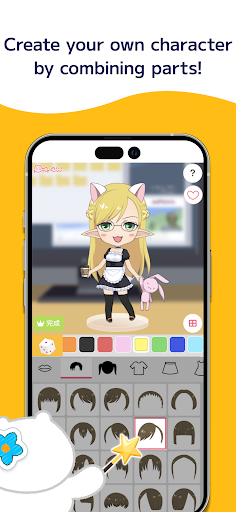

With Picrew's intuitive character creator, anyone can easily design their own characters. Our easy-to-use character maker is perfect for both beginners and experienced users.
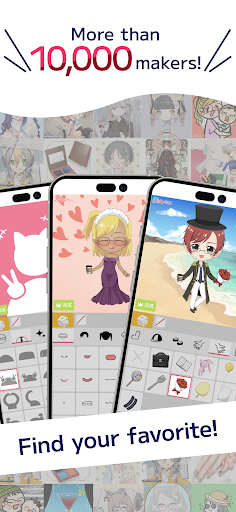
Picrew is a platform where you can create characters, portraits, and icons completely free of charge. With over 10,000 Image Makers available, whether you're looking for an OC maker, portrait maker, or character creator, Picrew has it all!
In addition, as an avatar maker, Picrew allows you to create avatars that look just like yourself by combining facial features or dressing up stylishly with different clothing parts. You can also make your own character that reflects your unique style. The images you create can be downloaded for free or shared on social media.
Furthermore, Picrew features Image Makers created by creators from all over the world, with various tastes such as cute, cool, stylish, or maybe a little scary? There are so many different Image Makers available that you're sure to find your favorite!
Currently, the 'create Image Makers' function is only available on our website. Please visit https://picrew.me/ to explore this feature.
【Feature Introduction】
- Dress-up Maker and Random Maker
The Dress-up Maker allows you to create your favorite images by selecting parts yourself. The Random Maker lets you create images based on luck, so you can enjoy it like a fortune-telling or a random drawing.
- Social Media Integration
You can easily share the images you create on social media platforms such as Facebook, X, LINE, etc.
- Search
You can search for Image Makers by narrowing down options such as keywords or available categories.
- Tag
You can search for Image Makers based on tags set by the creators of the Image Makers.
- Bookmark
You can save your favorite Image Makers for easy access.
- Report
If you come across an Image Maker that violates the terms of service or guidelines, you can report it to the administration.
- Block
You can block Image Makers that you don't want to see.
【Features】
- Design charming portraits using our portrait maker
- Design your own icons using our icon maker tool
- Craft your own character with our anime-style avatar maker
- Use our character creator to make your own character that looks just like you
- Easily create social media icons with our icon maker
- Design original characters using our character maker and OC maker
- Combine parts to create a character with our portrait maker
- Freely customize and create a character with our versatile character creator
- Effortlessly create cute characters with our intuitive character maker
【Target Recommendations】
- Enjoy creating avatars and icons for free
- Looking for an easy-to-use icon maker or avatar maker
- Want to create original characters with a character creator
- Enjoy customizing characters in a character maker
- Want to kill time by using an OC maker
【Things to Keep in Mind】
Images created with Picrew's Image Makers can only be used within the guidelines set by both the creator and Picrew. Each Image Maker creator defines how their images can be used, with options such as personal use, non-commercial use, commercial use, and modifications. Some creators may also include specific requests or limitations in the Image Maker's description. Before using any Image Maker, please check the allowed uses and carefully read any guidelines or requests provided by the creator.
【About Administration】
We continuously monitor the platform to maintain a safe and enjoyable environment. Users can report inappropriate content, and we take appropriate actions when necessary.
【Contact Us】
If you have any issues or feedback, please contact us: https://support.picrew.me/en/contact
Download Picrew now and start creating your own characters today!
【Follow Us】
Website: https://tetrachroma.co.jp/
X (Twitter): [@picrew_tc_en](https://twitter.com/picrew_tc_en)
Show more

1. Download MEmu installer and finish the setup

2. Start MEmu then open Google Play on the desktop

3. Search Picrew Character Creator&Maker in Google Play
Install
4. Download and Install Picrew Character Creator&Maker
5. On install completion click the icon to start

6. Enjoy using Picrew Character Creator&Maker on PC with MEmu
MEmu Play is the best Android emulator, and 100 million users already enjoy its superb Android app experience. Powered by advanced virtualization technology, it lets you enjoy thousands of Android apps smoothly on your PC—including the most graphics-intensive ones.
Bigger screen with better graphics; Long duration, without limitation of battery or mobile data.
Full Keymapping support for precise control of keyboard and mouse or gamepad.
Multiple game accounts or tasks on single PC at one time with Multi-Instance manager.
Use Picrew Character Creator&Maker on PC by following steps: