Play Music Theory: Draw Music
Updated
Current Version
2.2
Offered By

Stop worrying about high battery drain when using Play Music Theory: Draw Music on your phone. Free yourself from the tiny screen and enjoy the app on a much larger display. From now on, get a full-screen experience of your app with the convenience of a keyboard and mouse. MEmu offers you all the surprising features you’d expect: quick installation and easy setup, intuitive controls, and no more worries about battery life, mobile data, or unexpected calls. The all-new MEmu 9 is the choice for using Play Music Theory: Draw Music on your computer. With the MEmu multi-instance manager, you can run two or more accounts at the same time. Most importantly, our exclusive emulation engine unlocks your PC’s full potential, delivering smooth and enjoyable performance.
Show more
Enjoy superb experience of using Play Music Theory: Draw Music on PC with MEMU App Player. It's a powerful free Android emulator which provides you with thousands of android apps for their desktop version. Enjoy connecting with friends and polishing your work with higher efficiency! Draw a line.
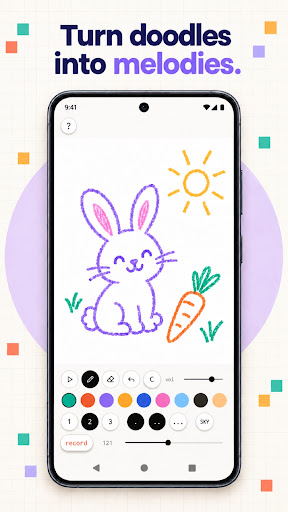
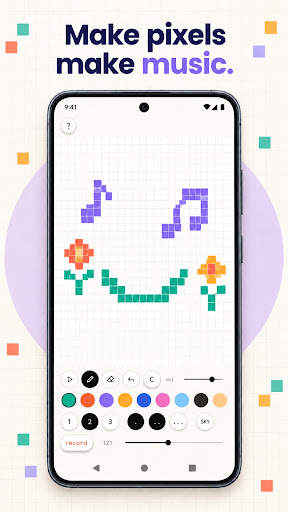
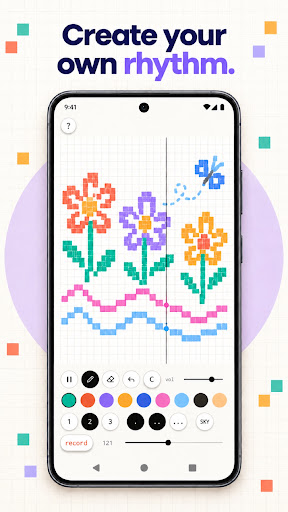
Draw a line. Press play. Hear it become a music loop.
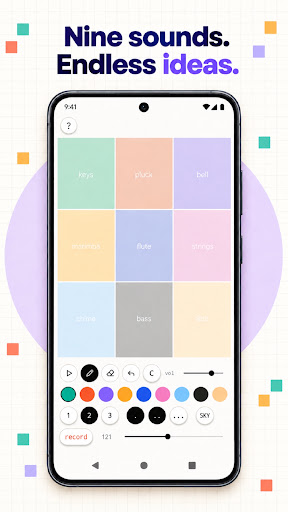
Play Music Theory: Draw Music is a visual instrument that turns shapes, colors and gestures into looping sound. Move left and right to choose when notes play. Move up and down for higher or lower notes. Choose from nine colors, each with its own synthesized voice.
No music theory required. Start with a doodle, build a rhythm and discover how sound can look.
CREATE WITH SOUND + SHAPE
• Draw freely on a textured musical canvas
• Hear notes as you draw
• Turn every sketch into a 24-step, eight-beat loop
• Choose nine colorful sounds: keys, pluck, bell, marimba, flute, strings, chime, bass and 8-bit
REMIX YOUR DRAWING
• Switch between ink, pixel-grid and color-stage views
• Layer preset bass, drum and arpeggio patterns
• Adjust tempo from 60 to 200 BPM
• Control playback and volume
• Erase, undo or clear and start again
• Try a soft sky background for a different mood
SAVE THE MOMENT
• Record your performance as a WAV audio file and share it
• Your latest composition, beat layers and tempo restore automatically
MADE FOR CURIOUS EARS
Use Music Theory: Draw Music as a pocket synth, visual sequencer or creative music maker. It is designed for artists, musicians, curious learners and anyone who wants to explore sound and shape without a keyboard or traditional notation.
PRIVATE BY DESIGN
Sound is generated directly on your device. No account, internet connection, ads, analytics or tracking are required.
Draw it. Hear it.
Show more

1. Download MEmu installer and finish the setup

2. Start MEmu then open Google Play on the desktop

3. Search Play Music Theory: Draw Music in Google Play
Install
4. Download and Install Play Music Theory: Draw Music
5. On install completion click the icon to start

6. Enjoy using Play Music Theory: Draw Music on PC with MEmu
MEmu Play is the best Android emulator, and 100 million users already enjoy its superb Android app experience. Powered by advanced virtualization technology, it lets you enjoy thousands of Android apps smoothly on your PC—including the most graphics-intensive ones.
Bigger screen with better graphics; Long duration, without limitation of battery or mobile data.
Full Keymapping support for precise control of keyboard and mouse or gamepad.
Multiple game accounts or tasks on single PC at one time with Multi-Instance manager.
Use Play Music Theory: Draw Music on PC by following steps: