
Punto Pago
Updated
Current Version
2.51.7
Offered By

Stop worrying about high battery drain when using Punto Pago on your phone. Free yourself from the tiny screen and enjoy the app on a much larger display. From now on, get a full-screen experience of your app with the convenience of a keyboard and mouse. MEmu offers you all the surprising features you’d expect: quick installation and easy setup, intuitive controls, and no more worries about battery life, mobile data, or unexpected calls. The all-new MEmu 9 is the choice for using Punto Pago on your computer. With the MEmu multi-instance manager, you can run two or more accounts at the same time. Most importantly, our exclusive emulation engine unlocks your PC’s full potential, delivering smooth and enjoyable performance.
Show more
Enjoy superb experience of using Punto Pago on PC with MEMU App Player. It's a powerful free Android emulator which provides you with thousands of android apps for their desktop version. Enjoy connecting with friends and polishing your work with higher efficiency! PUNTO PAGO is the leading free Wallet APP for the Marketplace of new products, which promotes a new way of buying online in local businesses and retailers, we are based on fair trade!

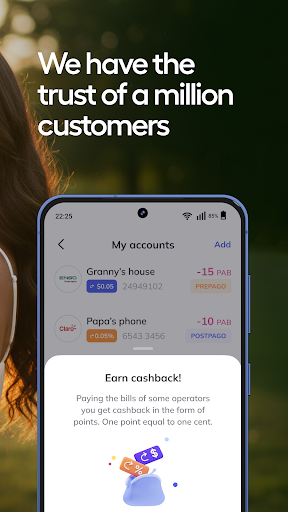
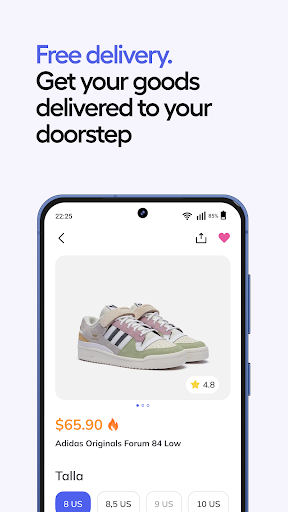
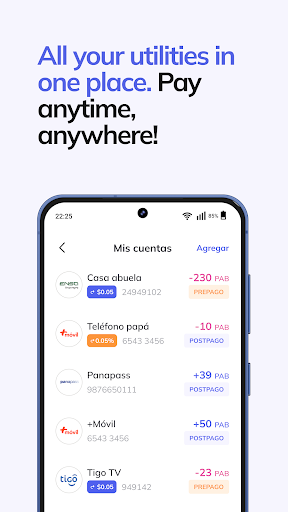
PUNTO PAGO is the leading free Wallet APP for the Marketplace of new products, which promotes a new way of buying online in local businesses and retailers, we are based on fair trade!
FIND UNIQUE OPPORTUNITIES
PUNTO PAGO APP shows the products you are looking for based on your location, if something interests you and is close to you, buy it! We have unique offers on products from good categories! We help with the guarantee, delivery and best of all easy to buy!
GET EVERYWHERE WITH PAYMENT POINT APP SHIPPING
EVEN WITHOUT MOVING FROM HOME!
· Purchase with the PUNTO PAGO guarantee, if a product was not the correct one or did not arrive with the appropriate quality, we will take care of it!
· Payment methods, VISA/MASTERCARD/CASH (Recharge your APP in our kiosks).
· Instant delivery 1 to 2 days at the door of your house safely!
· Keep consulting your accounts and mobile payments and favorite services, choose the operator to consult and pay, for example: +móvil, ensa, Claro, PayPal, Tigo, Belcorop and Metrobus.
· Quick money between PUNTO PAGO app a quick way to manage your accounts in Panama.
WHY BUY IN PUNTO PAGO APP?
· Secure and protected payment: payments made at PUNTO PAGO are always encrypted, so they are always protected. In addition, we do not transfer the money to the seller's account until you receive your product and confirm that it is in good condition.
· Refund guarantee: you can request your money back if the product never arrives, arrives in poor condition or is not the one described in the PUNTO PAGO APP
Our service is operated by customer service gurus who can answer all your questions and help resolve issues.
To learn more about Punto Pago:
· Visit: www.puntopago.net
· Write to: info@puntopago.net
· Call us at: (507) 399 3999
· WhatsApp 6262-5817
Address:
· Panamá City, Panamá, Provincia de Panamá, Calle 57 Este, Sortis Business
Tower, Office 17H Street 56/57
Send us your comments and ideas at info@puntopago.net
Show more

1. Download MEmu installer and finish the setup

2. Start MEmu then open Google Play on the desktop

3. Search Punto Pago in Google Play
Install
4. Download and Install Punto Pago
5. On install completion click the icon to start

6. Enjoy using Punto Pago on PC with MEmu
MEmu Play is the best Android emulator, and 100 million users already enjoy its superb Android app experience. Powered by advanced virtualization technology, it lets you enjoy thousands of Android apps smoothly on your PC—including the most graphics-intensive ones.
Bigger screen with better graphics; Long duration, without limitation of battery or mobile data.
Full Keymapping support for precise control of keyboard and mouse or gamepad.
Multiple game accounts or tasks on single PC at one time with Multi-Instance manager.
Use Punto Pago on PC by following steps: